- Key Takeaways
- Table of Contents
- What is email verification?
- Why email verification matters in 2026
- 1) Lower bounce rates (and fewer deliverability problems)
- 2) Better engagement signals
- 3) Stronger brand trust
- 4) Reduced costs
- How email verification works (simple explanation)
- Step A: Syntax checks
- Step B: Domain + DNS checks
- Step C: Mailbox-level signals (SMTP “handshake”)
- Step D: Risk detection
- How we picked these tools
- Quick comparison table
- Reviews: 10 Best Email Verification Tools in 2026
- 1) ZeroBounce
- 2) NeverBounce
- 3) Kickbox
- 4) Emailable
- 5) Bouncer
- 6) Hunter Email Verifier
- 7) Clearout
- 8) DeBounce
- 9) Verifalia
- 10) MailerCheck
- Best practices to clean & maintain your email list
- 1) Verify at capture (forms, checkout, registration)
- 2) Clean before major campaigns
- 3) Segment “risky” instead of deleting everything
- 4) Align with major sender requirements
- 5) Don’t buy lists
- How to implement verification in your workflow
- Option A: Manual bulk cleaning (fastest start)
- Option B: Verify at capture (best long-term)
- Option C: Automated list hygiene (scale mode)
- FAQs
- Do email verification tools actually improve deliverability?
- What’s the difference between email verification and email validation?
- Should I delete “catch-all” emails?
- How often should I clean my email list?
- Is real-time verification worth it?
- Will verification remove spam traps?
- Is email verification legal?
- Can I verify emails for cold outreach?
- References & further reading
Last updated: January 2026
Email marketing still delivers one of the best ROIs—but only when your list is clean. Invalid addresses, typos, disposable inboxes, role-based emails, and “catch-all” domains can quietly raise bounce rates, trigger spam filters, and weaken your sender reputation over time.
This guide reviews the 10 best email verification tools in 2026, with a practical comparison table, selection criteria, and step-by-step tips to keep your email list healthy (without over-complicating your workflow).
Key Takeaways
- Email verification is list hygiene: it reduces hard bounces and helps protect sender reputation.
- Verify at two points: (1) at capture (forms/checkout/CRM entry) and (2) before big campaigns.
- “Catch-all” ≠ deliverable: treat catch-all results as “risky” and segment them carefully.
- Automation matters: pick a tool with an API + integrations (Zapier/Make/CRM/ESP) if you’re scaling.
- Verification is not permission: follow CAN-SPAM/GDPR rules and send only to opted-in contacts.
What is email verification?
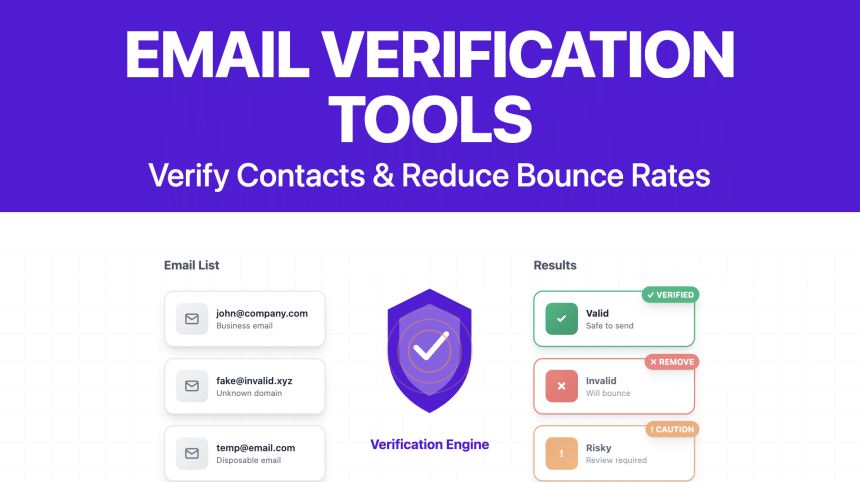
Email verification (also called email validation) is the process of checking whether an email address is likely to be real, reachable, and safe to send to—before you email it.
Most verification tools classify emails into categories like:
- Deliverable / Valid (likely to receive mail)
- Undeliverable / Invalid (typo, bad domain, non-existent mailbox)
- Risky (catch-all, full inbox, temporary/disposable, role-based)
- Unknown (server didn’t respond reliably, greylisting, or strict security settings)
Important: verification doesn’t replace permission. An email can be “valid” but still be an unsolicited address you’re not allowed to market to. Treat verification as hygiene, not a growth hack.
Why email verification matters in 2026
Email providers are stricter than ever, and deliverability is more competitive. Here’s what a cleaner list helps you achieve:
1) Lower bounce rates (and fewer deliverability problems)
Hard bounces (non-existent mailboxes) are one of the fastest ways to damage sender reputation. Cleaning your list reduces hard bounces and supports consistent inbox placement.
2) Better engagement signals
If you stop sending to junk addresses, your open/click rates become more meaningful. That helps you identify what’s working and avoid “spray and pray.”
3) Stronger brand trust
Fewer invalid emails means fewer spam complaints, fewer blocks, and fewer “why am I getting this?” replies.
4) Reduced costs
Most email platforms charge by subscriber count or send volume. If 10–20% of your list is low-quality, you’re paying to email ghosts.
How email verification works (simple explanation)
Verification tools typically use a layered approach:
Step A: Syntax checks
Confirms the address format looks correct (e.g., name@domain.com) and flags obvious typos.
Step B: Domain + DNS checks
Confirms the domain exists and checks mail-related DNS records (like MX records).
Step C: Mailbox-level signals (SMTP “handshake”)
Many tools attempt a lightweight SMTP check (without sending an email) to infer whether a mailbox exists. Results can be limited by privacy/security settings, which is why “unknown” or “catch-all” categories exist.
Step D: Risk detection
Good tools also detect patterns such as:
- Disposable/temporary emails (often used to grab a freebie)
- Role-based addresses like
admin@/support@(sometimes valid, often lower engagement) - Catch-all domains (domain accepts all mail—mailbox may or may not be real)
- Spam traps and other risky signals (varies by provider and methodology)
How we picked these tools
To keep this list practical for 2026, we prioritized tools that offer:
- Accurate categorization (valid/invalid/risky/unknown), including catch-all handling
- Bulk list cleaning (CSV upload or list import)
- Real-time verification (API or form integrations)
- Automation integrations (Zapier/Make/CRM/ESP/WordPress where relevant)
- Developer friendliness (docs, SDKs, webhooks)
- Compliance awareness (privacy & marketing law basics)
Quick comparison table
| Tool | Best for | Standout | Real-time API |
|---|---|---|---|
| ZeroBounce | Teams that want “all-in-one” deliverability tools | Integrations + deliverability add-ons | Yes |
| NeverBounce | High-volume list cleaning + point-of-entry checks | Strong API + workflows | Yes |
| Kickbox | Simple verification + developer integrations | Straightforward verification experience | Yes |
| Emailable | API-first teams & modern stacks | Clean docs, webhooks, batch ops | Yes |
| Bouncer | Fast verification + developer control | Strong API + batch endpoints | Yes |
| Hunter Email Verifier | Prospecting workflows | Works well with finding + verifying | Yes |
| Clearout | Form protection + bulk cleaning | “Verify at capture” options | Yes |
| DeBounce | Budget-friendly list cleaning | Simple pricing + bulk verification | Yes |
| Verifalia | Teams that want granular results | Detailed validation + API controls | Yes |
| MailerCheck | Email marketers who want list checks + deliverability tooling | Verification + deliverability analysis | Yes |
Reviews: 10 Best Email Verification Tools in 2026
Below are the 10 tools worth considering this year. Each section includes “best for,” notable strengths, and the kind of team it fits.
1) ZeroBounce
Best for: marketers who want email verification plus extra deliverability-focused features.
Why it’s on the list: ZeroBounce is widely used for bulk email list cleaning and supports real-time verification via API and integrations.
- Bulk verification: upload and clean large lists
- Real-time verification: validate emails as they’re collected
- Integrations: connects with many CRMs and email platforms
Try it / learn more: ZeroBounce official site
Who should choose it?
If you want a well-known vendor with strong platform support and you run recurring campaigns, ZeroBounce is a safe, mainstream choice.
2) NeverBounce
Best for: high-volume senders and teams who need both list cleaning and point-of-entry verification.
Why it’s on the list: NeverBounce is popular for bulk cleaning and has robust developer documentation for real-time checks.
- Real-time API: validate addresses at signup/checkout
- Bulk jobs: clean entire lists before importing to your ESP
- Workflow friendly: built for ongoing list hygiene, not just “one-time cleaning”
Docs & tools: NeverBounce API documentation
Who should choose it?
If you’re scaling lead gen, running multiple funnels, or doing frequent imports, NeverBounce fits nicely because it supports automation.
3) Kickbox
Best for: straightforward verification with developer and ecommerce integrations.
Why it’s on the list: Kickbox is commonly used to verify email deliverability and is frequently integrated into signup/checkout flows.
- Simple verification results: easy to understand categories
- Integrations: works with many automation platforms and ecommerce workflows
- Great for “verify before you store”: reduce junk leads early
Example integration docs: Kickbox integration for WooCommerce
Who should choose it?
If you want “set it and forget it” verification at capture (especially for ecommerce), Kickbox is a strong pick.
4) Emailable
Best for: API-first teams, SaaS products, and modern automation workflows.
Why it’s on the list: Emailable’s documentation emphasizes developer experience (webhooks, batch operations, and clean API patterns).
- Batch operations: verify lists at scale
- Webhooks: automate downstream actions after verification
- Client libraries: helpful for faster integration
API docs: Emailable API documentation
Who should choose it?
If your product collects emails continuously (signups, trials, onboarding) and you want a clean engineering-friendly API, Emailable is an excellent option.
5) Bouncer
Best for: fast verification with strong control via API endpoints.
Why it’s on the list: Bouncer is built around real-time verification and batch verification APIs, making it practical for developers and growth teams.
- Real-time verification: validate at the moment of entry
- Batch verification: process large lists with downloadable results
- Developer docs: clearly structured endpoints
Docs: Bouncer documentation
Who should choose it?
If your priority is integration speed and predictable API output (especially for apps), Bouncer is worth shortlisting.
6) Hunter Email Verifier
Best for: sales prospecting teams who already use Hunter for email discovery.
Why it’s on the list: Hunter is well known in outbound workflows—especially when finding and verifying business emails as part of lead gen.
- Useful in prospecting: verify before you outreach
- Bulk checks: validate lists
- API access: integrate into enrichment pipelines
Learn more: Hunter Email Verifier
Who should choose it?
If you do outbound prospecting and already rely on Hunter, using their verifier keeps your workflow simpler.
7) Clearout
Best for: teams that want to block bad emails at capture and clean lists in bulk.
Why it’s on the list: Clearout focuses heavily on “verify at capture” use cases and offers API docs for integrations.
- Form protection mindset: reduce spam leads at the entry point
- Bulk list cleaning: prepare lists before importing into your ESP
- API docs available: easy to start integrating
API docs: Clearout Email Verification API
Who should choose it?
If your biggest pain is junk leads from forms (or you run multiple lead sources), Clearout’s capture-first approach is useful.
8) DeBounce
Best for: budget-conscious teams that still need bulk cleaning and an API option.
Why it’s on the list: DeBounce is often chosen as a lower-cost alternative for list cleaning and basic verification workflows.
- Bulk list cleaning: upload and verify lists
- API availability: use in apps or backend systems
- Practical for periodic cleaning: monthly/quarterly hygiene
API listing (example): DeBounce Email Validation API
Who should choose it?
If you need a simple, no-frills verifier for routine list hygiene (and cost matters), DeBounce can be a practical choice.
9) Verifalia
Best for: teams that want granular validation results and flexible API controls.
Why it’s on the list: Verifalia is known for offering detailed validation outcomes and developer options for verification flows.
- Bulk + real-time: works for both one-off and ongoing hygiene
- Granular outcomes: helps you segment “risky” addresses better
- API-driven workflows: good for custom apps
Learn more: Verifalia official site
Who should choose it?
If you’re building a custom pipeline (lead capture → enrichment → CRM) and you want more detailed signals for decision-making, Verifalia is worth testing.
10) MailerCheck
Best for: email marketers who want verification plus deliverability-oriented checks.
Why it’s on the list: MailerCheck provides email verification and also positions itself around list quality and deliverability optimization.
- List verification: validate bulk lists and single emails
- Real-time API: verify new emails as you collect them
- Marketer-friendly workflows: built for ongoing maintenance
API docs: MailerCheck Developers
Who should choose it?
If you want a verification tool designed with email marketers in mind (not only developers), MailerCheck is a strong option.
Best practices to clean & maintain your email list
1) Verify at capture (forms, checkout, registration)
The cheapest invalid email is the one you never store. Add real-time verification to:
- newsletter forms
- lead magnet opt-ins
- checkout + account creation
- webinar registrations
2) Clean before major campaigns
Even if you verify at capture, lists drift. People change jobs, abandon inboxes, or switch domains. Do a bulk verification before:
- a product launch
- a re-engagement campaign
- importing a large partner list
3) Segment “risky” instead of deleting everything
Risky doesn’t always mean bad. A simple approach:
- Valid: mail normally
- Invalid: remove/suppress
- Catch-all / risky: send lower frequency, watch engagement, consider double opt-in
- Role-based: decide based on use case (B2B support inboxes can still be valuable)
4) Align with major sender requirements
Verification is one piece. Authentication and unsubscribe compliance matter too. Review the latest guidance:
- Google: Email sender guidelines
- Yahoo: Sender best practices
- Microsoft: Outlook high-volume sender requirements
- FTC: CAN-SPAM compliance guide
5) Don’t buy lists
Purchased lists are notorious for spam traps, outdated emails, and low engagement. If you must work with a third-party lead source, verify aggressively and use double opt-in.
How to implement verification in your workflow
Option A: Manual bulk cleaning (fastest start)
- Export your list from your CRM/ESP as CSV.
- Upload it to your verifier (one of the tools above).
- Download results and suppress/remove invalid emails.
- Import back into your platform with tags/segments (Valid / Risky / Catch-all).
Option B: Verify at capture (best long-term)
Use your tool’s real-time verification API to validate emails before they enter your database. Many tools provide:
- REST APIs (best for developers)
- integrations (Zapier/Make)
- WordPress plugins or form integrations (varies by tool)
Option C: Automated list hygiene (scale mode)
If you add leads daily (ads, partnerships, cold inbound), automate verification like this:
- New email captured →
- Send email to verifier API →
- Write status back to CRM →
- If invalid: block or tag + suppress →
- If risky: route to double opt-in or separate sequence
Pro tip: keep a suppression list for invalid/unsubscribed to prevent “re-adding” bad emails from future imports.
FAQs
Do email verification tools actually improve deliverability?
They can help significantly—mainly by reducing hard bounces and improving list hygiene. But deliverability also depends on authentication (SPF/DKIM/DMARC), sending behavior, engagement, spam complaints, and content quality.
What’s the difference between email verification and email validation?
In practice, most vendors use the terms interchangeably. “Validation” often includes syntax/domain checks, while “verification” may include mailbox-level checks. Most modern tools do both.
Should I delete “catch-all” emails?
Not automatically. Catch-all means the domain accepts email for any address, so the mailbox might exist—or might not. Treat catch-all as “risky,” test gently, and segment.
How often should I clean my email list?
It depends on how quickly your list grows. Many teams do a bulk verification monthly or quarterly, plus real-time verification at capture.
Is real-time verification worth it?
Yes if you run lead gen, ecommerce, webinars, or trials. Real-time verification prevents junk emails from entering your CRM, which reduces future cleanup work.
Will verification remove spam traps?
No tool can guarantee it will detect every trap (and vendors rarely disclose exact methods). The best strategy is permission-based growth + double opt-in + consistent hygiene.
Is email verification legal?
Generally yes, but legality depends on how you obtained the address and how you intend to use it. Always follow applicable laws like CAN-SPAM (US) and GDPR (EU/UK) and respect opt-outs.
Can I verify emails for cold outreach?
You can verify deliverability risk, but you still need to comply with the rules and norms of your region and industry. Also, cold outreach deliverability is often fragile—use warm-up, authentication, and careful targeting.
References & further reading
- ZeroBounce
- NeverBounce API Docs
- Kickbox Integration (WooCommerce)
- Emailable API Docs
- Bouncer Docs
- Hunter Email Verifier
- Clearout Email Verifier API
- DeBounce Email Validation API
- Verifalia
- MailerCheck Developers
- Google: Email sender guidelines
- Yahoo: Sender best practices
- Microsoft: Outlook high-volume sender requirements
- FTC: CAN-SPAM compliance guide
- RFC 5321 (SMTP)
- RFC 6376 (DKIM)
- RFC 7489 (DMARC)
- RFC 7208 (SPF)
Disclosure: If you later add affiliate links to any tools above, clearly disclose that to readers and only recommend products you’ve tested or can justify.