- Key Takeaways
- Table of Contents
- How to Choose Free Project Management Software
- 1) What’s your workflow style?
- 2) How big is your team (today and in 6 months)?
- 3) Do you need docs + tasks in one place?
- 4) What integrations matter most?
- 5) Do you need control of data (privacy/compliance)?
- Quick Comparison Table (Free Plans)
- The 17 Best Free Project Management Tools for 2026
- 1) Trello
- 2) Asana
- 3) ClickUp
- 4) Notion
- 5) Jira
- 6) Zoho Projects
- 7) Wrike
- 8) monday.com
- 9) MeisterTask
- 10) Todoist
- 11) OpenProject (Community Edition)
- 12) Taiga
- 13) GitHub Projects
- 14) GitLab (Issue Boards)
- 15) Redmine
- 16) Freedcamp
- 17) Airtable
- How to Set Up Your First Project in 30 Minutes
- Step 1: Create a tiny workflow (4 statuses max)
- Step 2: Define “Done” once
- Step 3: Set one weekly ritual
- Step 4: Create one dashboard/view per role
- Step 5: Lock your naming conventions
- FAQs
- 1) What is the best free project management software in 2026?
- 2) Are free project management tools good enough for small teams?
- 3) Which free tool is best for Agile/Scrum?
- 4) Which free tool is best for Gantt charts?
- 5) Which tools are best if I need self-hosting?
- 6) Can I manage projects with Google Sheets instead?
- 7) What’s the biggest mistake when choosing a PM tool?
- 8) How do I migrate between tools later?
- References & Further Reading
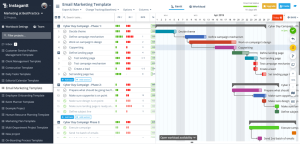
Free project management software has improved massively—many “free forever” plans now include Kanban boards, calendars, docs, templates, automations (limited), and surprisingly usable reporting. The challenge isn’t finding a tool… it’s picking one that matches how your team actually works.
In this guide, you’ll find 17 of the best free project management tools for 2026—including true free plans, freemium products, and open-source options you can self-host. Each pick includes: what it’s best for, what you get on the free tier, limitations to expect, and a quick tip to get started fast.
Key Takeaways
- Best “all-rounder” free tool: ClickUp (feature-rich with room to grow).
- Best simple Kanban: Trello or MeisterTask (easy, fast adoption).
- Best for personal task systems: Todoist + a lightweight board tool.
- Best for Agile dev teams: Jira (especially if you already use Atlassian).
- Best free “docs + projects” hub: Notion (great for internal wikis + lightweight tracking).
- Best open-source/self-hosted: OpenProject, Redmine (maximum control).
Table of Contents
How to Choose Free Project Management Software
Before you pick a tool, answer these five questions. They’ll eliminate 70% of “looks great, doesn’t work for us” mistakes.
1) What’s your workflow style?
- Kanban: best for continuous work (content, support, operations).
- List + Calendar: best for personal productivity and scheduling.
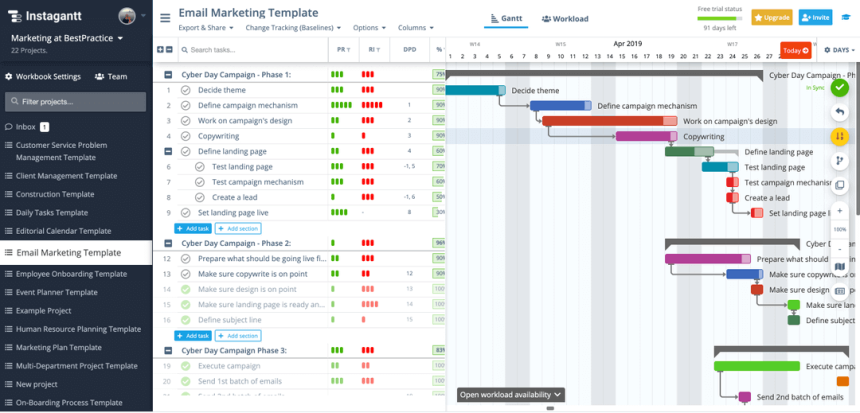
- Gantt/Timeline: best for deadline-driven projects with dependencies.
- Agile/Scrum: best for software teams using sprints and backlogs.
2) How big is your team (today and in 6 months)?
Some “free” plans cap seats (e.g., 2–10 users). If you’ll grow, choose a tool with a smooth upgrade path (or open-source/self-host).
3) Do you need docs + tasks in one place?
If you want wikis, SOPs, meeting notes, and tasks in one hub, tools like Notion can reduce “app switching”.
4) What integrations matter most?
At minimum, check for Google Calendar, Slack, email notifications, and file attachments. Advanced integrations often live behind paid tiers, so prioritize what you truly need.
5) Do you need control of data (privacy/compliance)?
If you must host on your own server (or you’re building for clients), open-source options like OpenProject/Redmine are strong.
Quick Comparison Table (Free Plans)
This table is a fast “first filter.” Use it to shortlist 2–3 tools, then jump to their detailed sections.
| Tool | Best for | Style | Why it’s a top free pick |
|---|---|---|---|
| Trello | Simple team boards | Kanban | Fast adoption; great for visual workflows |
| Asana | Personal + small projects | List/Board/Calendar | Clean task structure and timelines (limited) |
| ClickUp | All-in-one work hub | List/Board/Gantt | Feature-rich free tier; scalable |
| Notion | Docs + lightweight PM | Databases/Docs | Build custom trackers + wikis in one place |
| Jira | Agile teams | Scrum/Kanban | Best-in-class Agile planning for dev workflows |
| OpenProject | Self-hosted PM | Classic/Agile | Open-source control + serious PM features |
The 17 Best Free Project Management Tools for 2026
1) Trello
Best for: simple Kanban-based project tracking (content calendars, personal + small team workflows).
Why it’s great in 2026: Trello remains one of the fastest ways to go from “idea” to a working workflow. Boards, lists, and cards are instantly understandable—perfect when you need adoption without training.
- Free plan highlights: core Kanban boards, cards, due dates, basic automations (limited), power-ups (some limits apply).
- Watch-outs: advanced views and admin controls are mostly paid.
- Quick start tip: Create a “Backlog → Doing → Review → Done” board, then add one “Definition of Done” checklist template to every card.
Official pricing & free plan (Trello)
2) Asana
Best for: structured task management for individuals and very small teams who want clarity (owners, due dates, status).
Why it’s great in 2026: Asana shines when your work is “task + owner + deadline.” It’s clean, logical, and encourages consistent project hygiene.
- Free plan highlights: task lists, boards, calendar view, basic collaboration and updates (free tier is geared toward personal/small usage).
- Watch-outs: more advanced timeline/portfolio features typically require paid plans.
- Quick start tip: Add a weekly “Project Health” status update ritual—one sentence for wins, blockers, and next steps.
Official pricing & free plan (Asana)
3) ClickUp
Best for: teams who want an all-in-one workspace (tasks + docs + views + dashboards) without paying immediately.
Why it’s great in 2026: ClickUp offers an unusually feature-rich free tier and a broad set of views (list, board, calendar, Gantt) so you can match different departments’ preferences.
- Free plan highlights: task management, docs, multiple views, basic dashboards (limits apply), strong templates.
- Watch-outs: advanced automation, reporting depth, and some integrations scale with paid tiers.
- Quick start tip: Don’t enable everything. Start with ONE space, TWO lists, and THREE statuses. Expand only after 2 weeks.
Official pricing & free plan (ClickUp)
4) Notion
Best for: teams who want docs, wikis, and lightweight project tracking in a single place.
Why it’s great in 2026: Notion is less “rigid project software” and more “build-your-own workspace.” If you want SOPs + meeting notes + project trackers side-by-side, it’s hard to beat.
- Free plan highlights: great for individuals; teams can try collaboration with some usage limits (e.g., file upload limits per file and collaboration limits may apply).
- Watch-outs: Notion can become messy without naming conventions and a simple structure.
- Quick start tip: Create a single “Projects” database with properties: Owner, Status, Priority, Due Date, and Area (Marketing/Dev/Ops).
Official pricing & free plan (Notion)
5) Jira
Best for: Agile project management (Scrum/Kanban) for software teams, technical teams, and product backlogs.
Why it’s great in 2026: Jira is built for backlog → sprint → release workflows. If you need epics, sprints, issue types, and reports, Jira is a standard choice.
- Free plan highlights: a free plan exists (commonly suitable for small teams), with core project tracking and workflows.
- Watch-outs: Jira’s power comes with complexity. If your team is non-technical, consider Trello/Asana first.
- Quick start tip: Keep issue types minimal: Story, Bug, Task. Add more only when reporting requires it.
Official pricing & free plan (Jira)
6) Zoho Projects
Best for: budget-friendly project planning with classic PM features (tasks, milestones, basic Gantt) and a business-friendly ecosystem.
Why it’s great in 2026: Zoho often hits a “sweet spot” for small businesses that want structured projects without enterprise-level pricing.
- Free plan highlights: a free plan is available for small usage (good for freelancers/startups testing the workflow).
- Watch-outs: advanced reporting and higher storage/automation may require upgrades.
- Quick start tip: Use milestones as “phases” (Plan → Build → Test → Launch), then keep tasks inside each milestone.
Official free plan page (Zoho Projects)
7) Wrike
Best for: teams that need structured task management with scalable workflows (especially operations and marketing teams).
Why it’s great in 2026: Wrike is strong at organizing work across teams, with clear assignments, collaboration, and a path to more advanced PM controls as you grow.
- Free plan highlights: a free plan exists for getting started with core task/project management.
- Watch-outs: advanced analytics, automation, and more powerful resource planning are usually paid.
- Quick start tip: Create one shared intake form or “Request list” (even if manual) to control incoming work.
Official pricing & free plan (Wrike)
8) monday.com
Best for: visual work management—especially if you like spreadsheets with automation and templates.
Why it’s great in 2026: monday.com is highly visual and template-rich, making it easy to build boards for projects, content, CRM-lite pipelines, and operations tracking.
- Free plan highlights: a free plan exists (commonly limited seats/boards) for personal/small usage.
- Watch-outs: automation and integration depth scales on paid tiers.
- Quick start tip: Start with a single “Projects” board, then add a “Subitems” structure only after your first project is delivered.
Official pricing & free plan (monday.com)
9) MeisterTask
Best for: clean, lightweight Kanban for teams who value simplicity and focus.
Why it’s great in 2026: MeisterTask feels “minimal but polished.” It’s great when you want a Trello-like experience with an uncluttered UI.
- Free plan highlights: core boards, tasks, and collaboration for getting started.
- Watch-outs: integrations and automation depth may be limited on free.
- Quick start tip: Use a “Blocked” column and enforce a rule: no task can sit blocked without a comment explaining the blocker.
Official pricing & free plan (MeisterTask)
10) Todoist
Best for: personal productivity and lightweight team task lists (especially recurring tasks and routines).
Why it’s great in 2026: Todoist is fast. If you want a reliable task system (with reminders and recurring schedules), it’s one of the best free starting points.
- Free plan highlights: core task management, due dates, reminders (varies), and basic projects for personal use.
- Watch-outs: it’s not a full “project suite” with Gantt charts; pair it with a board tool for bigger projects.
- Quick start tip: Create three lists: “Today,” “Next 7 Days,” and “Waiting For.” Review “Waiting For” twice a week.
Official pricing & free plan (Todoist)
11) OpenProject (Community Edition)
Best for: teams who want serious project management features with full data control via self-hosting.
Why it’s great in 2026: OpenProject’s Community Edition is a leading open-source PM platform—great for organizations that need classic PM + Agile options without SaaS lock-in.
- Free plan highlights: the Community Edition is free and open-source; self-host it on your own server.
- Watch-outs: hosting/maintenance is on you (or your IT team).
- Quick start tip: Use Docker for a faster first install, then standardize a “project template” for repeatable setups.
OpenProject Community Edition (official)
12) Taiga
Best for: Agile teams that want open-source flexibility with Scrum/Kanban focus.
Why it’s great in 2026: Taiga is popular among teams who want an Agile-first tool that’s simpler than Jira but more structured than generic boards.
- Free plan highlights: open-source/self-host options exist; cloud plans may have free/low-cost tiers depending on current offerings.
- Watch-outs: verify current cloud free limits; open-source hosting gives you more control.
- Quick start tip: Keep your backlog small: only the next 2–3 sprints worth of items should be “ready.”
13) GitHub Projects
Best for: dev teams already using GitHub who want planning directly connected to issues and pull requests.
Why it’s great in 2026: GitHub Projects is a practical “planning layer” over development work. You can view work as tables, boards, and roadmaps while staying close to issues/PRs.
- Free plan highlights: Projects is available at the user or org level and integrates with issues/PRs.
- Watch-outs: it’s best when your work is already in GitHub Issues; for non-dev teams, a general PM tool may be easier.
- Quick start tip: Create fields for “Priority,” “Target sprint,” and “Work type,” then filter views for standups and planning.
GitHub Projects overview (official docs)
14) GitLab (Issue Boards)
Best for: teams on GitLab who want project planning tightly coupled with DevSecOps workflows.
Why it’s great in 2026: GitLab’s planning tools (issues, epics, boards) work well when you want everything—from code to CI/CD to planning—in a single platform.
- Free plan highlights: Issue boards are available on GitLab’s Free tier (with some advanced features reserved for higher tiers).
- Watch-outs: if your team isn’t developer-centric, GitLab may feel heavy.
- Quick start tip: Use a simple board: “To do → In progress → Review → Done,” and enforce WIP limits for faster throughput.
Issue boards on GitLab Free (official docs)
15) Redmine
Best for: organizations that want a mature, self-hosted, open-source tracker for issues, projects, and workflows.
Why it’s great in 2026: Redmine is “classic” project tracking—stable, flexible, and widely used. It’s not the prettiest UI, but it’s powerful when you need customization and control.
- Free plan highlights: open-source (GPL); self-host for free.
- Watch-outs: requires setup/maintenance; UI may feel dated compared to modern SaaS tools.
- Quick start tip: Keep custom fields minimal. Use categories and versions for structure instead of endless custom fields.
16) Freedcamp
Best for: teams that want a straightforward free plan and the ability to add features via paid add-ons later.
Why it’s great in 2026: Freedcamp markets a generous free plan for core work management. It can be a practical choice for small teams that want projects and tasks without overengineering.
- Free plan highlights: free plan available; core projects/tasks are included (feature depth varies by plan).
- Watch-outs: some advanced modules may be add-ons or paid tiers.
- Quick start tip: Use one “Client” or “Department” per project, then standardize task lists: Planning, Execution, QA, Delivery.
Freedcamp pricing & free plan (official)
17) Airtable
Best for: teams that want “project tracking meets database” flexibility (content pipelines, product launches, asset tracking).
Why it’s great in 2026: Airtable is ideal when your projects need structured fields and views: table, Kanban, calendar, and filtered dashboards. It’s not just tasks—it’s a configurable system.
- Free plan highlights: free plan available for getting started; great for personal/small workflows and prototypes.
- Watch-outs: usage caps (records/automations/storage) can appear as you scale.
- Quick start tip: Build a “Launch Tracker” base with views per team (Marketing/Design/Dev) and one master calendar view.
My quick pick method: Choose one tool from each bucket, then test for 7 days:
- Kanban simplicity: Trello / MeisterTask
- All-in-one workspace: ClickUp / Notion
- Agile dev: Jira / GitHub Projects / GitLab
- Self-hosted control: OpenProject / Redmine
How to Set Up Your First Project in 30 Minutes
Most teams fail with new PM tools because they build a perfect system instead of a usable one. Here’s a simple setup that works in almost any tool.
Step 1: Create a tiny workflow (4 statuses max)
- Backlog (not started)
- Doing (in progress)
- Review (waiting/approval/testing)
- Done
Step 2: Define “Done” once
Create a checklist template called Definition of Done (e.g., requirements met, reviewed, documented, delivered). Apply it to every task.
Step 3: Set one weekly ritual
- 15-minute weekly planning: decide the 5–10 most important tasks for the week.
- 2-minute daily check: update statuses so boards stay truthful.
Step 4: Create one dashboard/view per role
- Manager view: what’s blocked, what’s late, what’s next.
- Team view: my tasks, due this week.
Step 5: Lock your naming conventions
Example: [Project] Task name and tags like Design, Dev, Content, Ops. Consistency beats complexity.
FAQs
1) What is the best free project management software in 2026?
If you want a broad feature set with room to grow, ClickUp is a strong all-round option. For simple Kanban, Trello and MeisterTask are easy to adopt. For Agile development teams, Jira is the most purpose-built.
2) Are free project management tools good enough for small teams?
Yes—especially for teams under 10 people or for lightweight workflows. Most free plans handle tasks, due dates, boards, and basic collaboration. You usually hit limits on automation, advanced reporting, or admin controls first.
3) Which free tool is best for Agile/Scrum?
Jira is the most feature-complete for Scrum ceremonies and backlog management. If you want lighter Agile without complexity, consider Taiga or a simple Kanban tool.
4) Which free tool is best for Gantt charts?
Free tiers often restrict advanced Gantt features, but tools like ClickUp and some classic PM suites may offer basic timeline/Gantt views with limits. Always confirm on the official pricing page.
5) Which tools are best if I need self-hosting?
OpenProject and Redmine are excellent open-source options if you want full control of your data and workflows.
6) Can I manage projects with Google Sheets instead?
You can—but you’ll miss automated reminders, permissions, task assignments, and built-in collaboration flows. A PM tool becomes worth it when you need accountability and real-time status.
7) What’s the biggest mistake when choosing a PM tool?
Picking the tool with the most features instead of the one your team will actually use daily. Adoption beats capability every time.
8) How do I migrate between tools later?
Choose a tool that supports exports (CSV/JSON) and keep your structure simple: projects, tasks, owners, due dates, and status. Avoid heavy customization until you’re sure you’ll stay.
References & Further Reading
- Project Management Institute (PMI)
- PMI Standards & PMBOK resources
- Agile Manifesto (official)
- Trello plan details (Atlassian Support)
- Jira pricing (official)
Disclosure: This post may be updated as vendors change free plan limits and features. Always verify the latest details on the official pricing pages linked above.