The binder jetting process uses two materials; a powder based material and a binder. The binder acts as an adhesive between powder layers. The binder is usually in liquid form and the build material in powder form. A print head moves horizontally along the x and y axes of the machine and deposits alternating layers of the build material and the binding material. After each layer, the object being printed is lowered on its build platform.
Due to the method of binding, the material characteristics are not always suitable for structural parts and despite the relative speed of printing, additional post processing (see below) can add significant time to the overall process.
As with other powder based manufacturing methods, the object being printed is self-supported within the powder bed and is removed from the unbound powder once completed. The technology is often referred to as 3DP technology and is copyrighted under this name.
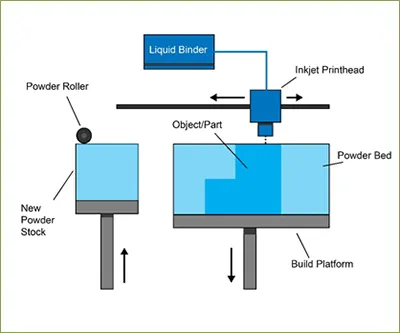
Binder Jetting – Step by Step
1. Powder material is spread over the build platform using a roller.
2. The print head deposits the binder adhesive on top of the powder where required.
3. The build platform is lowered by the model’s layer thickness.
4. Another layer of powder is spread over the previous layer. The object is formed where the powder is bound to the liquid.
5. Unbound powder remains in position surrounding the object.
6. The process is repeated until the entire object has been made.