The motherboard serves as a single platform to connect all of the parts of a computer together. A motherboard connects CPU, memory, hard drives, optical drives, video card, sound card, and other ports and expansion cards directly or via cables. It can be considered as the backbone of a computer.
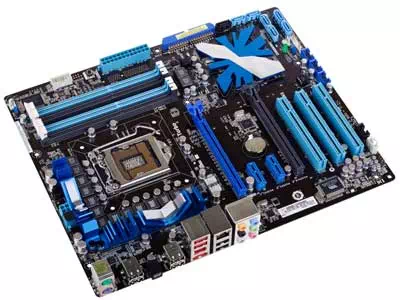
Features of Motherboard
A motherboard comes with following features:
● Motherboard varies greatly in supporting various types of components.
● Normally a motherboard supports a single type of CPU and few types of memories.
● Video Cards, Hard disks, Sound Cards have to be compatible with motherboard to function properly
● Motherboards, cases and power supplies must be compatible to work properly together.
Popular Manufacturers
● Intel
● ASUS
● AOpen
● ABIT
● Biostar
● Gigabyte
● MSI
Description of Motherboard
The motherboard is mounted inside the case and is securely attached via small screws through pre-drilled holes. Motherboard contains ports to connect all of the internal components. It provides a single socket for CPU whereas for memory, normally one or more slots are available. Motherboards provide ports to attach floppy drive, hard drive, and optical drives via ribbon cables. Motherboard carries fans and a special port designed for power supply.
There is a peripheral card slot in front of the motherboard using which video cards, sound cards and other expansion cards can be connected to motherboard.
On the left side, motherboards carry a number of ports to connect monitor, printer, mouse, keyboard, speaker, and network cables. Motherboards also provide USB ports which allow compatible devices to be connected in plug-in/plug-out fashion for example, pen drive, digital cameras etc.