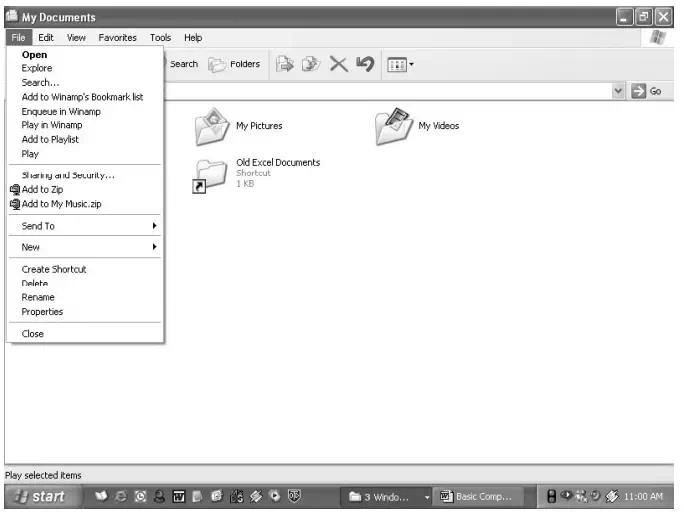
Folders help you to organize your files. You can create a folder either by using My Computer window or through Windows Explorer. You can create a Folder in any existing disk drive or folder or on the windows desktop. The steps for creating a folder are:
1. Click on Start, and then click on My Documents
2. Under File menu click New and select Folder. (see Fig. 1.23)
3. A new folder is displayed with the default name, New Folder.
4. Type a name for the new folder, and then press ENTER.
5. A new folder can also be created directly on the desktop by right-clicking a blank area on the desktop, pointing to New, and then clicking Folder.
Rename a file or folder
1. Click on Start, and then click on My Documents
2. Click on the file or folder you want to rename.
3. Under File menu click on Rename (see Fig. 1.23).
4. Type the new name, and then press ENTER key.
5. Alternately file or folder can also be renamed by right clicking it and then clicking on Rename.
Delete a file or folder
1. Click on Start, and then click on My Documents
2. Click on the file or folder you want to delete.
3. Under File menu click on Delete (see Fig. 1.23).
4. Files or folders can also be deleted by right-clicking the file or folder and then clicking Delete.
5. Deleted files or folders are stored in the Recycle Bin, till they are permanently removed from the Recycle Bin.
6. To retrieve a deleted file, double-click the Recycle Bin icon on the desktop. Right-click on the file to be retrieved, and then click Restore.
7. To permanently delete a file, press and hold down SHIFT key and drag it to the Recycle Bin.