- Quick Answer: Best Plan by Use Case
- What You’re Actually Paying For in Elementor
- 1) Building Power (Design + Theme Control)
- 2) Marketing & Growth Features
- 3) Scale (Multi-Site Licensing + Support)
- Elementor Plans Overview (Free vs Pro vs Bundles)
- Elementor Free (WordPress Plugin)
- Elementor Pro (Typical Pro Plans)
- Elementor “All-in-One” and Newer Bundles (Including Credits)
- Elementor Pricing Table (Typical Annual Costs)
- Which Plan Should You Choose? (Bloggers, Businesses, Agencies)
- Best Elementor plan for Bloggers
- Best Elementor plan for Businesses
- Ready to build faster with Elementor?
- Best Elementor plan for Agencies (and serious freelancers)
- Elementor Cloud Hosting: Who Should Choose It?
- Choose Elementor Cloud Hosting if…
- Consider separate hosting if…
- Want the simplest “WordPress + Elementor + Hosting” setup?
- Hidden Costs + Practical Budgeting
- 1) Hosting (if not bundled)
- 2) Theme and add-ons
- 3) Maintenance and security
- 4) Team workflow (for agencies)
- Key Takeaways
- FAQs
- Is Elementor Free enough for a new blog?
- Which Elementor plan is best for a single business website?
- What’s the difference between Essential and Advanced Solo?
- Do I need an agency plan to build client sites?
- Can I switch plans later?
- References
Elementor is one of the most popular ways to build WordPress pages visually—without needing to write code.
But once you move past the free version, the plan choices can feel confusing: Essential vs Advanced Solo vs Advanced vs Expert vs Agency… and now newer “all-in-one” bundles and hosting options, too.
In this guide, we’ll break down what each Elementor plan is designed for, what you actually get, and how to pick the most cost-effective option based on whether you’re a blogger, a business owner, or an agency.
Quick Answer: Best Plan by Use Case
- New Blogger / Portfolio: Start with Elementor Free. Upgrade only when you need Theme Builder, advanced widgets, forms, popups, or WooCommerce customization.
- Serious Blogger / Personal Brand (1 site): Essential is the typical entry plan for “one professional site.”
- Business Website or Online Store (1 site): Advanced Solo is usually the sweet spot because it unlocks advanced features that matter for marketing and ecommerce.
- Freelancer / Consultant Managing a Few Sites: Advanced (multi-site) is often best value.
- Agency: Expert (up to 25 sites) or Agency (high-volume client work) depending on your client count and workflow.
- Want “builder + hosting” in one bill: consider Elementor Cloud Hosting for a simpler stack (especially if you don’t want to manage separate hosting vendors).
If you want the fastest path: choose the plan based on how many sites you need to activate and whether you need advanced capabilities like Theme Builder, Forms, Popups, Dynamic Content, and WooCommerce Builder.
Need a deeper comparison? Keep reading—we’ll map each plan to real-world needs and budgets.
What You’re Actually Paying For in Elementor
Elementor pricing is not just “more templates.” In practice, upgrades pay for three core buckets:
1) Building Power (Design + Theme Control)
- Theme Builder: design headers, footers, blog templates, archives, and single posts visually.
- More Pro widgets: advanced elements, layout tools, and marketing-focused components.
- Dynamic Content: connect designs to WordPress content and custom fields (critical for scalable sites).
2) Marketing & Growth Features
- Form Builder + integrations: capture leads and connect to marketing platforms.
- Popup Builder: email capture, announcements, promotions, exit-intent flows.
- Landing page tools: conversion sections and reusable blocks.
3) Scale (Multi-Site Licensing + Support)
- More site activations: key for freelancers and agencies.
- Priority support: matters when client deadlines are involved.
- Collaboration / workflow: useful for teams handling multiple client builds.
If you only need a clean blog layout, you may not need a higher plan. But if your site is a revenue engine (leads, sales, bookings), the advanced capabilities quickly become worth it.
Related on SenseCentral:
WordPress speed tutorials,
CDN comparisons,
hosting guides.
Elementor Plans Overview (Free vs Pro vs Bundles)
Elementor Free (WordPress Plugin)
The free plugin is perfect for testing the interface and building basic pages. It’s widely used and has a large community and ecosystem of templates/add-ons.
If you are starting a blog, portfolio, or simple company site, this can be enough in the beginning.
Official plugin listing (WordPress.org) is here:
Elementor on WordPress.org.
Elementor Pro (Typical Pro Plans)
The Pro tier unlocks professional site-building: theme templates, advanced widgets, marketing tools, and (in higher tiers) ecommerce features and better support.
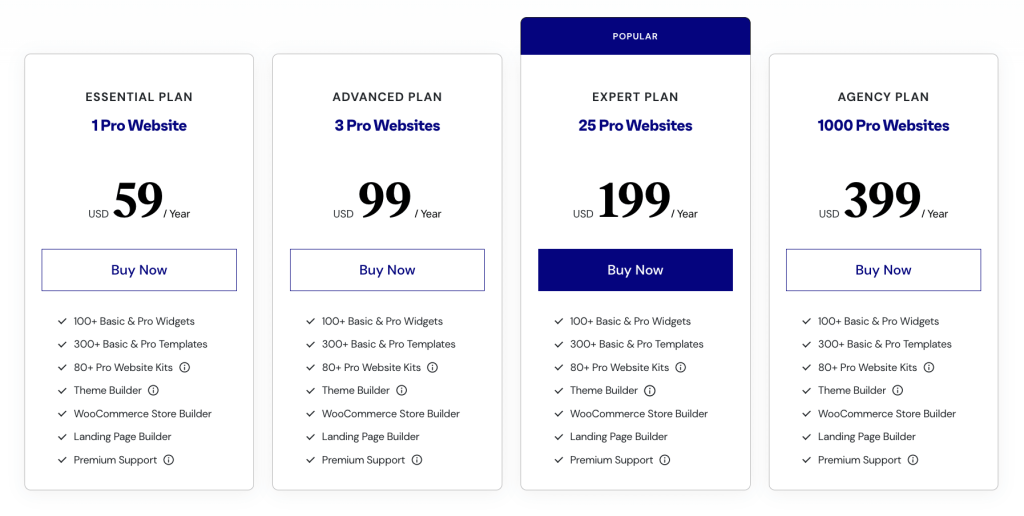
Site activation limits are a major differentiator: 1 site, 3 sites, 25 sites, and high-volume agency tiers.
Elementor “All-in-One” and Newer Bundles (Including Credits)
Elementor has been bundling additional functionality (AI tools, image optimization, accessibility tooling, email deliverability features, etc.) into broader packages in some plans.
These can simplify your toolkit if you prefer an integrated workflow instead of combining many separate plugins/services.
Elementor Pricing Table (Typical Annual Costs)
Important: Elementor frequently runs promotions and multi-year discounts. Checkout prices can vary by region, taxes, and limited-time deals.
Use the official pricing pages for the most current offer, then use the table below as a practical “budget planning” reference.
| Plan (Typical) | Typical Annual Cost (USD) | Approx. Monthly | Sites | Best For |
|---|---|---|---|---|
| Free | $0 | $0 | Unlimited* | Testing, basic pages, early-stage blogs |
| Essential | ~$59–$60 / year | ~$4.92–$5.00 | 1 | Single serious blog / brand site |
| Advanced Solo | ~$84 / year | ~$7.00 | 1 | Businesses, stores, lead-gen sites (1 site) |
| Advanced | ~$99 / year | ~$8.25 | 3 | Freelancers or small teams managing a few sites |
| Expert | ~$204 / year | ~$17.00 | 25 | Growing agencies, productized services, client work |
| Agency | ~$399 / year | ~$33.25 | 1000 | High-volume agencies with many client installs |
* “Unlimited” for Free refers to using the free plugin on multiple sites. Pro licensing limits apply only to Pro features and activations.
Prices above are typical reference points; checkout totals may differ based on promotions, billing cycle, rounding, and taxes shown at checkout.
Cost-per-site sanity check (for agencies)
This is the easiest way to know if you’re overpaying:
| If you manage… | Plan that usually makes sense | Why |
|---|---|---|
| 1 client site (or your own) | Essential or Advanced Solo | Lowest cost for 1 activation + Pro features |
| 2–3 sites | Advanced | Cheaper than buying multiple 1-site plans |
| 4–25 sites | Expert | Best balance for agencies doing steady client work |
| 25+ sites (high volume) | Agency | Per-site cost becomes extremely low at scale |
Which Plan Should You Choose? (Bloggers, Businesses, Agencies)
Best Elementor plan for Bloggers
If your primary goals are publishing content, building a clean brand, and ranking in search, you typically need:
a fast theme, good typography, nice templates, and reusable content blocks.
- Choose Free if you’re validating your blog, posting consistently, and keeping costs near zero.
- Choose Essential if you want to design headers/footers/blog templates visually (Theme Builder) and unlock more pro widgets for a premium look.
- Choose Advanced Solo if you’re running newsletter popups, lead magnets, and conversion funnels and you want more advanced marketing/ecommerce tooling on a single site.
On SenseCentral, explore:
SEO tutorials and
content strategy guides.
Best Elementor plan for Businesses
A business website typically needs more than a pretty design. It needs lead capture, conversion-focused landing pages, and often sales or booking flows.
That’s where higher tiers start paying for themselves.
- Service businesses: Advanced Solo is often ideal because it supports marketing workflows (forms, integrations, popups) and more advanced site control.
- Ecommerce stores: You’ll usually want Advanced Solo or above so you can fully customize WooCommerce layouts and run promotions professionally.
- Multiple brand sites: Advanced (3 sites) is a common value pick if you manage a main site + micro-sites or landing site variants.
If you’re comparing website stacks, you may also like:
best WordPress plugins and
landing page tools.
Ready to build faster with Elementor?
If you want the quickest way to start, use the official Elementor checkout through our affiliate link below.
Best Elementor plan for Agencies (and serious freelancers)
If you build websites for clients, you should make the decision based on:
site activations, workflow speed, and support reliability.
A plan that looks expensive can be cheaper per site when spread across client projects.
- Up to 3 sites: Advanced is often the cleanest value.
- Up to 25 sites: Expert typically fits agencies offering recurring website packages.
- High-volume installs: Agency is designed for shops handling many client builds and rollouts.
If you publish agency content on SenseCentral, you may want:
client website processes and
WordPress maintenance checklists.
Elementor Cloud Hosting: Who Should Choose It?
Elementor Cloud Hosting (Elementor’s hosted website builder for WordPress) is designed for people who want a simpler setup:
hosting + WordPress + Elementor in a single package, without managing separate hosting vendors and configurations.
Some official materials describe hosted plans starting around $9.99/month (pricing can vary by promo and region).
Choose Elementor Cloud Hosting if…
- You want a “one bill” setup: hosting + builder bundled.
- You prefer a more managed environment rather than configuring performance/security yourself.
- You’re launching quickly and don’t want to compare hosting companies, caching layers, CDNs, backups, and security add-ons.
Consider separate hosting if…
- You already have a high-performance WordPress host you trust (and a tuned stack).
- You need specialized server-level control or custom enterprise infrastructure.
- You’re optimizing heavily for edge cases (complex multi-site networks, heavy custom code, unusual scaling needs).
Want the simplest “WordPress + Elementor + Hosting” setup?
If you prefer a bundled approach, check Elementor Cloud Hosting here:
Hidden Costs + Practical Budgeting
When planning your Elementor budget, consider what typically shows up beyond the plan price:
1) Hosting (if not bundled)
A page builder can only be as fast and stable as the hosting stack beneath it. If you’re serious about performance, invest in quality hosting and caching.
Browse SenseCentral’s comparisons:
best WordPress hosting.
2) Theme and add-ons
Elementor works with many themes. A lightweight theme can reduce bloat and improve Core Web Vitals. You may also pay for premium templates or add-ons—but many users find Pro reduces the need for multiple extra plugins.
3) Maintenance and security
WordPress site ownership includes updates, plugin hygiene, backups, and security monitoring. Even if your builder is excellent, third-party add-ons can introduce risk if not maintained properly.
4) Team workflow (for agencies)
If your business model is “ship websites fast,” your real ROI is time saved: reusable templates, global widgets, dynamic content structures, and standardized conversion sections.
Higher-tier licenses often pay for themselves through speed and consistency.
Key Takeaways
- Pick a plan based on site activations first (1 vs 3 vs 25 vs agency-scale).
- Bloggers usually upgrade for Theme Builder + advanced templates; businesses upgrade for conversion tools; agencies upgrade for scale + workflow.
- Advanced Solo is often the best 1-site plan for business/ecommerce needs; Advanced is often best value for small multi-site workflows.
- Cloud Hosting is ideal if you want a simpler “builder + hosting” bundle and don’t want to manage separate vendors.
- Always check checkout pricing because promotions, billing cycles, taxes, and renewal rates can change.
FAQs
Is Elementor Free enough for a new blog?
Yes—if you’re focused on writing and don’t yet need Theme Builder, advanced marketing tools, popups, or ecommerce customization. Start free, validate your content strategy, then upgrade when the features directly support growth.
Which Elementor plan is best for a single business website?
For many businesses, Advanced Solo is the practical choice because it supports more serious marketing/ecommerce needs on one site. If your needs are simpler, Essential can be enough.
What’s the difference between Essential and Advanced Solo?
In general: Essential is positioned as a basic one-site Pro plan; Advanced Solo is positioned for professional sites needing more advanced capability (especially for growth, marketing, and ecommerce-style workflows).
Always confirm the feature list on the official pricing page before buying.
Do I need an agency plan to build client sites?
Not always. If you build a few sites per year, an Advanced or Expert tier may be enough. The agency tier usually becomes attractive when you’re managing many client installs and want a very low per-site cost.
Can I switch plans later?
Elementor commonly supports upgrading plans, but policies can change. If you expect to scale, it’s often worth choosing the plan that matches your next 12 months of growth rather than your current month.
References
- Elementor Pricing (Official)
- Elementor Pro Plans (Official)
- Elementor Hosted Website Builder (Official)
- License Activation Limits (Official Help Doc)
- Elementor Plugin on WordPress.org
Recommended next step
If you’re ready to choose a plan today, use the official Elementor checkout links below: