- Table of Contents
- What an AI productivity system really is
- The 5 principles that make it work
- 1) One trusted capture bucket
- 2) Decisions happen at scheduled times
- 3) Calendar protects focus; tasks hold the details
- 4) AI drafts fast, you verify and finalize
- 5) Weekly review is where the magic compounds
- Set up your stack (tasks + calendar + notes + AI)
- A) Task manager (your action list)
- B) Calendar (your reality)
- C) Notes / “Second brain” (your knowledge)
- D) AI assistant (your co-pilot)
- Daily workflow template (step-by-step)
- Step 1: Capture (2–5 minutes, multiple times/day)
- Step 2: Clarify (10 minutes once/day)
- Step 3: Plan (10–15 minutes in the morning)
- Step 4: Execute (focus blocks + batching)
- Step 5: Review + shutdown (5–10 minutes)
- Daily schedule table (with AI assist ideas)
- Copy/paste prompt library (planning, writing, decisions)
- Morning plan (daily workflow builder)
- Task clarification (turn vague into actionable)
- Deep work starter (beat procrastination)
- Meeting agenda + notes + next steps
- Decision log (avoid re-thinking the same choices)
- Writing assistant (draft + improve)
- Quality check (hallucination-resistant workflow)
- Automation ideas (Zapier/IFTTT) without losing control
- Quality, privacy, and “don’t trust blindly” rules
- Rule 1: Verify anything that affects money, health, or reputation
- Rule 2: Protect sensitive information
- Rule 3: Watch out for prompt injection and insecure outputs
- Rule 4: Use a “trusted system” mindset
- Rule 5: Manage AI risk like a grown-up
- Troubleshooting: when the system breaks
- “My list is too long and I ignore it.”
- “I keep context-switching.”
- “AI distracts me.”
- “I don’t follow the plan.”
- “I need motivation.”
- FAQs
- Do I need a paid AI tool to use this system?
- Is this just GTD with AI?
- How long does setup take?
- What if I have unpredictable days?
- What’s the single best habit to start with?
- Key Takeaways
- References & helpful external resources
If your days feel busy but not productive, you don’t need “more hacks.” You need a simple system that turns chaos into clarity—then uses AI for the repetitive parts (planning drafts, summaries, checklists, first-pass writing), while you keep control of priorities, decisions, and quality.
This post gives you a complete, practical AI productivity system you can run daily: a workflow template, prompts you can copy/paste, and a review ritual that compounds results over time. It’s designed to work whether you’re a creator, developer, student, freelancer, manager, or solo founder.
Table of Contents
What an AI productivity system really is
An AI productivity system is not “using ChatGPT a lot.” It’s a repeatable workflow that:
- Captures tasks, ideas, and inputs fast (so nothing leaks from your brain).
- Clarifies what each item means and what the next action is.
- Plans time intentionally (instead of reacting all day).
- Executes with focus blocks and reduced context switching.
- Reviews so the system improves every week.
AI plays a supporting role: it helps you think, draft, summarize, and structure—while you stay the editor-in-chief. If you do it right, AI reduces friction, decision fatigue, and “blank page” moments, but doesn’t decide what matters most.
The 5 principles that make it work
1) One trusted capture bucket
Random sticky notes, screenshots, and half-written messages create anxiety. Use one capture bucket (in your task app, notes app, or inbox list). Your rule: if it matters, it goes into capture.
2) Decisions happen at scheduled times
Most overwhelm comes from making micro-decisions all day. Instead, batch decisions into two short planning moments:
- Morning plan (10–15 minutes)
- Evening shutdown (5–10 minutes)
3) Calendar protects focus; tasks hold the details
Your calendar is for time commitments and focus blocks. Your task manager is for actions. When you mix them, everything becomes noise. A good guide to time blocking is here:
Time Blocking (Todoist).
4) AI drafts fast, you verify and finalize
AI is best at first drafts and structure. You’re best at truth, taste, and priorities. Treat AI output like a helpful intern: valuable, but never the final authority.
5) Weekly review is where the magic compounds
If you only plan daily, you’ll still drift. Weekly review reconnects tasks to goals and closes open loops. The GTD concept is a classic reference point:
Getting Things Done (GTD).
Set up your stack (tasks + calendar + notes + AI)
You can implement this system with almost any tools. Keep it simple:
A) Task manager (your action list)
Pick one place for tasks. Examples and learning resources:
- Todoist (task manager)
- Microsoft To Do
Minimum structure:
- Inbox (capture)
- Today (your daily commitments)
- Next actions (things you can do soon)
- Waiting (blocked by someone else)
- Projects (anything with multiple steps)
B) Calendar (your reality)
Use one calendar that you actually look at. If you use Google Calendar, you can schedule “Focus time” blocks:
Use focus time in Google Calendar.
C) Notes / “Second brain” (your knowledge)
This is where ideas, summaries, meeting notes, and reusable templates live.
- Obsidian (local Markdown vault)
- Notion AI guides
For organization, consider PARA (Projects, Areas, Resources, Archives):
The PARA Method and
Building a Second Brain overview.
D) AI assistant (your co-pilot)
You can use any AI tool you trust. Learn prompt basics here:
Rule of thumb: Don’t give AI raw secrets (passwords, private keys, OTPs, confidential client data). Use redaction and placeholders whenever possible.
Daily workflow template (step-by-step)
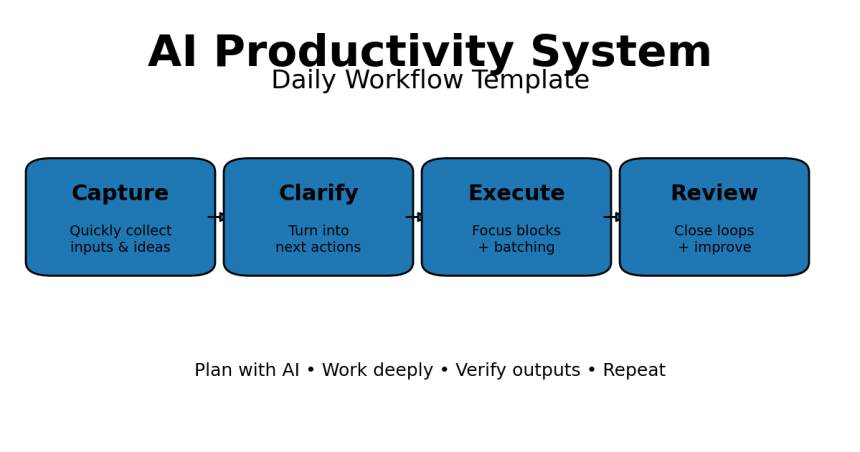
This is the core loop you’ll repeat every day:
Step 1: Capture (2–5 minutes, multiple times/day)
Any time you think “I should remember this,” capture it instantly into your inbox list. Examples:
- “Email client about contract update”
- “Fix bug in checkout flow”
- “Idea: blog post on on-device AI vs cloud AI”
- “Follow up: payment pending”
AI assist: If you captured something messy (voice note, rough notes), ask AI to convert it into clear next actions.
Step 2: Clarify (10 minutes once/day)
Process your inbox. For each item, decide:
- Delete (not real)
- Delegate (assign to someone / waiting)
- Do (if < 2 minutes)
- Defer (schedule or move to next actions)
This is similar to the logic behind the Eisenhower Matrix (urgent vs important):
Eisenhower Matrix guide.
Step 3: Plan (10–15 minutes in the morning)
Create a short daily plan that respects time and energy. Your goal is not “do everything.” Your goal is:
- 1–3 Most Important Tasks (MITs)
- 2–5 support tasks
- One improvement (small system upgrade)
AI assist: Ask AI to propose a time-block schedule based on your tasks and time constraints.
Step 4: Execute (focus blocks + batching)
Run your day using time blocks. Protect deep work time (the kind of focused work that creates real results). If you want the philosophy behind deep work, see:
Deep Work (Cal Newport).
Use a timer when helpful. Pomodoro is a popular option:
Pomodoro Technique.
Step 5: Review + shutdown (5–10 minutes)
Before you end the day:
- Mark what’s done
- Move unfinished tasks (don’t leave them floating)
- Write a 2–3 line “day log” (what moved, what blocked)
- Pick tomorrow’s MITs (optional)
Daily schedule table (with AI assist ideas)
Here’s a flexible daily template you can adapt. If your day starts earlier/later, shift the blocks—keep the logic.
| Time block | What you do | Where AI helps (optional) |
|---|---|---|
| Morning (10–15 min) | Plan: pick MITs, confirm calendar, define “done” | Draft a realistic schedule; break tasks into next actions |
| Deep Work Block 1 (60–120 min) | Hardest/most valuable task | Outline, draft, code suggestions, checklist, first-pass writing |
| Admin Batch (20–30 min) | Email/messages/inbox processing | Summarize threads; draft replies; extract action items |
| Meetings / Collaboration | Calls, reviews, teamwork | Meeting agenda; decision log; recap + next steps |
| Deep Work Block 2 (45–90 min) | Second priority task or creative output | Rewrite, polish, structure, generate alternatives |
| Ops / Maintenance (20–40 min) | Small tasks, fixes, errands, follow-ups | Generate micro-checklists; standard operating procedures |
| Shutdown (5–10 min) | Review, reschedule, note lessons | Summarize day log; suggest tomorrow’s 1–3 MITs |
3 variations (pick the one that matches your work)
Creator / Writer: 2 deep blocks for writing, 1 short admin batch, daily content “idea capture,” and a weekly publish plan.
Developer / Builder: Longest deep block for build/debug, strict message batching, AI used for outlining, test-case generation, documentation drafts.
Manager / Operator: Calendar-led day with meeting clusters, two “no meeting” focus blocks, AI used for agendas, summaries, and decision logs.
If you like paper-style time blocking, see:
Time Block Planner.
Copy/paste prompt library (planning, writing, decisions)
Use these prompts as templates. Replace the brackets.
Morning plan (daily workflow builder)
You are my productivity coach. Today is [date].
My fixed commitments are:
- [commitment + time]
My top goals this week are:
- [goal 1]
- [goal 2]

Here is my task inbox (messy):
[paste list]

1) Convert this into clear next actions and projects.
2) Suggest 1–3 MITs for today.
3) Create a time-block plan for the day (include breaks).
4) Highlight what to postpone or delete if time is tight.
Task clarification (turn vague into actionable)
Turn this vague task into:
- a clear outcome
- the very next action
- the smallest first step (2 minutes)
Task: [paste]
Deep work starter (beat procrastination)
Help me start this task in 5 minutes.
Task: [task]
Context: [where it lives, tools needed]
Give:
1) a 3-step starter plan
2) a “definition of done”
3) common distractions + how to avoid them
Meeting agenda + notes + next steps
I have a meeting about: [topic]
Attendees: [roles]
Goal: [desired outcome]

Create:
1) a 30-minute agenda
2) key questions to decide today
3) a notes template
4) a follow-up email draft with action items
Decision log (avoid re-thinking the same choices)
Help me make a decision.
Decision: [what]
Options: [A, B, C]
Constraints: [time, budget, quality]
Criteria: [what matters most]

Return:
- recommendation + reasoning
- risks and mitigations
- “what would change my mind?”
- next actions
Writing assistant (draft + improve)
Write a first draft for: [topic]
Audience: [who]
Tone: [friendly / expert / simple]
Length: [approx]
Must include: [points]

Then:
- suggest 5 stronger headlines
- add a checklist
- add 5 FAQs with short answers
Quality check (hallucination-resistant workflow)
Review the text below for:
- unclear claims
- missing assumptions
- potential factual errors (flag what needs verification)
- improvements to structure

Text:
[paste]Automation ideas (Zapier/IFTTT) without losing control
Automation is powerful when it reduces repetitive work—but dangerous when it silently creates noise. Use automation for routing and formatting, not for high-stakes decisions.
Good automation (low risk, high value)
- When a form is submitted → create a task + add notes.
- When you star an email → create a “Follow-up” task.
- When a meeting ends → generate a recap template.
Resources:
Automation safety rule
Always include a human checkpoint if automation is sending messages publicly, changing customer data, or publishing content.
Quality, privacy, and “don’t trust blindly” rules
AI output can be extremely useful—and occasionally wrong. Build safety into your workflow.
Rule 1: Verify anything that affects money, health, or reputation
Use AI for drafts, then verify with primary sources or your own expertise.
Rule 2: Protect sensitive information
Don’t paste secrets, passwords, private keys, OTPs, or confidential client details into prompts. Use placeholders (e.g., [CLIENT_NAME], [AMOUNT]) and redact identifiers.
Rule 3: Watch out for prompt injection and insecure outputs
If you use AI to summarize emails or webpages, treat it as untrusted input. Security references:
Rule 4: Use a “trusted system” mindset
Your system should be trustworthy because you review it daily/weekly—not because it’s perfect. The trusted system concept is central to GTD:
GTD fundamentals.
Rule 5: Manage AI risk like a grown-up
If you build workflows for a team or product, consider frameworks like NIST’s AI RMF:
NIST AI RMF (PDF).
Troubleshooting: when the system breaks
“My list is too long and I ignore it.”
Move 80% of tasks out of “Today.” Today should hold your commitments and the smallest set of actions that makes the day a win. Everything else goes to Next Actions or Someday/Maybe.
“I keep context-switching.”
Batch communications into 1–3 windows/day. Add focus blocks to your calendar and protect them.
“AI distracts me.”
Limit AI usage to specific moments:
- Morning planning (15 min)
- Drafting (inside a focus block)
- End-of-day review (10 min)
“I don’t follow the plan.”
That’s normal. Plans are hypotheses. Adjust the schedule when reality changes. Time blocking isn’t a prison—it’s a steering wheel.
“I need motivation.”
Don’t rely on motivation—rely on design. Habit design resources:
James Clear’s Habits Guide.
FAQs
Do I need a paid AI tool to use this system?
No. The system works with or without AI. AI simply reduces friction in planning, drafting, summarizing, and formatting.
Is this just GTD with AI?
It’s compatible with GTD, but it’s lighter. You can run it as a simple daily loop (capture → clarify → plan → execute → review) and add complexity only if needed.
How long does setup take?
About 30–60 minutes for a basic setup: task inbox + a few lists, calendar focus blocks, and 2–3 note templates.
What if I have unpredictable days?
Use shorter blocks (30–45 minutes) and keep a “minimum viable day” plan: 1 MIT + 2 support tasks + shutdown review.
What’s the single best habit to start with?
The end-of-day shutdown review. It prevents task spillover, reduces anxiety, and sets up tomorrow.
Key Takeaways
- An AI productivity system is a repeatable workflow—not random AI usage.
- Run a daily loop: capture → clarify → plan → execute → review.
- Use your calendar to protect focus blocks; tasks hold action details.
- AI is best for drafting, structuring, summarizing—while you verify and finalize.
- Weekly review makes the system improve over time.
Best Artificial Intelligence Apps on Play Store 🚀
Learn AI from fundamentals to modern Generative AI tools — pick the Free version to start fast, or unlock the full Pro experience (one-time purchase, lifetime access).

AI Basics → Advanced
Artificial Intelligence (Free)
A refreshing, motivating tour of Artificial Intelligence — learn core concepts, explore modern AI ideas, and use built-in AI features like image generation and chat.
More details
► The app provides a refreshing and motivating synthesis of AI — taking you on a complete tour of this intriguing world.
► Learn how to build/program computers to do what minds can do.
► Generate images using AI models inside the app.
► Clear doubts and enhance learning with the built-in AI Chat feature.
► Access newly introduced Generative AI tools to boost productivity.
- Artificial Intelligence- Introduction
- Philosophy of AI
- Goals of AI
- What Contributes to AI?
- Programming Without and With AI
- What is AI Technique?
- Applications of AI
- History of AI
- What is Intelligence?
- Types of Intelligence
- What is Intelligence Composed of?
- Difference between Human and Machine Intelligence
- Artificial Intelligence – Research Areas
- Working of Speech and Voice Recognition Systems
- Real Life Applications of AI Research Areas
- Task Classification of AI
- What are Agent and Environment?
- Agent Terminology
- Rationality
- What is Ideal Rational Agent?
- The Structure of Intelligent Agents
- Nature of Environments
- Properties of Environment
- AI – Popular Search Algorithms
- Search Terminology
- Brute-Force Search Strategies
- Comparison of Various Algorithms Complexities
- Informed (Heuristic) Search Strategies
- Local Search Algorithms
- Simulated Annealing
- Travelling Salesman Problem
- Fuzzy Logic Systems
- Fuzzy Logic Systems Architecture
- Example of a Fuzzy Logic System
- Application Areas of Fuzzy Logic
- Advantages of FLSs
- Disadvantages of FLSs
- Natural Language Processing
- Components of NLP
- Difficulties in NLU
- NLP Terminology
- Steps in NLP
- Implementation Aspects of Syntactic Analysis
- Top-Down Parser
- Expert Systems
- Knowledge Base
- Inference Engine
- User Interface
- Expert Systems Limitations
- Applications of Expert System
- Expert System Technology
- Development of Expert Systems: General Steps
- Benefits of Expert Systems
- Robotics
- Difference in Robot System and Other AI Program
- Robot Locomotion
- Components of a Robot
- Computer Vision
- Application Domains of Computer Vision
- Applications of Robotics
- Neural Networks
- Types of Artificial Neural Networks
- Working of ANNs
- Machine Learning in ANNs
- Bayesian Networks (BN)
- Building a Bayesian Network
- Applications of Neural Networks
- AI – Issues
- A I- Terminology
- Intelligent System for Controlling a Three-Phase Active Filter
- Comparison Study of AI-based Methods in Wind Energy
- Fuzzy Logic Control of Switched Reluctance Motor Drives
- Advantages of Fuzzy Control While Dealing with Complex/Unknown Model Dynamics: A Quadcopter Example
- Retrieval of Optical Constant and Particle Size Distribution of Particulate Media Using the PSO-Based Neural Network Algorithm
- A Novel Artificial Organic Controller with Hermite Optical Flow Feedback for Mobile Robot Navigation
Tip: Start with Free to build a base, then upgrade to Pro when you want projects, tools, and an ad-free experience.

One-time • Lifetime Access
Artificial Intelligence Pro
Your all-in-one AI learning powerhouse — comprehensive content, 30 hands-on projects, 33 productivity AI tools, 100 image generations/day, and a clean ad-free experience.
More details
Unlock your full potential in Artificial Intelligence! Artificial Intelligence Pro is packed with comprehensive content,
powerful features, and a clean ad-free experience — available with a one-time purchase and lifetime access.
- Machine Learning (ML), Deep Learning (DL), ANN
- Natural Language Processing (NLP), Expert Systems
- Fuzzy Logic Systems, Object Detection, Robotics
- TensorFlow framework and more
Pro features
- 500+ curated Q&A entries
- 33 AI tools for productivity
- 30 hands-on AI projects
- 100 AI image generations per day
- Ad-free learning environment
- Take notes within the app
- Save articles as PDF
- AI library insights + AI field news via linked blog
- Light/Dark mode + priority support
- Lifetime access (one-time purchase)
Compared to Free
- 5× more Q&As
- 3× more project modules
- 10× more image generations
- PDF + note-taking features
- No ads, ever • Free updates forever
Buy once. Learn forever. Perfect for students, developers, and tech enthusiasts who want to learn, build, and stay updated in AI.
References & helpful external resources
- Getting Things Done (GTD) – official overview
- Pomodoro Technique – official site
- Eisenhower Matrix – Asana guide
- Time blocking – Todoist guide
- Deep Work – Cal Newport
- PARA Method – Building a Second Brain
- Building a Second Brain overview – Forte Labs
- Prompt engineering – OpenAI docs
- OWASP Top 10 for LLM apps
- NIST AI RMF 1.0 (PDF)