- Start Here: Elementor Builder vs Elementor Cloud Hosting
- Key Takeaways
- What Makes an Ecommerce Template “Great”
- Best Elementor Template Types for Ecommerce Stores
- Where to Find High-Quality Elementor Ecommerce Templates
- 1) Elementor Template & Kit Library (recommended starting point)
- 2) Third-party marketplaces (best for niche variety)
- 3) Starter templates + build your own system
- How to Choose the Right Template for Your Store Type
- How to Customize Templates for Conversions (Without Killing Speed)
- Step 1: Replace default hero messaging with a purchase-oriented value proposition
- Step 2: Add trust early (above the fold on mobile)
- Step 3: Make category pages fast and scannable
- Step 4: Upgrade product pages to “decision pages”
- Step 5: Use popups intelligently (not aggressively)
- Performance rules for template-based ecommerce stores
- Quick Launch Checklist
- FAQs
- 1) Are Elementor Template Kits the same as WordPress themes?
- 2) Do I need WooCommerce to use ecommerce templates?
- 3) Can I use Elementor templates on an existing store?
- 4) How do I choose between a “one-page shop” and a full kit?
- 5) Will templates hurt my site speed?
- 6) What’s the fastest way to launch an Elementor ecommerce site?
- 7) What pages should every ecommerce template include?
- 8) Can I create custom product and shop layouts visually?
- 9) Should I buy third-party templates or start from Elementor’s library?
- 10) What is the best “next step” if I’m ready to build now?
- References
- Final Recommendation
Website: Sensecentral (www.sensecentral.com) • Topic: Ecommerce + Elementor Templates
Affiliate disclosure: This post contains affiliate links. If you purchase through them, Sensecentral may earn a commission at no extra cost to you. We only recommend tools we believe provide genuine value.
Ecommerce design is not just “how your store looks”—it influences trust, product discovery, add-to-cart rate, checkout completion, and even SEO engagement signals.
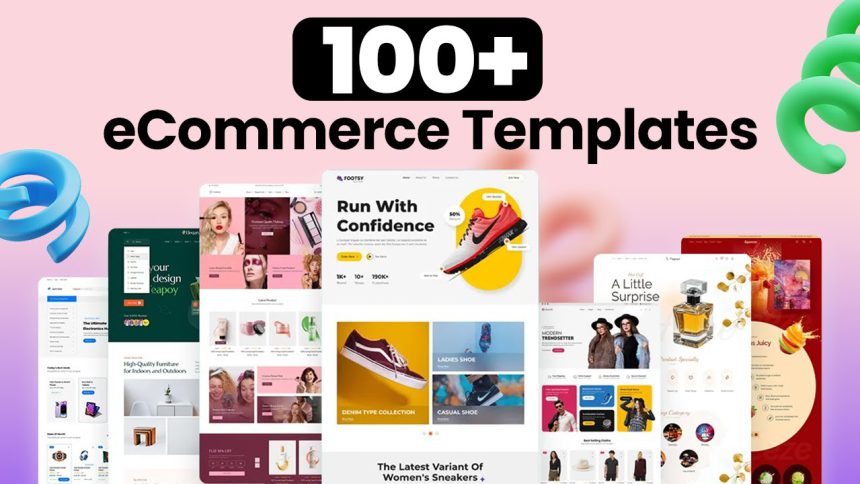
The good news: with Elementor, you can start from a professionally designed ecommerce template (often called a Template Kit) and customize it without code.
Elementor’s Kit Library includes full website kits and section-based kits that help you launch faster while keeping design consistency across pages.
Start Here: Elementor Builder vs Elementor Cloud Hosting
If you want the most flexible route, install Elementor on your existing WordPress hosting and build on top of a kit/template.
If you want a simpler “builder + managed hosting” bundle, Elementor offers a hosted solution where WordPress and Elementor are pre-installed and hosting is powered by Google Cloud (per Elementor’s hosting pages).
Prefer to compare first? Use our site search for related guides:
Elementor on Sensecentral •
WordPress guides •
WooCommerce tips
- Key Takeaways
- What Makes an Ecommerce Template “Great”
- Best Elementor Template Types for Ecommerce Stores
- Where to Find High-Quality Elementor Ecommerce Templates
- How to Choose the Right Template for Your Store Type
- How to Customize Templates for Conversions (Without Killing Speed)
- Quick Launch Checklist
- FAQs
- References
Key Takeaways
- Choose kits built for ecommerce flows: home → category → product → cart → checkout.
- Prioritize conversion blocks: trust badges, product highlights, shipping/returns, reviews, FAQs.
- Template Kits beat one-off pages when you want a cohesive store design fast.
- Keep it fast: optimize images, limit heavy animations, and keep widget usage disciplined.
- Elementor Cloud can reduce setup complexity if you want builder + managed hosting together.
What Makes an Ecommerce Template “Great”
The “best” ecommerce template is the one that matches your business model and makes buying feel effortless.
A beautiful design that hides shipping info or makes product filtering hard will underperform a simpler design built around clarity.
Use these criteria when evaluating Elementor templates:
1) Clear product discovery
- Category pages with strong filters (size, color, price, type)
- Prominent search and fast navigation
- Consistent product card design (price, rating, key attribute)
2) Strong product page persuasion
- Above-the-fold: product title, price, variations, CTA, key benefits
- Trust: reviews, guarantee, shipping & returns, secure payment badges
- Upsells: “You may also like” and “Frequently bought together”
3) Checkout confidence
- Minimal distractions and transparent costs (shipping, taxes)
- Clear “next step” actions and error messages
- Mobile-first layout (most stores are majority mobile traffic)
Best Elementor Template Types for Ecommerce Stores
Elementor templates generally come in a few formats. For ecommerce, you’ll typically see:
Template Kits (a cohesive set of templates for a full site),
Section templates (individual blocks like hero, testimonials, feature grids),
and WooCommerce-specific templates for shop/product layouts.
Elementor also supports designing WooCommerce templates visually through its WooCommerce Builder features.
| Template Type | Best For | What You Get | Success Tip |
|---|---|---|---|
| Full Ecommerce Template Kit | Launching fast with consistent branding | Multiple pages + styling system (fonts/colors) + often headers/footers | Pick a kit that already matches your store’s product density (few products vs catalog) |
| One-Page Shop Kit | Single product, limited collections | High-converting landing sections + simplified purchase flow | Use strong social proof blocks and FAQs close to the CTA |
| Niche Industry Store Kit | Fashion, cosmetics, supplements, pets, home decor, etc. | Industry-styled visuals + layout patterns tailored to that audience | Replace stock imagery quickly—visual mismatch kills trust |
| Section Templates | Improving an existing store without redesign | Reusable blocks: feature grids, promos, review rows, comparison tables | Only add what supports buying decisions—avoid “page bloat” |
Where to Find High-Quality Elementor Ecommerce Templates
Not all templates are equal. The safest path is to start with sources that are actively maintained and well-documented.
Here are the best places to look—especially if your goal is professional polish and fewer compatibility surprises:
1) Elementor Template & Kit Library (recommended starting point)
Elementor’s library includes website kits and template collections that you can import and customize.
For ecommerce specifically, browse Elementor’s WooCommerce website templates and ecommerce kits first.
If you’re new, this approach reduces friction because everything is designed to work inside Elementor’s editor.
External link suggestions:
Elementor Kit Library •
WooCommerce Website Templates
2) Third-party marketplaces (best for niche variety)
Marketplaces can offer stunning niche designs (fashion boutiques, luxury skincare, handmade crafts),
but quality varies. Look for:
recent updates, high sales volume, clear documentation,
and compatibility notes (Elementor version, required plugins, whether Elementor Pro is needed).
External link suggestion:
ThemeForest Elementor collection
3) Starter templates + build your own system
Advanced creators often choose a clean base kit and then build a reusable component system:
promo banners, product highlight blocks, review sections, guarantee blocks, and comparison rows.
This is ideal if you plan multiple stores or frequent campaigns.
How to Choose the Right Template for Your Store Type
Use your store model to drive template selection. A dropshipping catalog store needs different layouts than a premium single-product brand.
Below is a practical “matching table” you can use before importing anything:
| Store Model | Template Style That Works Best | Must-Have Sections | Common Mistake to Avoid |
|---|---|---|---|
| Single-product / hero product | One-page shop or focused landing kit | Problem → solution, benefits, testimonials, FAQs, guarantee, CTA repeats | Too many pages and choices (it lowers conversion) |
| Small curated catalog (10–50 products) | Clean ecommerce kit with editorial feel | Collection highlights, best sellers, bundles, “why us”, reviews | Overly complex filters and heavy visuals that slow mobile |
| Large catalog (50–1000+ products) | Utility-focused shop template | Advanced category navigation, filters, search prominence, quick add-to-cart | Fancy layouts that make browsing slow and confusing |
| Digital products | Minimal, trust-first template | Product previews, feature list, licensing, support promise, instant delivery info | Hiding details behind tabs or long pages without summaries |
| Subscription / membership | Conversion-led template with pricing emphasis | Pricing table, comparisons, onboarding steps, trust and guarantees | Not clarifying “what’s included” and cancellation terms |
When you shortlist templates, ask one simple question:
Does the template make the buying path obvious within 5 seconds?
If the answer is “no,” pick another kit—no amount of visual polish fixes a confusing path.
How to Customize Templates for Conversions (Without Killing Speed)
The highest ROI work is not “changing colors.” It’s aligning your templates with real buyer objections and removing friction.
Here is a proven customization sequence that works for most ecommerce stores using Elementor templates.
Step 1: Replace default hero messaging with a purchase-oriented value proposition
- State what you sell + who it’s for (clarity beats cleverness).
- Add 3 quick benefits (shipping speed, quality promise, guarantee).
- Use one primary CTA: “Shop Now” or “View Collection” (avoid multiple CTAs).
Step 2: Add trust early (above the fold on mobile)
- Review count + average rating near the hero or product grid
- Returns policy summary (example: “30-day returns”)
- Secure payments + delivery timeframe
Step 3: Make category pages fast and scannable
- Consistent product cards with clear pricing and variation cues
- Keep badges meaningful (Best Seller, New, Limited)
- Avoid huge carousels for every row—use them sparingly
Step 4: Upgrade product pages to “decision pages”
- Add a short “why it’s different” section
- Use comparison blocks (your product vs generic alternatives)
- Include FAQs that directly answer purchase objections
- Place shipping/returns and support promises near the CTA
Step 5: Use popups intelligently (not aggressively)
- Exit-intent discount (only for non-buyers)
- Back-in-stock notifications
- Email capture with a real incentive (guide, warranty extension, VIP offers)
If you’re building conversion popups and want an integrated workflow with Elementor’s ecosystem,
consider using Elementor’s tools and setup options:
keep popups light, targeted, and mobile-friendly.
Performance rules for template-based ecommerce stores
- Compress images (especially hero images and product thumbnails).
- Limit animation (micro-interactions are fine; large motion sections add weight).
- Standardize sections and reuse blocks instead of creating new complex layouts per page.
- Keep fonts disciplined: 1–2 font families, limited weights.
- Audit plugins: every extra plugin adds risk and overhead.
If you want a simpler setup path that combines site building with managed hosting,
Elementor’s all-in-one hosted option can be a practical route for many store owners.
Quick Launch Checklist
- Pick the right kit: matches your store model (single product vs catalog).
- Brand system: set global fonts, colors, buttons first.
- Core pages: Home, Shop, Category, Product, Cart, Checkout, About, Contact, Policies.
- Trust blocks: reviews, shipping/returns, guarantees, secure payment badges.
- Mobile pass: check spacing, CTA visibility, product images, and checkout steps.
- Speed pass: compress images, reduce heavy sections, remove unused templates.
- Tracking: set analytics and conversion events before you run ads.
FAQs
1) Are Elementor Template Kits the same as WordPress themes?
Not exactly. Template kits are collections of templates designed to create a cohesive site experience (multiple pages and parts).
Themes typically control site-wide styling and structure at the WordPress theme level. Kits focus on Elementor layouts you can import and customize.
2) Do I need WooCommerce to use ecommerce templates?
If you want a true store (cart, checkout, products), WooCommerce is the most common WordPress ecommerce foundation.
Some templates can be used for “catalog-only” sites, but selling usually requires an ecommerce plugin.
3) Can I use Elementor templates on an existing store?
Yes. The best approach is to import only what you need (sections or a few pages) and align typography/colors so your store remains consistent.
Avoid importing an entire kit if you already have a complex store unless you plan a full redesign.
4) How do I choose between a “one-page shop” and a full kit?
One-page works best for a single hero product or limited catalog where persuasion is the main job.
Full kits are best when your store needs navigation, categories, and multiple buying paths.
5) Will templates hurt my site speed?
Templates themselves are not the problem—how you customize them is. Heavy images, too many widgets, and excessive animations are typical culprits.
Keep things lean, compress images, and test on mobile.
6) What’s the fastest way to launch an Elementor ecommerce site?
Start with a ready-made ecommerce kit, set global design settings first, and fill in product/category pages next.
If you want a simplified setup (builder + hosting), consider Elementor’s hosted option:
Try elementor cloud hosting for wordpress.
7) What pages should every ecommerce template include?
Home, Shop/Categories, Product, Cart, Checkout, About, Contact, Shipping & Returns, Privacy Policy, and Terms.
For conversion, add FAQs and a trust/guarantee block.
8) Can I create custom product and shop layouts visually?
Elementor supports designing WooCommerce layouts visually via WooCommerce builder features, allowing you to shape product and archive experiences without custom code.
9) Should I buy third-party templates or start from Elementor’s library?
Start with Elementor’s library if you want fewer surprises and faster setup. Consider third-party templates when you need a very specific niche look and you’re comfortable checking compatibility and documentation.
10) What is the best “next step” if I’m ready to build now?
If you already have hosting, start with Elementor’s builder and import a WooCommerce kit.
If you want hosting + builder bundled, use this option:
Try elementor cloud hosting for wordpress.
References
- Elementor Kit Library
- Elementor WooCommerce Website Templates
- Elementor Hosting
- Elementor WooCommerce Builder
- What are Template Kits?
- Elementor plugin on WordPress.org
Final Recommendation
The best Elementor ecommerce template is the one that matches your store model and makes buying effortless.
Start with a kit designed for WooCommerce flows, customize it using a conversion-first sequence (trust → clarity → persuasion),
and keep performance tight.
Continue exploring on Sensecentral:
Elementor articles •
WooCommerce guides •
WordPress tutorials