- Table of Contents
- Key Takeaways
- Why Google Reviews Widgets Increase Conversions
- What to Look for in a Google Reviews Widget (Buyer Checklist)
- 1) Source & Sync Reliability
- 2) Moderation & Filtering
- 3) Design Flexibility
- 4) Platform Compatibility
- 5) Pricing Model That Fits Your Traffic
- Elfsight Google Reviews Widget (Overview)
- How to Add Elfsight Google Reviews to Your Website
- Pricing Models Explained (Including “Views”)
- A) Views-based pricing (common with no-code embed platforms)
- B) License-based pricing (common with WordPress plugins)
- C) Platform pricing (review management suites)
- Elfsight “Views” in plain English
- Elfsight vs Top Alternatives (Comparison Table)
- Top Alternatives (When to Choose Them)
- 1) Smash Balloon Reviews Feed (Best for WordPress-only)
- 2) EmbedSocial (Best for review management workflows)
- 3) Trustindex (Best for “unlimited views” style annual pricing)
- 4) Taggbox (Best for UGC-heavy brands & “social wall” use cases)
- So… Which One Should You Pick?
- Best Practices: Make Review Widgets Convert (Not Just “Look Nice”)
- 1) Place reviews next to the decision point
- 2) Use the “trust sandwich” layout
- 3) Show enough reviews to feel real
- 4) Don’t break platform policies
- 5) Add structured data (carefully)
- FAQs
- Final Verdict
- References
Affiliate Disclosure: This post contains affiliate links. If you click and purchase, Sensecentral may earn a commission at no extra cost to you. We only recommend tools we believe are genuinely useful.
If you’re serious about conversions, Google reviews are one of the highest-leverage trust signals you can add to your website.
Visitors may love your design and pricing, but they still ask one question: “Do other people trust this business?”
A Google Reviews widget answers that question instantly—right where it matters most: on your homepage, service pages, and checkout/lead forms.
In this guide, we’ll compare Elfsight (a popular no-code widget platform) against top alternatives, so you can pick the best
Google Reviews widget for your platform, budget, and growth goals.
✅ Try Elfsight (Google Reviews Widget)
Table of Contents
- Key Takeaways
- Why Google Reviews Widgets Increase Conversions
- What to Look for in a Google Reviews Widget
- Elfsight Google Reviews Widget (Overview)
- How to Add Elfsight Google Reviews to Your Website
- Pricing Models Explained (Including “Views”)
- Elfsight vs Alternatives (Comparison Table)
- Top Alternatives (When to Choose Them)
- Best Practices: Make Review Widgets Convert
- FAQs
- Final Verdict
- References
Key Takeaways
- Best all-around (most sites): Elfsight — fast no-code setup, flexible layouts, works across many platforms.
- Best for WordPress-only users: Smash Balloon Reviews Feed — WordPress-native plugin with annual licensing.
- Best for review management + collection: EmbedSocial — more “platform” than widget (often costs more).
- Best if you want “unlimited views” pricing: Trustindex — annual plans with unlimited views listed.
- Choose based on: your site platform, customization needs, traffic (views), and whether you need multi-source review management.
Why Google Reviews Widgets Increase Conversions
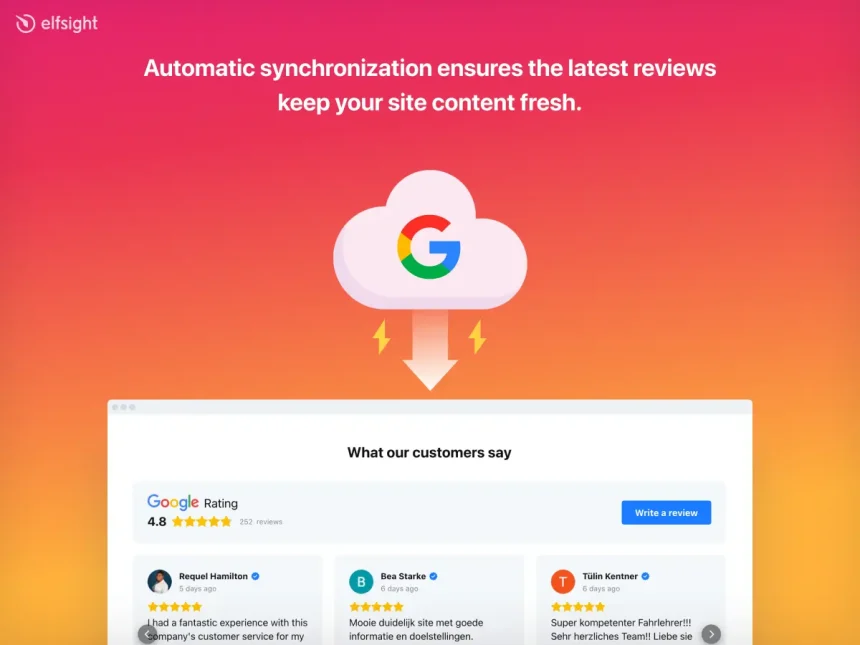
A Google Reviews widget is a website embed that displays customer reviews and star ratings pulled from your
Google Business Profile (or via an approved source/connection). It helps you convert more visitors by:
- Reducing risk: Social proof reassures visitors who’ve never heard of you.
- Speeding up decisions: Real feedback answers objections faster than sales copy.
- Improving engagement: Reviews keep users on-page longer and encourage deeper clicks.
Sensecentral Note: For local businesses, reviews matter even more—BrightLocal reports that a large share of consumers use Google
when researching local business reviews. Even if you’re not “local,” reviews act as instant trust currency.
What to Look for in a Google Reviews Widget (Buyer Checklist)
Before you choose a widget, evaluate these practical criteria:
1) Source & Sync Reliability
- Can it connect cleanly to your Google Business Profile and auto-update when new reviews appear?
- Does it handle outages gracefully (cached display, fallback, etc.)?
2) Moderation & Filtering
- Can you filter by star rating, exclude certain reviews, or highlight “best” reviews?
- Can you control review length, author display, and sorting?
3) Design Flexibility
- Multiple layouts (slider, grid, list), themes, fonts, spacing, and mobile responsiveness.
- Support for dark mode styling or custom CSS for brand match.
4) Platform Compatibility
- Works with WordPress, Shopify, Wix, Squarespace, Webflow, and custom HTML sites.
- Simple embed (copy/paste code) with minimal performance impact.
5) Pricing Model That Fits Your Traffic
- Some tools charge by monthly views (widget loads).
- Others charge by license/domain or by feature tier.
Elfsight Google Reviews Widget (Overview)
Elfsight is a no-code widget platform with a large library of website widgets and integrations.
Its Google Reviews widget is built to help you publish reviews quickly without writing code.
Why Elfsight is a top pick for most websites
- No-code setup: Create and customize the widget in a visual editor, then embed it.
- Conversion-friendly layout options: Use a compact badge, a carousel slider, or a full reviews section.
- Trust signals included: Star rating, review count, and a “Write a review” style action (based on configuration).
- Fast deployment: Great for bloggers, agencies, SaaS sites, and local businesses.
Best for
WordPress + non-WordPress sites, creators who want a clean “set it once” widget, and anyone who needs a flexible embed
(home page + landing pages + service pages) without plugin conflicts.
Quick CTA: If you want the fastest route to a polished Google Reviews widget, start here:
Try Elfsight → Add Google Reviews
How to Add Elfsight Google Reviews to Your Website
Here’s the simple, repeatable process (works similarly for most platforms):
Step 1: Create your widget
- Open Elfsight and choose the Google Reviews widget.
- Select a template/layout (slider, list, grid, badge, etc.).
- Connect your Google Business Profile (or select your place per Elfsight’s instructions).
Step 2: Customize for conversion
- Show your strongest reviews first (e.g., 4–5 stars).
- Enable the header (rating + total reviews) if you want instant trust at a glance.
- Match your site typography and spacing for a native look.
Step 3: Embed on your website
Elfsight provides an embed code. Paste it into:
WordPress (Custom HTML block), Shopify (theme section or page), Wix (custom embed),
Squarespace (Code block), or any HTML site.
Pro Tip (WordPress): Place your widget in 2–3 high-impact locations:
- Above the fold on the homepage
- Near your primary CTA on service/product pages
- Right before your contact/quote form
Want more website tool comparisons? Explore Sensecentral:
Sensecentral Home |
Website Widgets Posts |
WordPress Plugin Posts
Pricing Models Explained (Including “Views”)
Before comparing tools, understand the pricing styles you’ll see in this market:
A) Views-based pricing (common with no-code embed platforms)
A “view” typically counts when a widget loads on a page. If you embed the widget on multiple pages (or multiple widgets on one page),
your view usage adds up.
B) License-based pricing (common with WordPress plugins)
WordPress plugins often charge per site/year (1 site, 5 sites, etc.). This can be predictable for high-traffic sites.
C) Platform pricing (review management suites)
Some tools are not just widgets—they’re full review management platforms, which usually increases cost but adds features like review requests,
multi-source dashboards, and analytics.
Elfsight “Views” in plain English
If your widget appears on a page and that page is loaded, that generally counts as a view.
More pages showing the widget = more views. This matters most if you plan to place reviews sitewide.
Elfsight vs Top Alternatives (Comparison Table)
| Tool | Best For | Platform Fit | Pricing Style | Notable Strength |
|---|---|---|---|---|
| Elfsight | Most websites that want fast, polished embeds | Works across many site builders + custom sites | Views-based plans (plus free tier) | No-code editor + flexible layouts |
| Smash Balloon (Reviews Feed) | WordPress-only sites needing plugin control | WordPress | Annual license (site-based) | WP-native + predictable pricing for traffic |
| EmbedSocial | Businesses that want review management + tools | Many platforms | Subscription (platform suite) | Multi-source + management workflows |
| Trustindex | Sites wanting annual pricing with “unlimited views” | Many platforms (embed + plugins) | Annual plans | Large platform coverage + unlimited views listed |
| Taggbox | UGC + reviews + social wall style displays | Many platforms | Subscription (UGC platform) | UGC aggregation + campaign-style widgets |
Top Alternatives (When to Choose Them)
1) Smash Balloon Reviews Feed (Best for WordPress-only)
If your site is 100% WordPress and you prefer plugin-native control, Smash Balloon is a strong contender.
It’s designed specifically for WordPress and uses an annual license model.
- Choose it if: You want WordPress-native controls and predictable pricing (not views-based).
- Potential downside: Not useful if you run Wix/Squarespace/Shopify or multiple platforms.
2) EmbedSocial (Best for review management workflows)
EmbedSocial positions itself as more than a widget: it’s a reviews platform.
That can be valuable if you want multi-source dashboards, collection tools, and review operations—not just display.
- Choose it if: You want a platform suite and you’re okay with higher monthly cost.
- Potential downside: Overkill (and expensive) if you just need a clean Google Reviews widget.
3) Trustindex (Best for “unlimited views” style annual pricing)
Trustindex is popular among businesses that want a stable annual plan and broad review platform coverage.
It also highlights “unlimited views” in its pricing, which is appealing for high-traffic sites.
- Choose it if: You want annual plans and don’t want to think about view caps.
- Potential downside: Interface and styling may require more tweaking to match premium site aesthetics.
4) Taggbox (Best for UGC-heavy brands & “social wall” use cases)
Taggbox is often used when you want more than reviews—think UGC feeds, campaign-style social proof, and curated walls.
Great for events, hospitality, ecommerce brands, and UGC campaigns.
- Choose it if: You want UGC + reviews + marketing campaigns in one platform.
- Potential downside: It can be more complex than a simple reviews widget.
So… Which One Should You Pick?
- Pick Elfsight if you want the best balance of speed + design + cross-platform embedding.
- Pick Smash Balloon if you’re WordPress-only and want a WP-native plugin experience.
- Pick EmbedSocial if you need review management workflows (not just display).
- Pick Trustindex if you want annual pricing with “unlimited views” listed.
- Pick Taggbox if you’re doing UGC/social wall marketing in addition to reviews.
Best Practices: Make Review Widgets Convert (Not Just “Look Nice”)
1) Place reviews next to the decision point
Don’t hide reviews in the footer. Put them near your primary CTA:
“Book Now”, “Get Quote”, “Start Trial”, or “Add to Cart”.
2) Use the “trust sandwich” layout
- Benefit statement (what you do)
- Reviews widget (proof you deliver)
- CTA button (what to do next)
3) Show enough reviews to feel real
A single review looks cherry-picked. Aim for a healthy mix:
show several reviews, keep it scannable, and rotate with new ones.
4) Don’t break platform policies
Avoid offering incentives in exchange for reviews, and don’t selectively ask only happy customers to leave reviews.
Keep it authentic—review platforms are actively cracking down on manipulation.
5) Add structured data (carefully)
If you use schema markup (Review/AggregateRating), follow Google’s structured data policies and guidelines,
validate using Google tools, and ensure the markup reflects what’s actually visible on the page.
FAQs
What is the best Google Reviews widget overall?
For most websites, Elfsight is the best all-around pick because it’s fast to set up, looks modern,
and works across many platforms—not just WordPress.
Is Elfsight good for WordPress?
Yes. You can embed it using a Custom HTML block. It’s great if you want a no-code experience and flexible layouts.
If you want a WordPress-only plugin approach, Smash Balloon is an alternative.
What does “views” mean in Elfsight pricing?
A “view” generally counts when a widget loads on a page. If you place widgets on multiple pages, your monthly views can add up.
For sitewide placement on high-traffic sites, consider higher plans—or compare to annual license tools.
Will a Google Reviews widget improve SEO?
Indirectly, it can help by improving trust, click behavior, and conversion signals. If you use structured data,
follow Google’s guidelines and ensure it matches visible content.
Can I hide negative reviews?
Most tools let you filter or curate. However, don’t over-sanitize—users trust balanced feedback.
Aim for authenticity and highlight helpful reviews that address objections.
Which widget is best for high-traffic websites?
High-traffic sites should compare pricing styles: views-based vs annual license. If you want “set-and-forget”
design across many platforms, Elfsight is strong; if you want annual licensing and WordPress-only, consider Smash Balloon.
Final Verdict
If you want the best blend of speed, design, and platform flexibility, Elfsight is hard to beat.
It’s especially strong for creators and businesses that want a polished Google Reviews widget without plugin headaches.
Recommended next step
Build your widget, place it on your top 2–3 landing pages, and track conversions for 14 days.
Then decide whether you need sitewide placement (higher plan) or just key page placement (lower plan).
References
- Elfsight Google Reviews Widget
- Elfsight Pricing (Help Center)
- Elfsight Views Limit Explained
- EmbedSocial Reviews Pricing
- Trustindex Pricing
- Smash Balloon Reviews Feed Pricing
- Google Review Snippet Structured Data
- Google Policies (Incentivized Reviews)
- Spiegel Research: Reviews & Conversions
- BrightLocal: Local SEO & Reviews Stats
Read more on Sensecentral:
More posts about reviews |
Conversion optimization guides