- Table of Contents
- Why Elementor works so well for ecommerce homepages
- Homepage layout principles that increase sales
- 1) Above-the-fold clarity beats creativity
- 2) Reduce cognitive load with fewer, stronger choices
- 3) Trust is a design element
- 4) Your homepage should match your business model
- 3 high-converting homepage layout patterns (with best use cases)
- Pattern A: Category-First Gateway
- Pattern B: Best-Sellers Proof Stack
- Pattern C: Campaign Landing Homepage
- Homepage sections blueprint (what to include and why)
- Elementor widgets and features to build faster (WooCommerce-focused)
- Step-by-step: Build a sales-focused homepage in Elementor
- Step 1: Choose your homepage “job” (pick one primary goal)
- Step 2: Map the first 2 scrolls (the highest-value real estate)
- Step 3: Build the hero section for clarity (not complexity)
- Step 4: Add a category grid that behaves like a store directory
- Step 5: Create a best-seller block that looks credible
- Step 6: Insert a benefits/USP section (3–5 cards)
- Step 7: Add social proof that feels real
- Step 8: Finish with a low-friction email capture
- Optimization checklist: speed, mobile UX, and CRO
- Key Takeaways
- Ready to build a higher-converting WooCommerce homepage?
- FAQ
- Is Elementor good for WooCommerce stores?
- What homepage layout converts best for ecommerce?
- How many products should I show on the homepage?
- Should I use sliders on my ecommerce homepage?
- How do I improve homepage conversions without redesigning everything?
- Is Elementor Cloud worth it?
- References & helpful resources
Published on Sensecentral (www.sensecentral.com) • Ecommerce UX • WordPress • WooCommerce
If your store traffic is healthy but sales feel “stuck,” your homepage layout is often the quiet culprit. Ecommerce homepages are not decoration—they are
a routing system that guides shoppers to the right products, builds trust fast, and reduces friction until checkout.
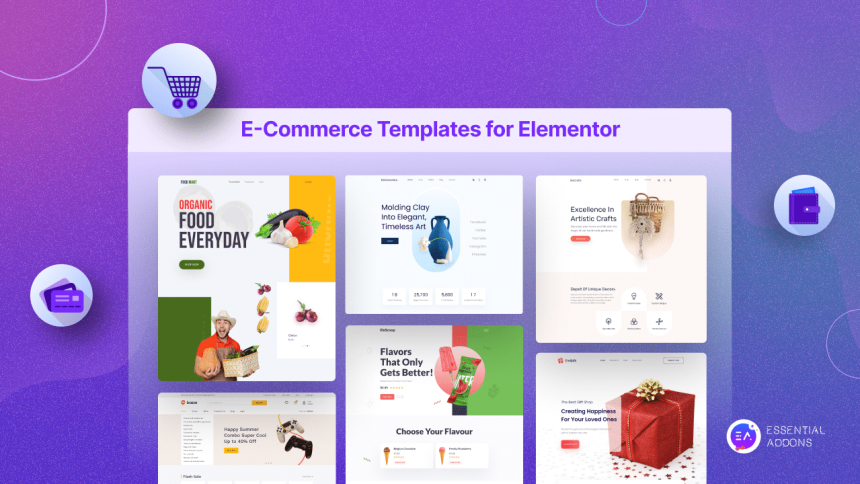
In this guide, you’ll learn proven homepage layout patterns and the exact Elementor + WooCommerce building blocks to implement them.
Elementor is especially useful for ecommerce because it lets you design conversion-focused sections without writing code, iterate quickly,
and keep pages consistent across campaigns and seasons. Whether you sell a single flagship product, a catalog of categories, or limited-time drops,
the right layout framework can improve add-to-cart rates, average order value (AOV), and overall conversion rate.
Table of Contents
- Why Elementor works so well for ecommerce homepages
- Homepage layout principles that increase sales
- 3 high-converting homepage layout patterns (with best use cases)
- Homepage sections blueprint (what to include and why)
- Elementor widgets and features to build faster (WooCommerce-focused)
- Step-by-step: Build a sales-focused homepage in Elementor
- Optimization checklist: speed, mobile UX, and CRO
- Key Takeaways
- FAQ
- References & helpful resources
Why Elementor works so well for ecommerce homepages
Most ecommerce sites fail for one of two reasons: (1) shoppers can’t quickly find what they want, or (2) shoppers don’t trust the store enough to buy.
Elementor helps solve both by enabling a layout that is clear, modular, and persuasive.
- Speed of iteration: You can change hero messaging, category tiles, banners, and social proof quickly—without developer delays.
- Design consistency: Global fonts, colors, and saved templates keep your campaigns cohesive and professional.
- WooCommerce integration: You can present products and categories in a way that matches your brand and conversion goals.
- Marketing flexibility: Seasonal pages, landing sections, upsell blocks, and announcement bars can be launched fast.
If you want to evaluate Elementor quickly, start here:
Try elementor website builder for wordpress
If you prefer an all-in-one setup (WordPress + hosting bundled in one platform experience), consider Elementor Cloud:
Try elementor cloud hosting for wordpress
Internal reading on Sensecentral:
WordPress guides •
WooCommerce tutorials •
Hosting comparisons
Homepage layout principles that increase sales
Before choosing a layout, align on the principles that make ecommerce homepages convert. These apply to almost every store niche.
1) Above-the-fold clarity beats creativity
Your hero section should answer three questions within 5 seconds: What do you sell? Who is it for? Why should I trust you?
A clean headline, a short value proposition, and one primary CTA will outperform a busy “magazine layout” most of the time.
2) Reduce cognitive load with fewer, stronger choices
Too many category tiles, banners, and rotating sliders push shoppers into decision fatigue. The goal is not to show everything—it’s to route shoppers
to the right path: best sellers, top categories, new arrivals, or your hero collection.
3) Trust is a design element
Trust signals should be visible early: shipping/returns highlights, customer reviews, secure payments, badges, and “as seen in” mentions (if true).
For new brands, your homepage must function like a credibility builder.
4) Your homepage should match your business model
A single-product store needs a different homepage than a catalog store. Choose a layout pattern based on how people shop your inventory:
- Single hero product: narrative + proof + benefits + bundles
- Category-led catalog: clear navigation + featured categories + best sellers
- Deal/seasonal store: promotions + urgency + collections + email capture
3 high-converting homepage layout patterns (with best use cases)
Below are three layout patterns that consistently work. The best pattern depends on your product range and customer intent.
Pattern A: Category-First Gateway
This pattern prioritizes navigation and category clarity. It works when customers arrive with an intent (“I need running shoes”) and want quick filtering.
The homepage acts like a clean store directory.
Recommended structure:
- Hero with simple value proposition + primary CTA (Shop Men / Shop Women / Shop New)
- Top categories grid (4–8 tiles maximum)
- Best sellers (social proof)
- New arrivals / trending
- Trust bar (shipping, returns, support)
- Content + email capture (optional)
Pattern B: Best-Sellers Proof Stack
If you have products that already sell well (or you want to push a tight selection), this pattern focuses on “proof” and conversion elements.
Instead of lots of choices, you present the most compelling set: best sellers + reviews + benefits.
Recommended structure:
- Hero product story (headline + short benefit bullets)
- Best sellers section (3–8 products)
- Reviews/testimonials block
- Bundles / frequently bought together
- Guarantee + shipping/returns
- FAQ snippet + CTA
Pattern C: Campaign Landing Homepage
This pattern is designed for ad traffic or a special promotion. The homepage becomes a campaign page: fewer exits, stronger urgency, and
clear purchase paths. It’s ideal for product launches, holiday sales, or influencer-driven bursts.
Recommended structure:
- Promo hero (offer + countdown if appropriate)
- Featured collection or products
- Benefit sections (why buy now)
- Social proof (UGC, reviews)
- Guarantee + shipping/returns
- Email capture (“Get early access” or “Unlock extra discount”)
Homepage sections blueprint (what to include and why)
Regardless of the pattern you choose, most high-converting ecommerce homepages use a shared set of “conversion modules.” Think of these as reusable blocks
you can reorder and A/B test.
before they see products. Design for decisions, not aesthetics.
Elementor widgets and features to build faster (WooCommerce-focused)
To build ecommerce homepages efficiently, the key is reusability: templates, global sections, and consistent product presentation.
Here’s how Elementor typically adds leverage for ecommerce teams.
Must-use building blocks
- Global design settings: Define fonts, colors, and buttons once so every campaign section stays consistent.
- Saved sections & templates: Save your best-performing blocks (trust bars, promo banners, category grids) and reuse.
- WooCommerce elements: Build product grids, featured products, and category sections that match your layout pattern.
- Responsive controls: Adjust spacing and layout for mobile so your above-the-fold content stays clear.
When to consider Elementor Cloud
If you want fewer moving parts—especially when launching a new store—Elementor Cloud can simplify setup by bundling website creation and hosting in one place.
This can help reduce configuration overhead and keep your focus on layout testing and marketing execution.
Try elementor cloud hosting for wordpress
Step-by-step: Build a sales-focused homepage in Elementor
Step 1: Choose your homepage “job” (pick one primary goal)
- Catalog routing: “Help users find the right category fast.”
- Best-seller conversion: “Move users to add-to-cart quickly.”
- Campaign conversion: “Convert paid traffic with fewer exits.”
Step 2: Map the first 2 scrolls (the highest-value real estate)
Most users skim. Your first two scrolls should include:
- Clear hero value proposition + CTA
- Trust signals (shipping/returns/support)
- Either categories (for catalogs) or best sellers (for hero-product brands)
Step 3: Build the hero section for clarity (not complexity)
A high-performing hero usually includes:
- Headline: specific benefit (not generic “Welcome to our store”)
- Subheadline: short proof or differentiator
- Primary CTA: “Shop best sellers” / “Explore categories” / “Shop the collection”
Step 4: Add a category grid that behaves like a store directory
If you sell multiple product types, use a category grid with clear labels and consistent images. Avoid too many tiles. Start with 4–8.
Use categories that match how customers think (“Running,” “Casual,” “Work”) rather than internal product taxonomy.
Step 5: Create a best-seller block that looks credible
Your best-seller section should feel like “these are the safe choices.” Consider adding:
- Ratings/reviews (where possible)
- Short feature highlight (“Top-rated,” “Back in stock,” “Editor’s pick”)
- Clear pricing and a fast path to product pages
Step 6: Insert a benefits/USP section (3–5 cards)
This is your “why buy from us?” module. Keep it scannable:
- Premium materials / quality assurance
- Fast shipping timeline
- Hassle-free returns
- Secure payments
- Support availability
Step 7: Add social proof that feels real
If you have testimonials, customer photos (UGC), or review highlights, include them above your footer. Social proof works best when it is specific:
product names, outcomes, and context.
Step 8: Finish with a low-friction email capture
Email capture is not just for newsletters—it is for recovering future revenue. Offer something tangible:
- First order discount
- Early access to drops
- Buying guide / sizing guide
- Bundle deal alerts
“How to speed up WordPress,” or “Best payment gateways.” Use your existing posts, or start with these searches:
WooCommerce •
WordPress speed •
Elementor
Optimization checklist: speed, mobile UX, and CRO
Speed essentials
- Compress images (use modern formats where possible) and avoid loading huge hero images.
- Limit heavy sliders/animations on the homepage.
- Use caching and a CDN when appropriate (especially for global audiences).
- Audit plugins: too many can slow down ecommerce stores.
Mobile UX essentials
- Keep hero text readable without zooming.
- Make the CTA visible above the fold on mobile.
- Use larger tap targets for category tiles and buttons.
- Reduce vertical clutter—mobile users should reach products quickly.
CRO essentials (the homepage conversion levers)
- Prioritize one primary CTA per section.
- Use “safe choice” merchandising: best sellers, top-rated, trending.
- Make policies visible: shipping, returns, warranty.
- Reduce friction: search visibility, clear navigation, fewer distractions.
run each for 2–4 weeks (or until you have meaningful traffic), and compare add-to-cart rate, conversion rate, and revenue per visitor.
Key Takeaways
- Your homepage is a routing system: guide shoppers to the right products fast.
- Choose a layout pattern that matches your catalog and traffic intent (Category-First, Proof Stack, or Campaign).
- Build with reusable modules: hero, trust bar, categories, best sellers, benefits, social proof, email capture.
- Optimize for mobile and speed: the best design fails if it loads slowly or hides key actions.
- Iterate based on data: test variations and measure conversion outcomes, not just aesthetics.
Ready to build a higher-converting WooCommerce homepage?
Start with Elementor to design your ecommerce homepage layouts faster, test more ideas, and keep your store experience consistent.
FAQ
Is Elementor good for WooCommerce stores?
Yes—Elementor is widely used for WordPress site building and can be a practical choice for ecommerce because it supports modular, conversion-focused layouts.
The key is to keep your homepage structured, avoid heavy visual bloat, and prioritize fast navigation to products.
What homepage layout converts best for ecommerce?
It depends on your store model. Catalog-heavy stores often do best with a Category-First Gateway.
Brands with a few strong products often do best with a Best-Sellers Proof Stack.
Ad-driven promotions often do best with a Campaign Landing Homepage.
How many products should I show on the homepage?
Show fewer than you think. A common high-performing range is 4–12 products across one or two sections,
plus clear categories/collections. Too many product tiles can reduce clarity and slow page load.
Should I use sliders on my ecommerce homepage?
Use them cautiously. Sliders can hide important content and reduce CTA clicks—especially on mobile.
If you use one, keep it minimal, fast-loading, and ensure slide 1 contains the core offer and CTA.
How do I improve homepage conversions without redesigning everything?
- Tighten the hero headline and CTA
- Add a trust bar (shipping/returns/support)
- Move best sellers higher
- Reduce category tiles to the most important 4–8
- Improve mobile spacing and CTA visibility
Is Elementor Cloud worth it?
If you want a simplified setup that reduces hosting and platform configuration overhead—especially for a new store—Elementor Cloud can be a reasonable option.
If you already have a strong hosting setup and workflow, you may prefer a separate hosting provider.
References & helpful resources
- Elementor (official)
- Elementor features overview
- Elementor hosting / cloud information
- WooCommerce (official)
- WordPress (official)
- Sensecentral: product reviews & comparisons