- Table of Contents
- 1) Why countdown timers boost affiliate conversions
- 2) Countdown timer types (fixed-date vs evergreen vs recurring)
- 3) Best placements on review & comparison pages
- Placement A: Under the “Best pick” or “Editor’s choice” box
- Placement B: Sticky announcement bar (site-wide during promos)
- Placement C: In-content (right after the intro)
- Placement D: Sidebar (desktop) + after the first comparison table
- Placement E: Exit-intent popup (use carefully)
- 4) How to add a countdown timer with Elfsight (step-by-step)
- Step 1: Create your countdown timer widget
- Step 2: Customize the design for your site
- Step 3: Copy the embed code
- Step 4: Add it to WordPress (3 easy methods)
- 5) Copy-paste promo templates (headlines + CTA text)
- Template 1: Deal expiry
- Template 2: Coupon ending soon
- Template 3: Evergreen bonus
- Template 4: Shipping cutoff (seasonal)
- 6) How to track clicks & performance (simple tracking stack)
- Track #1: Link clicks on your CTA
- Track #2: UTM parameters for campaign clarity
- Track #3: A/B test placements
- 7) Elfsight vs alternatives (quick comparison)
- 8) Common mistakes (and how to avoid them)
- Mistake 1: Fake deadlines
- Mistake 2: Too many timers on one page
- Mistake 3: Poor mobile experience
- Mistake 4: No “after expiry” plan
- Mistake 5: Missing affiliate disclosure
- FAQ
- Do countdown timers work for affiliate marketing?
- Should I use a fixed-date or evergreen countdown?
- Where should I place the countdown timer on Sensecentral posts?
- Will a countdown timer slow down my site?
- What if the offer expires—should I delete the timer?
- How many affiliate links are too many?
- Can I use Elfsight for other widgets too?
- Key takeaways
- References
Disclosure: This post contains affiliate links. If you purchase through my link, I may earn a commission at no extra cost to you. I only recommend tools I believe are genuinely useful.
Limited-time offers are everywhere in affiliate marketing: “Deal ends tonight,” “coupon expires in 3 hours,” “bonus is available until Friday,” and seasonal promos like Black Friday. But on most affiliate sites, the problem isn’t the deal—it’s that visitors don’t feel the deadline. A well-placed countdown timer turns “maybe later” into “I’ll check this now,” especially on product review and comparison pages where people are already in decision mode.
In this guide, I’ll show you how to add a high-converting countdown timer to your WordPress site—without coding—using Elfsight, plus where to place it, how to keep it ethical, and how to track results for your affiliate promos.
Table of Contents
1) Why countdown timers boost affiliate conversions
A countdown timer works because it makes the deadline visible. That matters on affiliate sites where visitors often open multiple tabs, compare options, and postpone decisions. When you show a real-time countdown, you’re reducing indecision and nudging action.
- Creates urgency: People act faster when they understand time is limited.
- Improves scan-ability: Timers summarize “how long left” in one glance.
- Supports deal pages: On product comparisons, the countdown reinforces “this option is currently cheaper/better.”
- Pairs well with bonuses: If you offer an extra bonus guide or checklist for buyers, a timer makes it clear when that bonus ends.
Important: Use countdown timers ethically. If your offer doesn’t truly expire, don’t pretend it does. Instead, use a timer for real events (sale end date, coupon expiry, shipping cutoff, webinar start time) or use an evergreen timer for a genuine “bonus valid for X hours after first visit.”
Related on Sensecentral:
affiliate marketing tips •
product comparison posts •
conversion optimization guides
Try Elfsight (Countdown Timer)
2) Countdown timer types (fixed-date vs evergreen vs recurring)
Pick the timer type based on what you’re promoting. Here’s the practical breakdown:
| Timer type | Best for | Example affiliate use |
|---|---|---|
| Fixed-date countdown | Sales that end at a specific date/time | “Deal ends Jan 31 at 11:59 PM” |
| Evergreen countdown | Per-visitor deadlines that start on first visit | “Bonus checklist available for the next 24 hours” |
| Recurring countdown | Weekly/monthly repeating promos | “Every Friday: deal refresh” |
| Number counter / limited slots | Scarcity messaging (use carefully) | “Only X bonus downloads left” (only if true) |
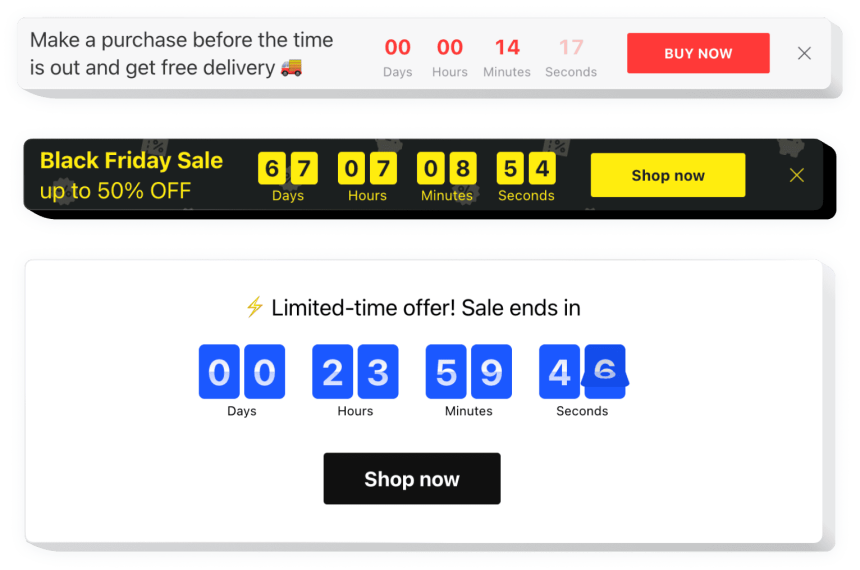
Pro tip: Decide what happens when the timer ends. Good countdown tools let you hide the timer, replace it with a message, or redirect to another page (like an updated comparison page or a “deal expired” page with alternatives).
3) Best placements on review & comparison pages
Placement matters more than design. Here are the top spots that work especially well for affiliate content:
Placement A: Under the “Best pick” or “Editor’s choice” box
On a comparison post, your “best overall” recommendation already has attention. Add a small countdown under the CTA button: “Price check ends in…” so visitors feel urgency without clutter.
Placement B: Sticky announcement bar (site-wide during promos)
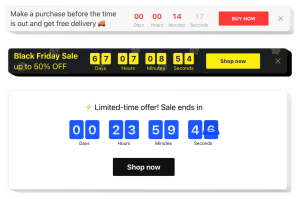
Running a site-wide promo week? Use a top bar countdown that links to your main deals/comparison hub. This is perfect for seasonal events.
Placement C: In-content (right after the intro)
Put a countdown right after you explain the offer. This catches visitors before they scroll away.
Placement D: Sidebar (desktop) + after the first comparison table
Sidebars still convert on desktop. On mobile, a timer after the first table is often better than a sidebar.
Placement E: Exit-intent popup (use carefully)
If you use popups, keep it simple: countdown + 1 CTA. Avoid stacking multiple popups. (If you want a popup-based version, Elfsight also supports popup-style widgets.)
See more Sensecentral deal-style posts
Try Elfsight for Your Promo Timer
4) How to add a countdown timer with Elfsight (step-by-step)
Elfsight is a no-code widget builder that lets you create a countdown timer and embed it on your site. The workflow is basically: create → customize → copy embed code → paste into WordPress.
Step 1: Create your countdown timer widget
- Open Elfsight and choose the Countdown Timer widget.
- Pick a template (fixed-date, evergreen, launch timer, day countdown, etc.).
- Set your deadline and time zone (important for global visitors).
Start here:
Try Elfsight
Step 2: Customize the design for your site
- Keep it readable: Big digits, high contrast, and clear labels (Days / Hours / Minutes).
- Add a short headline: Example: “Limited-time deal ends in:”
- Add a CTA button: “Check price now” / “See updated comparison”
- Choose post-timer behavior: Hide, show a message, or redirect users to a new URL.
Step 3: Copy the embed code
Once your widget is ready, Elfsight provides an installation code snippet.
Step 4: Add it to WordPress (3 easy methods)
Method A (simple): Custom HTML block
- In WordPress, edit your post/page.
- Add a Custom HTML block.
- Paste the Elfsight embed code.
- Preview and publish.
Method B: Theme / site-wide insertion (promo week)
If you want the countdown on all pages (like a site-wide promo bar), your theme/builder may allow a global header section or “insert scripts” area. Use this for seasonal campaigns.
Method C: Elementor users
If you build with Elementor, you can usually place the embed via an HTML widget/section or use Elfsight’s Elementor-related integration options.
Bonus: If you’re promoting multiple affiliate offers, create a dedicated “Deals hub” page and point expired timers to that hub so visitors always have a next-best option.
Try Elfsight (No-Code Countdown Timers)
5) Copy-paste promo templates (headlines + CTA text)
Use these tested text patterns on your countdown timer (or right above it):
Template 1: Deal expiry
- Headline: Deal ends in:
- Subtext: Price and availability can change quickly.
- CTA: Check today’s price
Template 2: Coupon ending soon
- Headline: Coupon expires in:
- Subtext: Apply code at checkout before time runs out.
- CTA: Grab the coupon
Template 3: Evergreen bonus
- Headline: Bonus available for:
- Subtext: Download the bonus checklist after purchase (limited time).
- CTA: Unlock the bonus
Template 4: Shipping cutoff (seasonal)
- Headline: Order within:
- Subtext: To maximize chances of delivery before the holiday deadline.
- CTA: See top picks
Tip: On comparison posts, match your CTA to the reader’s intent: “See updated comparison” often converts better than “Buy now,” because it feels helpful and neutral.
6) How to track clicks & performance (simple tracking stack)
You don’t need a complex setup to measure whether your countdown is working. Here’s a practical approach:
Track #1: Link clicks on your CTA
- Use your affiliate dashboard reporting (first-level tracking).
- If you route visitors through a “deal page” on Sensecentral first, you can track clicks there with your analytics events.
Track #2: UTM parameters for campaign clarity
If you link to your own pages (like a deals hub) or track external campaigns, use UTMs so you can see results in analytics. Google’s Campaign URL Builder is a simple way to generate UTMs.
Example UTM idea:
?utm_source=sensecentral&utm_medium=countdown&utm_campaign=jan-deals
Track #3: A/B test placements
Test just one change at a time:
- Timer under your “Best pick” box vs timer after the first comparison table
- Short headline vs headline + subtext
- CTA “Check price now” vs “See updated comparison”
Rule of thumb: Give each test enough traffic to be meaningful. If you don’t have huge volume, focus on placement and clarity rather than micro-optimizations.
7) Elfsight vs alternatives (quick comparison)
Here’s a quick, affiliate-site-focused comparison to help you choose the right path.
| Option | Pros | Cons | Best for |
|---|---|---|---|
| Elfsight Countdown Timer | No-code, templates, multiple timer types, easy embed | May require plan upgrade as your traffic grows | Affiliate sites that want speed + polish |
| Theme/builder countdown block | Simple, sometimes free | Limited designs/features, fewer behaviors after expiry | Basic pages with one-off timers |
| Custom-coded timer | Full control, no third-party dashboard | Time-consuming, needs maintenance | Developers who want full customization |
8) Common mistakes (and how to avoid them)
Mistake 1: Fake deadlines
Nothing kills trust like a timer that restarts every refresh when it shouldn’t. If your offer is not truly limited, switch to an evergreen timer with honest wording (“Bonus available for 24 hours after you first visit”).
Mistake 2: Too many timers on one page
One page = one primary countdown. Multiple timers feel spammy and reduce clarity.
Mistake 3: Poor mobile experience
Make sure the timer is responsive, readable, and not pushing your main content too far down on mobile.
Mistake 4: No “after expiry” plan
Always decide what happens when the timer ends: hide it, show an updated message, or redirect visitors to your latest comparison page.
Mistake 5: Missing affiliate disclosure
Disclose affiliate relationships clearly and close to where your affiliate links appear. Keep it straightforward and easy to understand.
FAQ
Do countdown timers work for affiliate marketing?
Yes—especially on high-intent pages like comparisons and “best picks,” where visitors are already deciding. A timer improves clarity around deadlines and can increase clicks when used ethically.
Should I use a fixed-date or evergreen countdown?
Use fixed-date for real deadlines (sale ends Friday). Use evergreen if you genuinely offer a per-visitor bonus window (e.g., a download available for 24 hours after the first visit).
Where should I place the countdown timer on Sensecentral posts?
Start with: (1) under your “Best overall” recommendation, and (2) after your first comparison table. Then test a site-wide bar during seasonal promo weeks.
Will a countdown timer slow down my site?
Any widget can add weight, but modern no-code widgets are typically optimized for common site builders. Keep pages clean, avoid stacking multiple widgets, and always test performance after publishing.
What if the offer expires—should I delete the timer?
Better: replace it with a message (“Deal ended—see current best alternatives”) and link to your updated comparison page or deals hub.
How many affiliate links are too many?
There’s no magic number, but readers can sense spam. Use links where they’re helpful: after explaining value, near your recommended choice, and at the end as a final CTA.
Can I use Elfsight for other widgets too?
Yes—many affiliates use it for social proof (reviews), contact forms, chat buttons, announcement bars, and more. If you want an all-in-one widget toolkit, it’s worth exploring.
Try Elfsight (Build Your Countdown Now)
Key takeaways
- A countdown timer makes deadlines visible—perfect for affiliate promos on comparison pages.
- Use the right timer type: fixed-date for real deadlines, evergreen for honest per-visitor windows.
- Best placements: under “Best pick,” after the first table, or a site-wide bar during promo weeks.
- Always plan “after expiry” behavior (hide, message, or redirect to updated deals).
- Disclose affiliate links clearly and keep scarcity claims truthful.
References
- Elfsight Countdown Timer overview
- Add Countdown Timer to WordPress (Elfsight)
- Elfsight Help Center: Add widget to WordPress
- Elfsight Help Center: Views limit explained
- FTC: .com Disclosures (PDF)
- Nielsen Norman Group: Scarcity Principle
- Google Analytics Campaign URL Builder
Next step: If you’re running a promo week, publish a dedicated “Deals” hub on Sensecentral, then place a countdown timer site-wide that links to that hub.