Ever feel like your week “happens to you” instead of the other way around? Professional-level weekly planning is the skill of turning a messy list of tasks into a realistic schedule that protects your priorities, reduces stress, and leaves room for life. The secret isn’t working harder—it’s deciding ahead of time what matters, when it will happen, and what you’ll say “no” to.
- Table of Contents
- What “Planning Your Week Like a Pro” Really Means
- Why Time Blocks Work (and Why To-Do Lists Fail)
- Quick Setup: Tools You Need (and What to Skip)
- The 45-Minute Weekly Planning Ritual (Step-by-Step)
- Step 1: Choose your “planning window” (2 minutes)
- Step 2: Empty your head (5 minutes)
- Step 3: Audit your calendar (8 minutes)
- Step 4: Review your task list and choose weekly outcomes (10 minutes)
- Step 5: Prioritize with a quick matrix (5 minutes)
- Step 6: Convert outcomes into time blocks (12 minutes)
- Step 7: Add buffers and recovery time (3 minutes)
- Step 8: End with a quick “Weekly Review” (optional, 5 minutes)
- Pick Your Weekly Priorities (Without Overloading)
- How to Build Time Blocks That Actually Stick
- Rule 1: Name blocks by outcome, not by task
- Rule 2: Use 3 block types
- Rule 3: Start with “anchors”
- Rule 4: Time-box your work (and use a timer)
- Rule 5: Protect the first 90 minutes of your day (if possible)
- Rule 6: Keep a “move list” for when the day breaks
- Weekly Planning Template (Copy/Paste)
- Example Week With Time Blocks (Realistic, Not Perfect)
- Common Mistakes (and How Pros Avoid Them)
- Mistake 1: Scheduling without buffers
- Mistake 2: Confusing “busy” with “important”
- Mistake 3: Overestimating your weekly capacity
- Mistake 4: Mixing deep work and admin
- Mistake 5: No weekly review
- Advanced Pro Moves
- 1) Theme days
- 2) Two-week horizon planning
- 3) The “default calendar” trick
- 4) Track your time for one week
- 5) Use focus time automation
- 6) Time tracking for professionals and freelancers
- Key Takeaways
- FAQs
- 1) When is the best time to plan my week?
- 2) How many time blocks should I schedule?
- 3) What if my schedule changes constantly?
- 4) Should I time block personal life too?
- 5) How do I avoid overplanning?
- 6) Is time blocking better than a normal to-do list?
- 7) What if I don’t finish a block?
- 8) Can I use this system as a student?
- 9) Do I need a fancy app?
- 10) How long before this feels natural?
- References & Helpful Resources
This how-to guide gives you a simple, repeatable weekly planning system (with copy/paste templates) and shows you how to turn that plan into time blocks—chunks of focused time reserved on your calendar for what matters most.
Table of Contents
- What “Planning Your Week Like a Pro” Really Means
- Why Time Blocks Work (and Why To-Do Lists Fail)
- Quick Setup: Tools You Need (and What to Skip)
- The 45-Minute Weekly Planning Ritual (Step-by-Step)
- Pick Your Weekly Priorities (Without Overloading)
- How to Build Time Blocks That Actually Stick
- Weekly Planning Template (Copy/Paste)
- Example Week With Time Blocks (Realistic, Not Perfect)
- Common Mistakes (and How Pros Avoid Them)
- Advanced Pro Moves
- FAQs
- References & Helpful Resources
What “Planning Your Week Like a Pro” Really Means
Planning your week like a pro is not about creating a rigid schedule that breaks the moment something unexpected happens. Instead, pros plan with three goals:
- Clarity: You know what matters this week and why.
- Control: You decide when your important work happens—before your calendar fills up.
- Calm: You stop carrying your entire life in your head.
A professional weekly plan has these five ingredients:
- A single “source of truth” for commitments (calendar) and tasks (task list).
- Weekly priorities (3–5 outcomes that matter most).
- Time blocks reserved for deep work, admin, life, rest, and buffers.
- Rules for surprises (what gets moved, what gets dropped, what gets delegated).
- A weekly review to reset and improve.
That’s it. You don’t need a complicated system. You need a consistent one.
Why Time Blocks Work (and Why To-Do Lists Fail)
To-do lists are useful for capturing tasks, but they often fail as a planning system because they don’t answer one critical question:
When exactly will you do the work?
Time blocking solves that by turning “someday” tasks into scheduled work. It’s a method popularized by many productivity experts and used widely in knowledge work. If you want a deep dive, see Todoist’s guide to time blocking and Cal Newport’s Time-Block Planner approach:
Why it works:
- It forces realism. You can’t schedule 18 hours of work into a 6-hour day.
- It reduces decision fatigue. You decide once, then follow the plan.
- It creates protection. Your most important tasks get a home on your calendar.
- It helps beat Parkinson’s Law. Work tends to expand to fill the time you give it, so tighter blocks encourage focus and completion.
If you want the background on Parkinson’s Law, here are two solid references:
Quick Setup: Tools You Need (and What to Skip)
You can plan your week with paper, a notes app, or a full productivity suite. The important part is using two lanes:
- Calendar = commitments + time blocks (meetings, appointments, and planned work time)
- Task list = tasks (what needs doing, sorted and prioritized)
Recommended simple tool stack
- Calendar: Google Calendar (link) or Outlook/Microsoft 365 (Viva Insights Focus Plan: link)
- Task list: any app you’ll actually open (or a notebook)
- Optional focus timer: Pomodoro Technique (link) and the official web timer (link)
If you like templates
If you want to measure your time (optional)
What to skip: building a “perfect system” before you plan your first week. Start with a plain template and 3–5 time blocks. Improve after you use it.
The 45-Minute Weekly Planning Ritual (Step-by-Step)
This is the weekly planning routine you can repeat every week. The best time is Sunday evening or Monday morning. If your schedule is unpredictable, do it when you have 45 minutes of quiet.
Step 1: Choose your “planning window” (2 minutes)
Pick one recurring time and treat it like an appointment with your future self. Many people like Sunday evening because it reduces Monday stress.
Step 2: Empty your head (5 minutes)
Do a quick brain dump—everything you’re worried about, forgetting, or carrying mentally. Don’t organize yet. Just capture.
Step 3: Audit your calendar (8 minutes)
Open your calendar and look at the week ahead. Write down:
- Meetings, deadlines, appointments, travel/commute time
- Personal commitments (family, health, errands)
- Any “hidden time” (prep time, follow-ups, recovery time)
Pro move: Identify “light days” and “heavy days.” Your time blocks will fit differently depending on the day’s load.
Step 4: Review your task list and choose weekly outcomes (10 minutes)
Scan your tasks and ask:
- What must be finished this week?
- What would make the biggest difference if completed?
- What would reduce stress if handled early?
Pick 3–5 weekly outcomes. Not 12. Not 20. If you choose too many, you’ll default to urgency and feel behind all week.
Step 5: Prioritize with a quick matrix (5 minutes)
When you’re overloaded, the Eisenhower Matrix is a simple way to sort tasks by urgency and importance. Here are two practical guides:
In plain language:
- Do: urgent + important
- Schedule: important, not urgent (this is where growth happens)
- Delegate: urgent, not important (if possible)
- Delete: neither
Step 6: Convert outcomes into time blocks (12 minutes)
This is the heart of “planning like a pro.” Take your 3–5 weekly outcomes and schedule time blocks for them before you schedule everything else.
A simple rule:
- 1 outcome = 2–4 blocks (depending on size)
- One deep-work block should be 60–120 minutes (start with 60)
- Admin blocks should be 30–60 minutes
If you use Google Calendar, this walkthrough is helpful:
Step 7: Add buffers and recovery time (3 minutes)
Pros plan for reality. Add:
- Buffer blocks (30–60 minutes, 2–4 times a week)
- Catch-up block (Friday afternoon or Sunday evening)
- Life blocks (meals, exercise, errands, rest)
Step 8: End with a quick “Weekly Review” (optional, 5 minutes)
The GTD Weekly Review checklists are a strong reference for keeping your system clean:
Pick Your Weekly Priorities (Without Overloading)
Most weekly plans fail for one reason: people schedule their week based on wishful thinking.
Use this simple capacity formula:
- Total work hours available = (work hours) − (meetings) − (admin) − (breaks/buffers)
- Plan 70–80% of that time, not 100%
Why only 70–80%? Because surprises happen—messages, urgent requests, family needs, low-energy days, tech issues. If you plan 100%, you’re guaranteed to fail and feel behind.
How to choose the “Big 3” outcomes
When in doubt, choose weekly outcomes that:
- Move your biggest goal forward (even a little)
- Prevent a problem (pay the bill, book the appointment, prepare the deadline)
- Reduce mental clutter (finish the open loop that keeps bothering you)
Tip: If you’re juggling personal + work priorities, pick:
- 2 outcomes for work
- 1 outcome for life/health/home
This keeps the plan human.
How to Build Time Blocks That Actually Stick
Time blocks are only useful if they survive contact with reality. Here are the rules pros use.
Rule 1: Name blocks by outcome, not by task
Instead of “Work on report,” write “Finish report draft (Outcome).” This keeps you focused on completion, not busywork.
Rule 2: Use 3 block types
- Deep Work Blocks: 60–120 minutes, phone away, single focus
- Shallow/Admin Blocks: email, scheduling, calls, follow-ups
- Buffer Blocks: catch-up time for spillover and surprises
Rule 3: Start with “anchors”
Anchors are fixed points that make your week stable:
- Morning routine block
- Exercise/health block
- Focused work block
- Evening shutdown block
Once anchors are placed, everything else becomes easier.
Rule 4: Time-box your work (and use a timer)
Set a time limit for tasks to prevent them from expanding. The Pomodoro Technique is a classic way to do this with short sprints and breaks:
Rule 5: Protect the first 90 minutes of your day (if possible)
If you can, block the first 60–90 minutes for your most important work. It’s often the quietest part of the day—fewer messages, fewer interruptions, more mental clarity.
Rule 6: Keep a “move list” for when the day breaks
When an emergency hits, you don’t delete your plan—you move it. Create a short “move list” (2–5 items) that can shift to a buffer block later in the week.
Weekly Planning Template (Copy/Paste)
Use this template in a note, Notion doc, Google Doc, or even printed on paper. Keep it simple. Use it every week.
1) Weekly Overview Template
WEEK OF: _______________________

1) WEEKLY OUTCOMES (Pick 3–5)
- Outcome #1:
- Outcome #2:
- Outcome #3:
- Outcome #4 (optional):
- Outcome #5 (optional):

2) FIXED COMMITMENTS (Calendar)
- Meetings/Appointments:
- Deadlines:
- Family/Personal commitments:

3) TIME BLOCK PLAN (Key blocks only)
- Deep Work Blocks (60–120 min): ________________________
- Admin Blocks (30–60 min): _____________________________
- Buffer Blocks (30–60 min): _____________________________
- Health/Life Blocks: ____________________________________

4) TOP TASKS (Next actions)
- Must-do (max 3):
  1)
  2)
  3)
- Nice-to-do (max 5):
  1)
  2)
  3)
  4)
  5)

5) RISKS + IF-THEN PLANS
- Risk: __________________  If happens, then I will: __________________
- Risk: __________________  If happens, then I will: __________________

6) WEEKLY REVIEW (End of week)
- Wins:
- Lessons:
- One change I’ll make next week:
2) Weekly Time-Block Grid (Simple)
Copy this into your notes and fill it with your actual time blocks.
| Day | Deep Work Block | Admin Block | Buffer Block | Life/Health Block |
|---|---|---|---|---|
| Mon | __________ | __________ | __________ | __________ |
| Tue | __________ | __________ | __________ | __________ |
| Wed | __________ | __________ | __________ | __________ |
| Thu | __________ | __________ | __________ | __________ |
| Fri | __________ | __________ | __________ | __________ |
| Sat/Sun | Weekly reset / errands / rest / family time / planning window | |||
Prefer digital templates? Try:
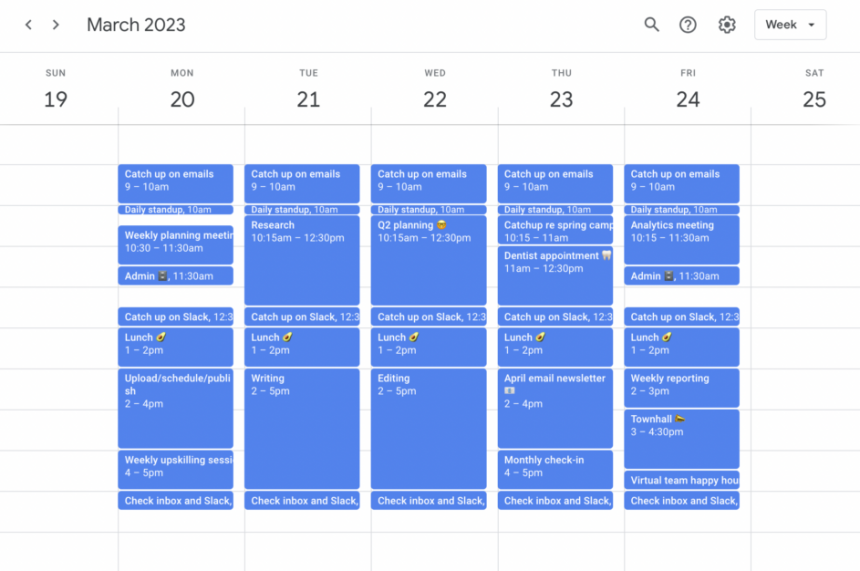
Example Week With Time Blocks (Realistic, Not Perfect)
Below is a sample schedule for someone working a standard week with meetings. Adjust the times to your life. The point is the pattern.
Weekly outcomes (example)
- Outcome 1: Finish draft of Project X
- Outcome 2: Plan and schedule next week’s content/marketing
- Outcome 3: Handle personal admin (bills, appointment, errands)
Time-block plan (example)
- Mon: Deep Work (Project X) + Admin + Buffer
- Tue: Deep Work + Meetings + Admin
- Wed: Deep Work + Buffer + Personal block
- Thu: Deep Work + Meetings + Admin
- Fri: Finish + Weekly review + Cleanup
| Day | Morning | Midday | Afternoon | Evening |
|---|---|---|---|---|
| Mon | Deep Work: Project X (90m) | Meetings / calls | Admin (45m) + Buffer (45m) | Light task + shutdown |
| Tue | Deep Work: Project X (60m) | Meetings | Admin (60m) + small tasks | Rest / family |
| Wed | Deep Work: Draft finish (90m) | Buffer (60m) | Personal admin (60m) | Exercise / recovery |
| Thu | Deep Work: Polish + send (60m) | Meetings | Marketing plan block (90m) | Light task + shutdown |
| Fri | Weekly review + next-week outline (60m) | Catch-up tasks | Cleanup + buffer (90m) | Weekend starts earlier |
For another perspective on protecting your weekend with better weekly planning, this HBR piece is worth reading:
Common Mistakes (and How Pros Avoid Them)
Mistake 1: Scheduling without buffers
If you plan every minute, you’re building a plan that can’t survive. Add buffer blocks like you add seatbelts: you hope you won’t need them, but you will.
Mistake 2: Confusing “busy” with “important”
Pros schedule important-but-not-urgent work first (the “Schedule” quadrant). That’s how goals move forward.
Mistake 3: Overestimating your weekly capacity
Your plan should feel slightly under-filled. That’s not laziness—that’s realism.
Mistake 4: Mixing deep work and admin
Batch email, messages, and small tasks into admin blocks. Keep deep work protected and distraction-free.
Mistake 5: No weekly review
Without a weekly review, tasks pile up, your list becomes noise, and planning feels pointless. Even 10 minutes can reset your system.
Advanced Pro Moves
1) Theme days
Assign themes (e.g., “Creation Tuesday,” “Admin Wednesday,” “Meetings Thursday”). This reduces context switching and helps you plan faster.
2) Two-week horizon planning
During your weekly plan, glance at the following week for upcoming deadlines. This prevents last-minute crunch.
3) The “default calendar” trick
Create a default weekly calendar layout (with recurring time blocks), then adjust week-to-week. This makes planning nearly automatic.
4) Track your time for one week
If you always feel short on time, track for 5–7 days to find leaks (scrolling, random admin, interruptions). Tools like RescueTime can help:
5) Use focus time automation
If you use Microsoft 365, Viva Insights can automatically schedule focus time on your calendar:
6) Time tracking for professionals and freelancers
Key Takeaways
- Plan outcomes, not fantasies: pick 3–5 weekly outcomes that matter most.
- Calendar = reality: schedule time blocks for priorities before the week fills up.
- Use three block types: deep work, admin, and buffers.
- Plan at 70–80% capacity: leave space for surprises and recovery.
- Review weekly: a short weekly review keeps your system clean and sustainable.
FAQs
1) When is the best time to plan my week?
Most people succeed with Sunday evening or Monday morning. Choose a consistent 45-minute window and treat it like an appointment.
2) How many time blocks should I schedule?
Start small: 1 deep-work block per day (or even 3–4 per week), plus 2–3 admin blocks and 2–4 buffer blocks per week.
3) What if my schedule changes constantly?
Use shorter blocks (30–60 minutes) and plan in “anchors” (morning focus block + buffer). Then move blocks rather than deleting them.
4) Should I time block personal life too?
If you want it to happen reliably—yes. Health, family time, errands, and rest deserve calendar protection, not leftover scraps.
5) How do I avoid overplanning?
Plan fewer outcomes and schedule fewer blocks. A good plan is one you can follow—not one that looks impressive.
6) Is time blocking better than a normal to-do list?
They work best together. Use the to-do list to capture tasks, then use the calendar to decide when you’ll do the important ones.
7) What if I don’t finish a block?
End the block on time anyway. Note the “next action,” then move a continuation block into a buffer slot. This trains focus and reduces spillover.
8) Can I use this system as a student?
Absolutely. Replace “deep work” with studying and assignments. Time blocking is especially helpful when you’re juggling multiple subjects and deadlines.
9) Do I need a fancy app?
No. A calendar + a simple list is enough. Apps are optional. Consistency is the real upgrade.
10) How long before this feels natural?
Usually 2–4 weeks. Your first week will feel awkward. By week three, it becomes faster and more intuitive.
References & Helpful Resources
- Cal Newport: Time-Block Planner
- Todoist: Time Blocking guide
- Asana: Eisenhower Matrix
- Todoist: Eisenhower Matrix
- GTD: The Weekly Review (PDF)
- GTD: Weekly Review Checklist (PDF)
- Pomodoro Technique (official)
- Pomodoro web timer
- Google Calendar
- Clockwise: Google Calendar time blocking walkthrough
- Microsoft Support: Viva Insights Focus Plan
- Notion: Weekly Planner templates
- Trello: Weekly Planner template
- RescueTime
- Toggl Track
- Harvard Business Review: Plan your week to keep your weekend free
- Britannica: Parkinson’s Law (background)
- Wikipedia: Parkinson’s Law (overview)
If you want, tell me your typical weekly schedule (work hours + meeting load + priorities), and I’ll generate a personalized time-block plan for your next week using this template.