Microsoft Office Word 2010 allows you to create and edit personal and business documents, such as letters, reports, invoices, emails and books. By default, documents saved in Word 2010 are saved with the .docx extension. Microsoft Word can be used for the following purposes −
· To create business documents having various graphics including pictures, charts, and diagrams.
· To store and reuse readymade content and formatted elements such as cover pages and sidebars.
· To create letters and letterheads for personal and business purpose.
· To design different documents such as resumes or invitation cards etc.
· To create a range of correspondence from a simple office memo to legal copies and reference documents.
Audience
This tutorial has been designed for computer users who are willing to learn Microsoft Word in simple steps and they do not have much knowledge about computer usage and Microsoft applications. This tutorial will give you enough understanding on MS Word from where you can take yourself to higher levels of expertise.
Prerequisites
Before you begin with this tutorial, we assume you have a basic understanding of Computer peripherals like mouse, keyboard, monitor, screen, etc. and their basic operations.
we will discuss how to get started with Word 2010. We will understand how to start a Word 2010 application in simple steps. Assuming you have Microsoft Office 2010 installed in your PC, to start the Word application, follow these steps −
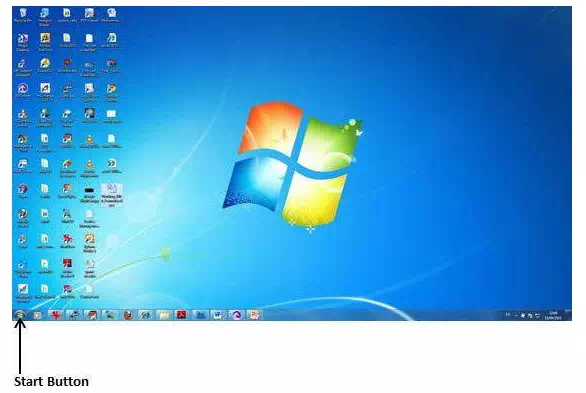
Step 1 − Click the Start button.
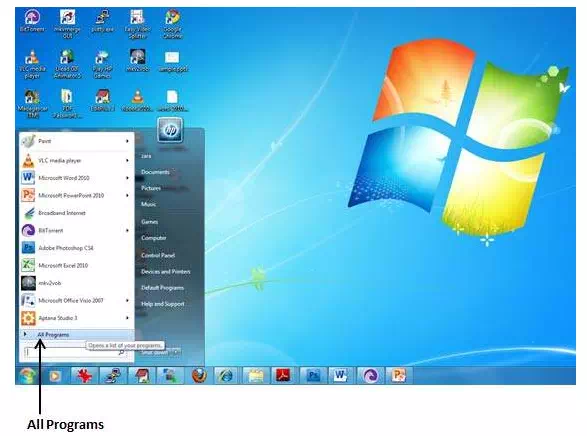
Step 2 − Click the All Programs option from the menu.
Step 3 − Search for Microsoft Office from the submenu and click it.
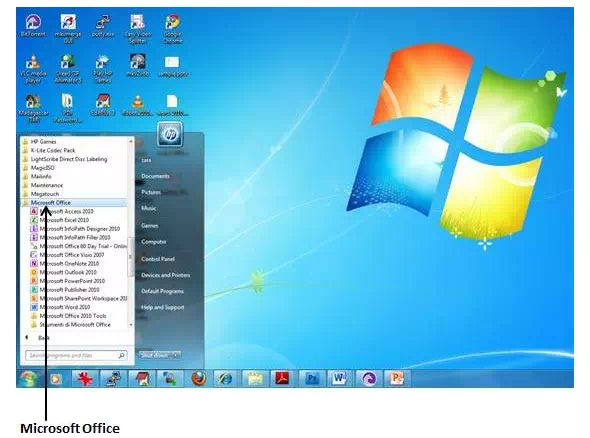
Step 4 − Search for Microsoft Word 2010 from the submenu and click it.

This will launch the Microsoft Word 2010 application and you will see the following window.