- Table of Contents
- 1) What on-device AI is
- 2) What cloud AI is
- 3) Privacy: what really changes
- On-device AI privacy advantages
- Where on-device privacy can still fail
- Cloud AI privacy: what to check
- 4) Speed: latency and responsiveness
- 5) Cost, battery, and data usage
- 6) Reliability: offline and failure modes
- On-device reliability benefits
- On-device reliability risks
- Cloud reliability benefits
- Cloud reliability risks
- 7) Security and compliance considerations
- 8) Use cases: when each wins
- 9) Hybrid approaches (best of both worlds)
- 10) How to choose (decision checklist)
- 11) Quick comparison table
- Key Takeaways
- FAQs
- Is on-device AI always private?
- Is cloud AI always slower?
- Which is more secure: on-device or cloud?
- What’s the best approach for a mobile app in 2026?
- Do on-device models work without internet?
- How can I tell if an app is using on-device AI?
- Best Artificial Intelligence Apps on Play Store 🚀
- References & further reading
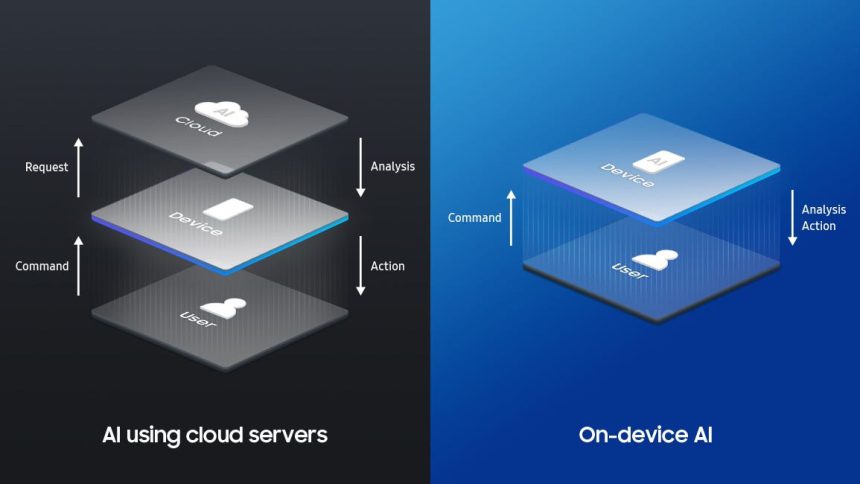
On-device AI (also called edge AI) runs machine learning models directly on your phone, laptop, or IoT device. Cloud AI runs models on remote servers and sends results back to your device. Both can feel “instant,” both can be private (or not), and both can deliver amazing experiences—but the trade-offs are real: latency, costs, reliability, regulatory risk, and what happens to your data.
In this guide, you’ll learn the differences in plain language, see a practical comparison table, and get a decision framework you can actually use—whether you’re a product builder, a marketer, or a power user trying to pick tools you can trust.
Table of Contents
- 1) What on-device AI is
- 2) What cloud AI is
- 3) Privacy: what really changes
- 4) Speed: latency and responsiveness
- 5) Cost, battery, and data usage
- 6) Reliability: offline and failure modes
- 7) Security and compliance considerations
- 8) Use cases: when each wins
- 9) Hybrid approaches (best of both worlds)
- 10) How to choose (decision checklist)
- 11) Quick comparison table
- Key Takeaways
- FAQs
- References & further reading
1) What on-device AI is
On-device AI means the model runs locally on your device—your phone, tablet, PC, smartwatch, car infotainment system, or an IoT device. Instead of sending your input (text, image, voice) to the cloud, the device processes it and returns a result right there.
Modern on-device AI became practical because of three big shifts:
- Specialized chips (NPUs/TPUs/Neural Engines) that accelerate ML workloads.
- Optimized runtimes like TensorFlow Lite and Core ML that make models efficient on mobile.
- Model compression techniques (quantization, pruning, distillation) that shrink models without totally destroying accuracy.
Examples you’ve likely used:
- Real-time camera enhancements (portrait blur, HDR, object tracking)
- Keyboard next-word prediction and autocorrect
- Wake-word detection (“Hey…” triggers)
- On-device translation and speech-to-text (in some apps/modes)
2) What cloud AI is
Cloud AI means the model runs on remote infrastructure—data centers with powerful GPUs/TPUs. Your device sends input to the server; the server runs inference; the result is returned.
Cloud AI is dominant for “big model” tasks because cloud providers can:
- Run huge models that don’t fit on phones
- Scale to many users quickly
- Update models instantly (no app update needed)
- Use massive context windows and tools (search, databases, plugins)
Common cloud AI scenarios:
- Large language model chat and long-form writing
- High-quality image generation and editing
- Complex document analysis across many files
- Enterprise analytics and forecasting
3) Privacy: what really changes
Privacy is the #1 reason people get excited about on-device AI—and it’s often justified. If your data never leaves your phone, that can reduce exposure. But “on-device” doesn’t automatically mean “private,” and “cloud” doesn’t automatically mean “unsafe.” What matters is the data flow.
On-device AI privacy advantages
- Local processing: your voice, photos, or typed text can be processed without uploading raw data.
- Lower data retention risk: fewer servers and logs involved means fewer places data can leak.
- Better user trust: many users feel safer when sensitive data stays local.
Where on-device privacy can still fail
- Telemetry and analytics: apps may still upload usage events, prompts, or derived signals.
- Cloud “fallback”: some apps do on-device first but silently send to cloud for “better quality.”
- Model updates and content filters: depending on design, these can involve remote checks.
Cloud AI privacy: what to check
If you use cloud AI, ask these practical questions:
- Does the provider store prompts/inputs by default?
- Is data used for training (opt-in vs opt-out)?
- How long is data retained? Is there an enterprise “no retention” option?
- What encryption is used in transit and at rest?
- Are there clear policies for abuse monitoring and human review?
Helpful privacy-related resources:
- NIST AI Risk Management Framework (AI RMF)
- OECD AI Principles
- GDPR overview (EU data protection)
- Google AI Principles
4) Speed: latency and responsiveness
“Speed” isn’t only raw compute. For users, speed is mostly latency: how long it takes from input to response. That’s where on-device AI often shines.
Why on-device can feel faster
- No network round trip: you avoid upload time, routing, and server queues.
- Stable real-time performance: great for camera, AR, voice triggers, and live transcription.
- Predictable UX: fewer “spinning” states and fewer timeouts.
Why cloud can still win on “time to best answer”
- Bigger models: a larger model might produce a better result in fewer iterations.
- More compute headroom: heavy tasks (4K image generation, multi-document reasoning) are simply faster in data centers.
- Tool access: cloud AI can call search, databases, and other APIs in one flow.
Practical rule: for real-time interactive features (camera, voice, AR, safety alerts), on-device usually feels better. For deep generation (long writing, advanced image generation), cloud often wins on quality-per-minute.
5) Cost, battery, and data usage
Cost is where the trade-offs get interesting—because the cost is paid by different parties depending on where AI runs.
On-device AI costs
- Battery drain: heavy inference can heat the device and reduce battery life.
- Performance budget: older devices may struggle, creating inconsistent UX across users.
- App size: shipping models increases download size and storage footprint.
Cloud AI costs
- Server inference cost: someone pays for GPU time—either you (subscriptions) or the app/company (freemium limits).
- Data usage: uploading images/audio/video can be expensive or slow on mobile networks.
- Scaling costs: a viral feature can create a serious cloud bill overnight.
For builders: on-device can reduce ongoing inference spend, but increases engineering complexity and device-compat testing. For users: cloud can be battery-light, but data-heavy and sometimes paywalled.
6) Reliability: offline and failure modes
Reliability is not just uptime. It’s “does it work when I need it?”
On-device reliability benefits
- Works offline (or in poor connectivity environments)
- No dependency on server outages
- Lower tail latency: fewer random slowdowns from network congestion
On-device reliability risks
- Device constraints: overheating, low battery, low RAM can degrade performance.
- Fragmentation: feature quality can vary widely across devices.
Cloud reliability benefits
- Centralized updates: fix bugs and improve models without waiting for users to update apps.
- Consistent compute: a server can deliver consistent speed regardless of user device.
Cloud reliability risks
- Network dependence: no internet = no AI (unless cached or hybrid).
- Rate limits and overload: sudden demand can slow things down.
7) Security and compliance considerations
Security is different from privacy. Privacy is about who should see the data. Security is about who could steal or manipulate it.
On-device security considerations
- Model extraction: attackers may try to copy your on-device model.
- Prompt/data leakage: if you store sensitive data locally, it must be protected (encryption, sandboxing).
- On-device jailbreak risk: compromised devices can expose local assets.
Cloud security considerations
- Central breach risk: a server-side incident can affect many users at once.
- Access controls: IAM, key management, audit logs are essential.
- Cross-tenant isolation: critical for enterprise and multi-tenant services.
Two privacy-preserving techniques worth knowing:
- Federated learning: trains improvements across many devices without uploading raw data (only model updates are shared).
- Differential privacy: adds statistical noise so individual user data can’t be reverse-engineered from aggregates.
Learn more:
8) Use cases: when each wins
On-device AI wins when…
- You need real-time results (camera, AR, live audio)
- You need offline functionality
- You handle sensitive inputs (health, personal photos, private notes)
- You want lower recurring inference costs at scale
Cloud AI wins when…
- You need very large models for best quality
- Your task is compute-heavy (high-res generation, long documents)
- You need fast iteration and frequent model updates
- You want tool integrations (search, databases, workflows)
9) Hybrid approaches (best of both worlds)
Many modern products use hybrid AI:
- On-device first for speed and basic understanding
- Cloud escalation for complex tasks (with clear user consent)
- Smart caching so repeat queries feel instant
- Privacy controls so users can choose local-only mode
A simple hybrid pattern looks like this:
- Try on-device model for immediate response.
- If confidence is low or user requests “best quality,” send to cloud.
- Show a clear UI indicator (Local vs Cloud) so users understand what happened.
Tip: If you’re building tools for sensitive domains, consider a “Local-only” toggle—even if it reduces quality—because trust can be worth more than a slightly better answer.
10) How to choose (decision checklist)
Use this checklist to decide what’s right for your app—or which AI tools to trust as a user:
- Data sensitivity: Does the input include personal photos, IDs, private messages, health info?
- Latency requirements: Must it respond in <200ms to feel real-time?
- Offline needs: Should it work in airplanes, rural areas, basements, or factories?
- Model size/quality: Do you need the biggest model available to get acceptable results?
- Operating cost: Who pays for inference—user battery or your GPU bill?
- Update frequency: Do you need weekly improvements without app updates?
- Compliance: Do you need GDPR-style controls, retention limits, audit logs?
Quick heuristic:
- Choose on-device for privacy-sensitive + real-time features.
- Choose cloud for maximum quality + heavy generation + tool integrations.
- Choose hybrid when you want both speed and “best possible” results.
11) Quick comparison table
| Factor | On-device AI (Edge) | Cloud AI |
|---|---|---|
| Privacy | Often stronger (data can stay local) | Depends on provider policies + retention |
| Speed (latency) | Very fast for real-time interactions | Can be slower due to network + queues |
| Quality ceiling | Limited by device memory/compute | Higher (bigger models, more compute) |
| Offline support | Yes | No (unless cached/hybrid) |
| Battery impact | Higher (device does the work) | Lower (server does the work) |
| Data usage | Low | Potentially high (uploads/downloads) |
| Updates | Slower (app/model updates) | Fast (server-side updates) |
| Cost to provider | Lower recurring inference cost | Higher ongoing GPU/compute costs |
Key Takeaways
- On-device AI is typically best for privacy, offline use, and real-time responsiveness.
- Cloud AI is typically best for big-model quality, heavy generation, and rapid updates.
- Privacy depends on data flow, not marketing terms—check retention, training usage, and consent.
- Hybrid designs often win: local-first with optional cloud escalation and transparent UI labels.
- For sensitive apps, offering a Local-only mode can dramatically increase user trust.
FAQs
Is on-device AI always private?
No. On-device AI can be private if inputs stay local and the app doesn’t upload prompts, media, or analytics that reveal sensitive data. Always review the app’s privacy policy and settings.
Is cloud AI always slower?
Not always. For very large models and heavy tasks, cloud AI can produce higher-quality results faster overall—especially when your device would struggle or when your network is fast and stable.
Which is more secure: on-device or cloud?
It depends. On-device reduces centralized breach risk but can face device compromise and model extraction threats. Cloud can provide strong enterprise-grade security, but a server incident can affect many users at once.
What’s the best approach for a mobile app in 2026?
For many apps, hybrid is the practical winner: run fast baseline features on-device (for responsiveness and privacy), then offer cloud mode for “best quality” with clear consent and controls.
Do on-device models work without internet?
Yes—if the model is packaged in the app and the feature doesn’t require a server. That said, some apps still require sign-in or cloud checks for licensing, moderation, or updates.
How can I tell if an app is using on-device AI?
Look for cues like “works offline,” “runs on your device,” or “no data leaves your phone.” Technical signs include references to on-device frameworks such as Core ML, TensorFlow Lite, or ML Kit in developer docs.
Best Artificial Intelligence Apps on Play Store 🚀
Learn AI from fundamentals to modern Generative AI tools — pick the Free version to start fast, or unlock the full Pro experience (one-time purchase, lifetime access).

AI Basics → Advanced
Artificial Intelligence (Free)
A refreshing, motivating tour of Artificial Intelligence — learn core concepts, explore modern AI ideas, and use built-in AI features like image generation and chat.
More details
► The app provides a refreshing and motivating synthesis of AI — taking you on a complete tour of this intriguing world.
► Learn how to build/program computers to do what minds can do.
► Generate images using AI models inside the app.
► Clear doubts and enhance learning with the built-in AI Chat feature.
► Access newly introduced Generative AI tools to boost productivity.
Topics covered (full list)
- Artificial Intelligence- Introduction
- Philosophy of AI
- Goals of AI
- What Contributes to AI?
- Programming Without and With AI
- What is AI Technique?
- Applications of AI
- History of AI
- What is Intelligence?
- Types of Intelligence
- What is Intelligence Composed of?
- Difference between Human and Machine Intelligence
- Artificial Intelligence – Research Areas
- Working of Speech and Voice Recognition Systems
- Real Life Applications of AI Research Areas
- Task Classification of AI
- What are Agent and Environment?
- Agent Terminology
- Rationality
- What is Ideal Rational Agent?
- The Structure of Intelligent Agents
- Nature of Environments
- Properties of Environment
- AI – Popular Search Algorithms
- Search Terminology
- Brute-Force Search Strategies
- Comparison of Various Algorithms Complexities
- Informed (Heuristic) Search Strategies
- Local Search Algorithms
- Simulated Annealing
- Travelling Salesman Problem
- Fuzzy Logic Systems
- Fuzzy Logic Systems Architecture
- Example of a Fuzzy Logic System
- Application Areas of Fuzzy Logic
- Advantages of FLSs
- Disadvantages of FLSs
- Natural Language Processing
- Components of NLP
- Difficulties in NLU
- NLP Terminology
- Steps in NLP
- Implementation Aspects of Syntactic Analysis
- Top-Down Parser
- Expert Systems
- Knowledge Base
- Inference Engine
- User Interface
- Expert Systems Limitations
- Applications of Expert System
- Expert System Technology
- Development of Expert Systems: General Steps
- Benefits of Expert Systems
- Robotics
- Difference in Robot System and Other AI Program
- Robot Locomotion
- Components of a Robot
- Computer Vision
- Application Domains of Computer Vision
- Applications of Robotics
- Neural Networks
- Types of Artificial Neural Networks
- Working of ANNs
- Machine Learning in ANNs
- Bayesian Networks (BN)
- Building a Bayesian Network
- Applications of Neural Networks
- AI – Issues
- A I- Terminology
- Intelligent System for Controlling a Three-Phase Active Filter
- Comparison Study of AI-based Methods in Wind Energy
- Fuzzy Logic Control of Switched Reluctance Motor Drives
- Advantages of Fuzzy Control While Dealing with Complex/Unknown Model Dynamics: A Quadcopter Example
- Retrieval of Optical Constant and Particle Size Distribution of Particulate Media Using the PSO-Based Neural Network Algorithm
- A Novel Artificial Organic Controller with Hermite Optical Flow Feedback for Mobile Robot Navigation
Tip: Start with Free to build a base, then upgrade to Pro when you want projects, tools, and an ad-free experience.

One-time • Lifetime Access
Artificial Intelligence Pro
Your all-in-one AI learning powerhouse — comprehensive content, 30 hands-on projects, 33 productivity AI tools, 100 image generations/day, and a clean ad-free experience.
More details
Unlock your full potential in Artificial Intelligence! Artificial Intelligence Pro is packed with comprehensive content,
powerful features, and a clean ad-free experience — available with a one-time purchase and lifetime access.
What you’ll learn
- Machine Learning (ML), Deep Learning (DL), ANN
- Natural Language Processing (NLP), Expert Systems
- Fuzzy Logic Systems, Object Detection, Robotics
- TensorFlow framework and more
Pro features
- 500+ curated Q&A entries
- 33 AI tools for productivity
- 30 hands-on AI projects
- 100 AI image generations per day
- Ad-free learning environment
- Take notes within the app
- Save articles as PDF
- AI library insights + AI field news via linked blog
- Light/Dark mode + priority support
- Lifetime access (one-time purchase)
Compared to Free
- 5× more Q&As
- 3× more project modules
- 10× more image generations
- PDF + note-taking features
- No ads, ever • Free updates forever
Buy once. Learn forever. Perfect for students, developers, and tech enthusiasts who want to learn, build, and stay updated in AI.
References & further reading
Here are reputable resources to explore the tooling and concepts mentioned in this post:
- TensorFlow Lite (on-device ML runtime)
- Apple Core ML
- Google ML Kit
- Android Neural Networks API (NNAPI)
- ONNX Runtime for Mobile
- Qualcomm AI Engine (mobile acceleration)
- NVIDIA Jetson (edge AI hardware)
- NIST AI Risk Management Framework
- OECD AI Principles
- GDPR overview
- Google AI Principles
- Federated Learning overview
- Differential Privacy foundations
- Knowledge distillation (Hinton et al., arXiv)
- Quantization and efficient inference (survey, arXiv)