Print in black and white

Prabhu TL
1 Min Read
Disclosure: This website may contain affiliate links, which means I may earn a commission if you click on the link and make a purchase. I only recommend products or services that I personally use and believe will add value to my readers. Your support is appreciated!


If you have a Word document that contains color text or graphics but you want to print it in black and white or grayscale, you can do so by changing your printer properties. The options you have available depend on the type of printer you have.

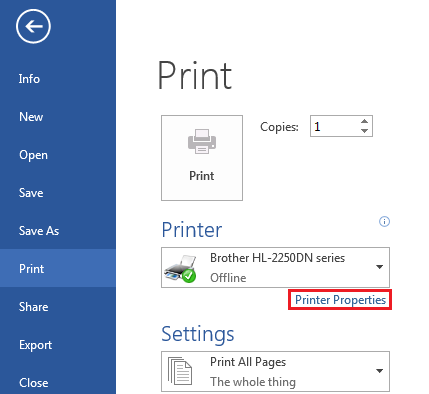
1.      Click the File tab, and then click Print.

2.      Click Printer Properties.
The dialog box that opens and the options available are specific to the printer. In the dialog box, find and select the properties for printing in color, grayscale or black and white.

For more detailed information, see your printer manufacturer’s instructions.

aa

Share This Article
Prabhu TL is a SenseCentral contributor covering digital products, entrepreneurship, and scalable online business systems. He focuses on turning ideas into repeatable processes—validation, positioning, marketing, and execution. His writing is known for simple frameworks, clear checklists, and real-world examples. When he’s not writing, he’s usually building new digital assets and experimenting with growth channels.
Leave a review