- Key Takeaways
- Table of Contents
- 1) Quick Definitions
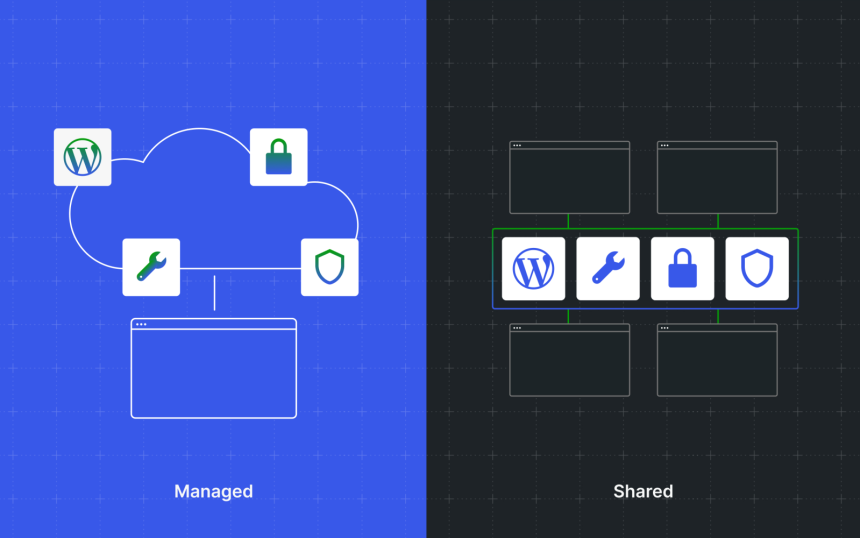
- 2) Shared vs Managed: Side-by-Side Comparison
- 3) Performance: Speed, TTFB, Caching, and CDN
- Why shared hosting can feel slow (especially over time)
- Why managed WordPress hosting tends to be faster (and more predictable)
- Caching in plain English
- CDN: Why global delivery matters
- 4) Security: Isolation, WAF, Malware, and Updates
- 5) Workflow: Staging, Backups, and Developer Experience
- Staging: the simplest way to avoid breaking your live site
- Backups: “automatic” is not enough—restores must be easy
- Developer quality-of-life features that matter (even if you’re not a developer)
- 6) Support: What You Actually Get
- 7) Cost: The “Cheap Hosting” Trap (Total Cost of Ownership)
- 8) Who Should Choose What?
- 9) Example: What Managed Hosting Looks Like with Kinsta
- 10) Decision Checklist
- FAQs
- Is shared hosting “bad” for WordPress?
- When should I upgrade from shared hosting to managed WordPress hosting?
- Will managed WordPress hosting automatically make my site fast?
- Do I still need caching plugins on managed hosting?
- Is managed hosting worth it for a blog?
- What’s the biggest mistake buyers make?
- References
Last updated: January 2026
Choosing hosting is not just about price. It’s about risk (downtime, hacks, failed updates), performance (TTFB, Core Web Vitals),
and time (how many hours you spend troubleshooting instead of publishing or selling).
This buyer’s guide breaks down shared hosting vs managed WordPress hosting in plain language,
then gives you a practical framework to decide which one fits your site today—and when it’s time to upgrade.
Key Takeaways
- Shared hosting is cheapest, but performance and security can vary because resources are shared.
- Managed WordPress hosting costs more, but typically bundles speed, security, backups, staging, and expert support.
- If your site earns money (ads, affiliates, leads, ecommerce), reliability and speed usually matter more than saving a few dollars.
- Most upgrades happen after one of three events: traffic spike, security incident, or site slowdown.
- A good “value” host reduces your total cost of ownership: fewer plugins, fewer emergencies, less developer time.
Table of Contents
1) Quick Definitions
What is shared hosting?
Shared hosting means your website lives on a server that also hosts many other websites.
All those sites share underlying resources (CPU, RAM, storage throughput). That’s why it’s inexpensive:
the hosting provider spreads server costs across many customers.
Shared hosting can be a reasonable starting point for:
a personal blog, a portfolio, a simple brochure site, or a brand-new project with low traffic and minimal plugins.
But the trade-off is that your performance and stability can be affected by “neighbors” on the same server
(especially on lower-end plans).
What is managed WordPress hosting?
Managed WordPress hosting is a WordPress-optimized hosting service where the provider handles more of the technical work:
platform-level performance tuning, security hardening, backups, staging environments, monitoring, and WordPress-specialist support.
Instead of building your own “stack” (caching plugin + backup plugin + security plugin + CDN + monitoring),
managed hosting often bundles many of those essentials into the platform.
2) Shared vs Managed: Side-by-Side Comparison
| Factor | Shared Hosting | Managed WordPress Hosting |
|---|---|---|
| Price | Low monthly cost; upsells common | Higher monthly cost; more included |
| Performance consistency | Can vary (shared resources) | Typically more consistent (optimized stack) |
| Security posture | Basic; you handle more hardening | Often includes WAF/CDN, monitoring, isolation, and proactive help |
| Backups | May be limited or paid add-on | Typically automated; restore tools are simpler |
| Staging | Sometimes missing or manual | Usually included and easy to use |
| Support | General hosting support; WordPress depth varies | WordPress-specialist support is a core value |
| Best for | New sites, hobby projects, tight budgets | Businesses, publishers, ecommerce, agencies, serious growth |
3) Performance: Speed, TTFB, Caching, and CDN
For WordPress, performance is not just “nice to have.” It affects:
SEO, conversions, ad revenue, email signups, and the user experience that builds trust.
Two hosting environments can run the same theme and plugins and still feel dramatically different.
Why shared hosting can feel slow (especially over time)
- Resource contention: other sites on the same server can consume CPU/RAM at peak times.
- Lower-end storage/network: cheaper tiers often use less performant setups.
- One-size-fits-all configuration: not tuned specifically for WordPress workloads.
- DIY performance stack: you’re responsible for choosing caching, CDN, image optimization, and database tuning.
Why managed WordPress hosting tends to be faster (and more predictable)
- WordPress-optimized server stack: caching layers, modern PHP, tuned database settings.
- Built-in caching/CDN: fewer plugins needed and fewer compatibility issues.
- Edge delivery: cached content served closer to users reduces latency.
- Performance tools: built-in monitoring makes bottlenecks easier to find.
Caching in plain English
Caching means storing copies of content so it can be served faster on the next request.
Instead of rebuilding a page on every visit (PHP + database queries + plugin logic),
a cache can serve a ready-to-go version quickly.
CDN: Why global delivery matters
A CDN stores and serves assets (images, CSS, JS) from locations closer to your visitors.
If your audience is spread across countries, a CDN can reduce load times and lower strain on your origin server.
that’s a strong signal your hosting environment needs better caching and scaling options.
4) Security: Isolation, WAF, Malware, and Updates
On WordPress, security incidents are rarely “random.” They usually come from:
outdated plugins/themes, weak passwords, vulnerable admin paths, or infected files spreading through poor isolation.
Hosting plays a major role in how fast you detect issues and how painful recovery becomes.
Shared hosting security realities
- Basic protection: many shared plans include only baseline security.
- You manage more: hardening, security plugins, firewall settings, and cleanup often fall to you.
- Higher blast radius: if server-level isolation is weak, problems can spread more easily.
Managed WordPress hosting security advantages
- Platform-level hardening: hosting is tuned for WordPress threats.
- Proactive monitoring: suspicious activity can be caught earlier.
- CDN + WAF options: reduces bot traffic, blocks bad requests, and mitigates DDoS patterns.
- Faster recovery: streamlined restore processes reduce downtime costs.
No host can make risky plugins “safe.” But a strong managed host can reduce exposure and dramatically reduce time-to-recovery.
5) Workflow: Staging, Backups, and Developer Experience
Staging: the simplest way to avoid breaking your live site
A staging environment is a separate copy of your site where you can test updates, new plugins, and design changes.
If staging is difficult to set up, people skip it—and that’s how “quick updates” become weekend emergencies.
Backups: “automatic” is not enough—restores must be easy
A backup only matters if:
(1) it runs consistently, and (2) you can restore quickly when something breaks.
On cheaper hosting, backups may be an add-on, limited, or complicated to restore.
On better managed platforms, backup + restore is designed as a normal workflow.
Developer quality-of-life features that matter (even if you’re not a developer)
- One-click staging and push-to-live flows.
- Easy PHP version switching for compatibility testing.
- Performance monitoring (APM) to find slow plugins and database queries.
- Modern infrastructure that stays updated without you babysitting the stack.
It’s the difference between “routine maintenance” and “high-risk change.”
6) Support: What You Actually Get
Support is often the hidden difference between shared and managed hosting.
On shared hosting, support teams handle a wide range of issues across many platforms.
That can be fine—until you hit a WordPress-specific problem: plugin conflicts, slow queries, caching layers, PHP errors, memory limits.
Shared hosting support (typical)
- Helps with account access, DNS, basic server availability, and generic hosting issues.
- WordPress troubleshooting may be limited or handled via knowledge base links.
- Performance and security remediation often becomes “your responsibility.”
Managed WordPress support (typical)
- WordPress is the product, so the support team is trained for WordPress environments.
- Better support can reduce time spent debugging and reduce downtime duration.
- More guidance on performance tuning and safe workflows.
7) Cost: The “Cheap Hosting” Trap (Total Cost of Ownership)
Many buyers compare only the monthly hosting fee. That’s a mistake.
The real question is: What does it cost to run this WordPress site reliably?
Total cost of ownership (TCO) usually includes
- Backup solution (and restore reliability)
- Security tooling (WAF/CDN, malware scanning, login protection)
- Performance tooling (caching, CDN, image optimization, monitoring)
- Your time (or developer time) when something goes wrong
- Downtime cost (lost sales, lost leads, lost rankings, lost trust)
| Cost area | Shared hosting (typical) | Managed WordPress (typical) |
|---|---|---|
| Base hosting fee | Low | Higher |
| Backups | Often add-on or plugin-based | Often included + easier restores |
| CDN / WAF | May require separate setup | Often bundled or deeply integrated |
| Performance tuning | Mostly DIY | Optimized environment + tools |
| Emergency recovery time | Can be slow and stressful | Typically faster with better restore workflows |
If your site makes money, the “cheapest” plan is often the most expensive plan once you count
lost time, slower growth, and downtime risk.
8) Who Should Choose What?
Shared hosting is usually fine if you:
- Run a personal blog or portfolio with low traffic.
- Have minimal plugins and a lightweight theme.
- Can tolerate occasional slowdowns.
- Are comfortable handling WordPress maintenance yourself.
Managed WordPress hosting is usually worth it if you:
- Rely on your site for leads, sales, appointments, or revenue.
- Publish frequently and need safe update workflows (staging + backups).
- Expect traffic spikes (campaigns, SEO growth, seasonal sales, viral content).
- Care about Core Web Vitals, SEO stability, and conversion rates.
- Want faster expert help when something breaks.
9) Example: What Managed Hosting Looks Like with Kinsta
To make managed hosting concrete, here is what a modern managed WordPress platform typically includes.
Kinsta is a well-known example in this category.
(Always verify current inclusions on the provider’s official pages, as features evolve.)
What Kinsta emphasizes (high level)
- Managed WordPress hosting with an emphasis on performance and security.
- Free migrations and migration scheduling options.
- Staging environments for testing changes safely.
- Cloudflare-powered features (CDN, DDoS protection, and security layers depending on configuration).
Why buyers choose a premium managed host
- Less plugin bloat: fewer “must-have” plugins because the platform covers core needs.
- Fewer emergencies: staging + backups reduce “update roulette.”
- Better performance baseline: helps you meet speed targets with less guesswork.
- Support that speaks WordPress: faster resolution when issues appear.
If you want to test managed hosting with minimal risk:
Related on Sensecentral
10) Decision Checklist
Use this checklist to choose confidently. If you answer “yes” to 3 or more, managed WordPress hosting is likely the better fit.
- Does your site generate revenue (ads, affiliates, leads, ecommerce)?
- Would downtime cost you money or reputation?
- Do you publish often and update plugins/themes regularly?
- Do you get traffic spikes from social, SEO, or campaigns?
- Do you care about Core Web Vitals and SEO performance consistency?
- Do you want staging + backups built into the normal workflow?
- Do you want WordPress-specialist support when issues arise?
If you’re still unsure, consider a staged approach:
start on shared hosting for a new project, then upgrade once traffic and revenue justify the reliability investment.
FAQs
Is shared hosting “bad” for WordPress?
Not inherently. Shared hosting can work well for small, low-traffic sites with lightweight themes and minimal plugins.
The key is aligning expectations: shared hosting prioritizes affordability, not maximum performance or premium support.
When should I upgrade from shared hosting to managed WordPress hosting?
Upgrade when your site becomes important to your business—or when you experience slowdowns, repeated errors, security scares,
or traffic spikes that overwhelm your current plan.
If your site earns money, upgrading earlier often reduces risk and saves time.
Will managed WordPress hosting automatically make my site fast?
It improves your baseline environment, but your theme, plugins, images, and content still matter.
The best results happen when you combine quality hosting with sensible optimization:
lightweight theme, limited plugins, compressed images, and caching/CDN best practices.
Do I still need caching plugins on managed hosting?
Sometimes yes, sometimes no. Many managed hosts provide platform caching and CDN integration.
However, specific needs (e.g., advanced ecommerce rules, custom cache exclusions) can still require a plugin or custom configuration.
Is managed hosting worth it for a blog?
If the blog is a hobby, shared hosting is often enough. If the blog is a business asset—earning from SEO, affiliates, or ads—
managed hosting can pay for itself through better speed, fewer outages, and less maintenance time.
What’s the biggest mistake buyers make?
Comparing only the monthly hosting price. The real cost is downtime, slow performance, security incidents, and the hours spent troubleshooting.
Think in terms of total cost of ownership, not just the invoice.
References
- WordPress requirements (official)
- Cloudflare: What is caching?
- Kinsta Docs: Migrations
- Kinsta Docs: Staging environments
- Kinsta: Cloudflare integration
- Kinsta: Pricing (verify current plans)
Ready to upgrade your WordPress hosting?
If your site is growing—or you’re tired of slowdowns, plugin conflicts, and risky updates—managed hosting can be the cleanest next step.