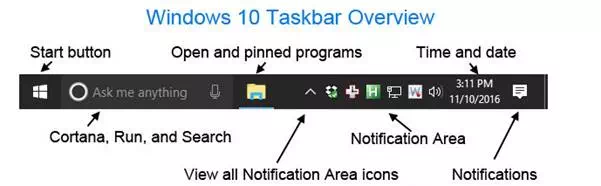
A bar located at the bottom of the screen first introduced with Microsoft Windows 95and found in all the versions of Windows that followed. The taskbar allows you to locate and launch programs through the Start button or view any program that is currently open. It also allows them to check the date and time, items running in the background through the Notification Area, and with early versions of Windows access to the Quick Launch.
Users more familiar with Apple Macintosh computers can think of the taskbar as the Dock.
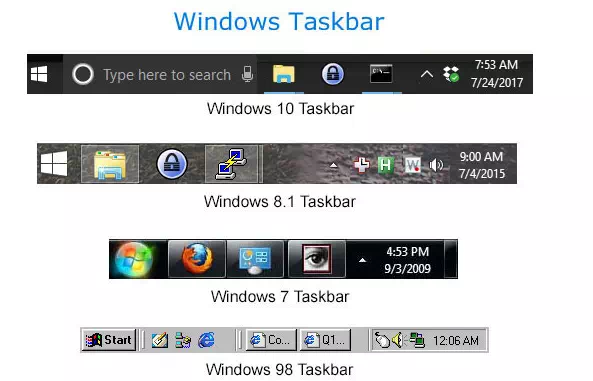
The above picture shows the Windows taskbar throughout Windows history. Except for the Quick Launch feature, the taskbar in Windows 95, 98, ME, NT 4.0 resembled the Windows 98 taskbar. With the release of Windows Vista and 7, Microsoft removed the Quick Launch, added the Start Orb, and allowed icons in the Windows Notification Area to be hidden. With Windows 8, Microsoft removed the Start button, but later added the Start button back into Windows 8.1. Windows 10 resembles Windows 8.1 with a new Cortana search box. Below is an overview of the Microsoft Windows 10 taskbar with each of its major elements listed.