A semantic element clearly describes its meaning to both the browser and the developer.
Examples of non-semantic elements: <div> and <span> – Tells nothing about its content.
Examples of semantic elements: <form>, <table>, and <article> – Clearly defines its content.
Semantic Elements in HTML
Many web sites contain HTML code like: <div id=”nav”> <div class=”header”> <div id=”footer”> to indicate navigation, header, and footer.
In HTML there are some semantic elements that can be used to define different parts of a web page:
- <article>
- <aside>
- <details>
- <figcaption>
- <figure>
- <footer>
- <header>
- <main>
- <mark>
- <nav>
- <section>
- <summary>
- <time>
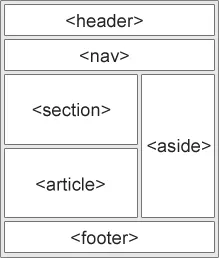
HTML <section> Element
The <section> element defines a section in a document.
According to W3C’s HTML documentation: “A section is a thematic grouping of content, typically with a heading.”
A home page could normally be split into sections for introduction, content, and contact information.
Example
<section>
<h1>WWF</h1>
<p>The World Wide Fund for Nature (WWF) is….</p>
</section>
HTML <article> Element
The <article> element specifies independent, self-contained content.
An article should make sense on its own, and it should be possible to read it independently from the rest of the web site.
Examples of where an <article> element can be used:
- Forum post
- Blog post
- Newspaper article
Example
<article>
<h1>What Does WWF Do?</h1>
<p>WWF’s mission is to stop the degradation of our planet’s natural environment,
and build a future in which humans live in harmony with nature.</p>
</article>