A computer system is an integrated form of different components that work together to give a desirable result. It has different component and each works for a specific purpose; however, they generate a common result as required by the user.
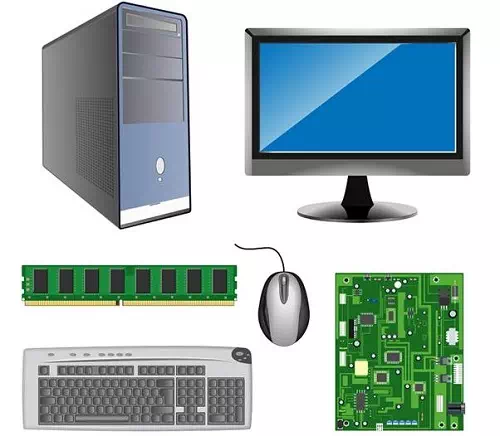
Components of Computer System
Let us now understand the following basic components of a computer system.
- Hardware
- Software
- Humanware
- Firmware
- Bridgeware
Hardware
The physical components collectively form the hardware of a computer system. Hardware comprises of the equipment that helps in the working system of the computer.
Following are the different types of hardware components (which have specific functions) −
· Monitor − It displays (visual) the result.
· CPU − It is the Central Processing Unit that controls the computer’s functions and transmits data.
· Motherboard − It is mainly accountable to establish communication between components and transmission of information.
· RAM − It is the Random Access Memory and responsible for the storage of programs that are currently running and also stores data temporarily.
· Hard Disk Drive − It is a permanent memory storage device.
· Floppy Disk Drive − It is hardly being used in recent times.
· Optical disks − It is a device that also store data. For example, CD, DVD, etc.
Input & Output Device
The following table categorically lists down the input and output device −
| Input Device | Output Device | Input Device | Output Device |
| Mouse | Monitor | Microphone | Speaker |
| Keyboard | Printer | Camera | Earphone |
| Scanner | Projector | Trackball | Monitor |
| Touchpad | Plotter | Joystick | Monitor |
Software
The hardware components can only function when software components are added to the computer system. Software is a program that performs different commands given by a user.
Software is an intangible part of hardware and controls the sequence of operations.
Types of Software
Depending on the basic features and functionality, software can be categorized as −
- Operating Systems (OS)
- Application Software (AS)
- E-accessibility Software
Let us now discuss the software components in brief.
Operating System
This software helps to load the basic program automatically as soon as the computer is started. Following are the major types of operating system −
| Operating Software | Examples |
| Microsoft Windows | XP, Vista, etc. |
| Mac OS X | Panther, Cheetah, Snow leopard, etc. |
| Linux | Debian, Ubuntu, Fedora, Knoppix, etc. |
Application Software
The software, which can be used on an installed operating system, is known as application software. Following are the significant examples of application software −
| Application Software | Examples |
| Office programs | Microsoft Office, OpenOffice, LibreOffice, etc. |
| Web browser | Internet Explorer, Mozilla Firefox, Google Chrome, Opera, Safari, etc. |
| Antivirus Program | Norton, McAfee, Quick Heal, Avira, Kaspersky, etc. |
E-accessibility Software
The E-accessibility software components additional facilities to users such as −
- Voice recognition software
- Screen reader
- Magnifying tool
- On-screen keyboard
- Video games
- Learning software, etc.