- Table of Contents
- 1) What matters in a WooCommerce page builder (buying criteria)
- 2) Elementor WooCommerce Builder: what it is and what it can replace
- 3) Elementor workflow for WooCommerce (templates, conditions, and safe iteration)
- Step A: Start with templates (not individual pages)
- Step B: Use conditions like a “routing system”
- Step C: Treat Cart + Checkout as “critical infrastructure”
- 4) Elementor Cloud Hosting: when it makes sense for WooCommerce
- 5) Elementor alternatives: Divi, Beaver Builder, Bricks, Oxygen, Blocks, SeedProd
- Divi (Elegant Themes) + WooCommerce Modules
- Beaver Builder + Beaver Themer (WooCommerce integration)
- Bricks (WooCommerce Builder)
- Oxygen (WooCommerce integration)
- WooCommerce Blocks + a block theme (Gutenberg approach)
- SeedProd (WooCommerce Blocks for marketing pages)
- 6) Comparison table: Elementor vs top alternatives
- 7) Performance + SEO realities (page builders and Core Web Vitals)
- 8) Which one should you choose? (by store stage + team)
- Choose Elementor if you want speed + visual control
- Choose Divi if your business is already “Divi-native”
- Choose Beaver Builder if you want structured, maintainable templating
- Choose Bricks or Oxygen if you’re performance-minded and technical
- Choose WooCommerce Blocks for simplicity
- Choose Elementor Cloud Hosting if you want an all-in-one setup
- 9) Implementation checklist (safe setup for real stores)
- 10) FAQs
- Is Elementor good for WooCommerce stores?
- Will a page builder slow down my WooCommerce store?
- Do I need Elementor Cloud Hosting to use Elementor for WooCommerce?
- What’s the best Elementor alternative for WooCommerce?
- What should I customize first to improve conversions?
- Key Takeaways
- References
WooCommerce gives you a powerful commerce engine—but your store’s revenue often hinges on something simpler: how well your product pages, shop pages, cart, and checkout are designed.
A strong WooCommerce page builder helps you create conversion-focused layouts without constantly editing theme files or fighting shortcodes. The result is a store that looks premium, loads fast enough to sell, and is easier to iterate as your catalog grows.
- Best “all-around” WooCommerce builder for most WordPress store owners: Elementor (especially if you want visual control across key store pages).
- Best for Divi-first users: Divi + WooCommerce modules (strong design system if you’re already committed to Divi).
- Best for “clean, developer-leaning workflow”: Bricks or Oxygen (more technical, often favored by performance-minded builders).
- Best for simple stores or minimal customization: WooCommerce Blocks + a block theme (lower complexity, fewer moving parts).
Table of Contents
- What matters in a WooCommerce page builder (buying criteria)
- Elementor WooCommerce Builder: what it is and what it can replace
- Elementor workflow for WooCommerce (templates, conditions, and safe iteration)
- Elementor Cloud Hosting: when it makes sense for WooCommerce
- Elementor alternatives: Divi, Beaver Builder, Bricks, Oxygen, Blocks, SeedProd
- Comparison table: Elementor vs top alternatives
- Performance + SEO realities (page builders and Core Web Vitals)
- Which one should you choose? (by store stage + team)
- Implementation checklist (safe setup for real stores)
- FAQs
- Key Takeaways
- References
1) What matters in a WooCommerce page builder (buying criteria)
Before comparing Elementor to alternatives, align on what you’re actually buying. The “best” WooCommerce page builder is the one that improves your store’s revenue and workflow with the least ongoing friction.
Here are the criteria that matter most for real-world stores:
- Control over key store pages: Product, shop/archive, category/tag archives, cart, checkout, and customer account pages.
- Template logic & conditions: Can you apply a template to specific product categories, tags, or product types without custom code?
- Conversion features: Does it support layouts that reduce friction (clear product info, trust blocks, upsells, fast cart access, simplified checkout)?
- Performance impact: Every builder adds “weight.” The best builders reduce the need for extra plugins and keep output reasonably lean.
- Compatibility: Works with your theme, payment gateways, shipping rules, multilingual setup, and essential WooCommerce extensions.
- Learning curve: Your team’s time is a cost. A builder that’s “powerful” but too complex can stall execution.
- Maintenance risk: Updates should be predictable, and templates should fail gracefully (especially cart/checkout).
A practical mindset: your builder is not just a design tool. It’s a “revenue interface layer” that sits on top of WooCommerce’s transaction flow.
If it makes cart and checkout easier to improve (without breaking), it’s usually worth it.
Recommended next step: If you want a quick WooCommerce performance baseline before you install or switch builders, review your hosting and caching setup first.
Internal guides you may find useful:
Best Caching Setup for WordPress,
Core Web Vitals for WordPress, and
Best WooCommerce Hosting.
2) Elementor WooCommerce Builder: what it is and what it can replace
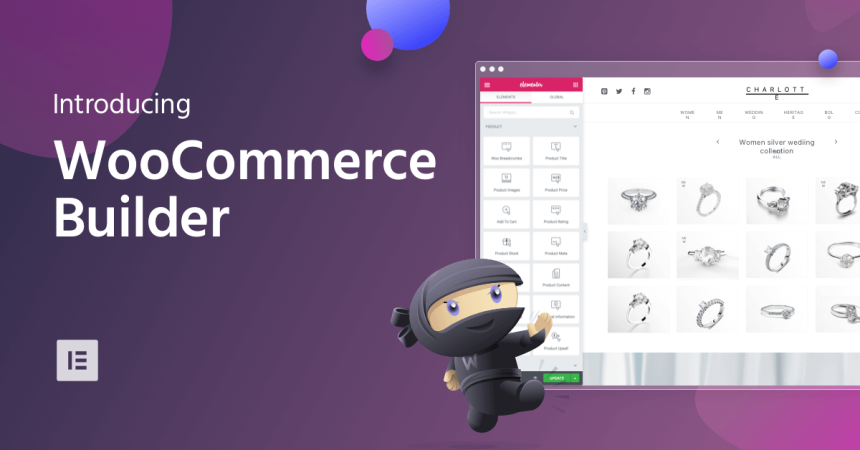
Elementor’s WooCommerce Builder is designed to let you visually customize the pages WooCommerce stores rely on—especially the pages themes typically “lock down” (like product templates, shop archives, cart, checkout, and account).
Instead of editing PHP templates or relying on theme-specific options, you build templates visually and apply them with conditions.
In practice, Elementor can replace multiple categories of tools that store owners often stack together:
- Theme-specific WooCommerce styling: because you can design templates directly.
- One-off shortcode customizations: because templates handle layout consistently across products.
- “Cart/Checkout customization” plugins: because you can design those pages visually (and test improvements faster).
If you’re building a store for revenue (not just aesthetics), Elementor’s biggest advantage is iteration speed:
you can make meaningful changes to product layout and checkout UX without turning every improvement into a mini-development project.
What Elementor is strongest at for WooCommerce
- Consistent design system: Reuse sections (trust blocks, guarantee, shipping info, reviews layout) across templates.
- Checkout optimization: Easier to reduce friction (layout clarity, spacing, mobile usability) and test improvements.
- Store-wide template control: Apply templates to categories/tags and keep your catalog visually consistent.
- Marketing-friendly workflows: Landing pages + product pages can share the same design language and components.
Where Elementor can be “too much”
- Ultra-minimal builds: If you only need small tweaks and your theme already looks great, Blocks + theme options may be enough.
- Highly technical performance targets: Developer-first builders may offer a leaner workflow for advanced optimization (with higher learning cost).
3) Elementor workflow for WooCommerce (templates, conditions, and safe iteration)
A reliable WooCommerce design workflow has two goals: (1) make improvements quickly, and (2) avoid breaking revenue-critical pages.
Here’s a proven, low-risk approach when building with Elementor:
Step A: Start with templates (not individual pages)
Instead of editing individual products one by one, you build templates:
a Single Product template and a Product Archive (Shop) template first.
This creates consistency across your entire store.
Step B: Use conditions like a “routing system”
Conditions help you roll out designs incrementally.
For example, apply a new product template only to a specific category first (e.g., “Accessories”) before rolling it out store-wide.
This lets you validate performance and conversions before full deployment.
Step C: Treat Cart + Checkout as “critical infrastructure”
Cart and checkout are where stores win or lose revenue.
Make changes in small increments and always test:
- Mobile checkout flow (thumb-friendly, minimal scrolling)
- Coupons, shipping calculators, tax calculation display
- Payment methods (Stripe/PayPal/COD/etc.)
- Order confirmation success path
Practical testing tip: create a “test product” priced at a minimal value and run full checkout tests after any major cart/checkout change.
4) Elementor Cloud Hosting: when it makes sense for WooCommerce
Elementor Cloud Hosting is positioned as an all-in-one path: hosting plus an Elementor-focused site environment.
For store owners, the appeal is not “hosting” itself—it’s reducing operational complexity.
If you prefer fewer dashboards, fewer compatibility issues, and a more guided setup experience, Cloud Hosting can be attractive.
Elementor’s hosting offering emphasizes managed features that matter for business sites: security layers, CDN, SSL, and migration support.
For WooCommerce, this can be helpful if you want to spend less time on infrastructure decisions and more time improving product pages and checkout UX.
Who should consider Elementor Cloud Hosting
- Solo founders and small teams who want a simpler “website + builder + hosting” stack.
- Non-technical store owners who want fewer moving parts and fewer vendor handoffs.
- Marketing-led businesses that ship frequent landing page and product page improvements.
Who might prefer separate hosting
- Stores with complex infrastructure requirements (multi-site, heavy customizations, specialized stacks).
- Teams that already have an optimized hosting stack (and only need a builder layer).
5) Elementor alternatives: Divi, Beaver Builder, Bricks, Oxygen, Blocks, SeedProd
Elementor is popular for a reason—but it’s not the only serious option. Here are the most common alternatives store owners consider, and when each one makes sense.
Divi (Elegant Themes) + WooCommerce Modules
Divi is a strong alternative if you’re already invested in the Divi ecosystem. Its WooCommerce modules let you build and style product layouts inside the Divi Builder, which can be a big win for consistency if your entire site is Divi-based.
- Best for: Divi-first sites and agencies standardized on Divi.
- Tradeoff: Switching ecosystems later can be disruptive; keep portability in mind.
Beaver Builder + Beaver Themer (WooCommerce integration)
Beaver Builder is often favored by teams that want a stable, structured workflow. With Beaver Themer, you can build WooCommerce archive and single product layouts using a template-based approach.
- Best for: Agencies, maintainable builds, teams that prefer “less magic” and more structure.
- Tradeoff: The “wow factor” of instant design flourish may take more deliberate work than in more design-forward ecosystems.
Bricks (WooCommerce Builder)
Bricks is commonly considered by performance-conscious builders who still want visual control. Bricks’ WooCommerce Builder approach is template-driven and focuses on building the full store layout system (shop, product, cart, checkout, account) with dedicated template types.
- Best for: Advanced users, leaner builds, “template-first” store architecture.
- Tradeoff: Higher learning curve than mainstream drag-and-drop tools.
Oxygen (WooCommerce integration)
Oxygen is another developer-leaning builder with WooCommerce integration. It’s powerful for custom templates and is frequently used when teams want deep control and are comfortable with a more technical workflow.
- Best for: Custom store builds where technical flexibility matters.
- Tradeoff: Not the fastest ramp for non-technical store owners.
WooCommerce Blocks + a block theme (Gutenberg approach)
If your store is straightforward—and you want fewer plugins and a more native WordPress experience—WooCommerce Blocks can be enough.
This route is especially sensible when your goal is “clean and stable” rather than “fully custom everywhere.”
- Best for: Simple stores, minimal customization, teams that want fewer builder dependencies.
- Tradeoff: Custom layouts and conversion experiments can be slower or more constrained than builder-first workflows.
SeedProd (WooCommerce Blocks for marketing pages)
SeedProd is best known for landing pages and marketing layouts. If your primary goal is building high-converting landing pages that connect to WooCommerce (promotions, launches, limited-time offers), it can be a useful complement or alternative in marketing-heavy stores.
- Best for: Campaign pages, funnels, and promotional layouts.
- Tradeoff: It’s not always the first choice for full store template control compared to dedicated WooCommerce builders.
6) Comparison table: Elementor vs top alternatives
| Builder | Best For | WooCommerce Coverage | Learning Curve | Notes |
|---|---|---|---|---|
| Elementor | Most store owners who want fast visual iteration | Strong control across product, archives, cart/checkout, account | Low–Medium | Excellent for conversion experiments and consistent design systems |
| Divi | Divi-first sites, design-heavy builds | Strong product layout styling via WooCommerce modules | Medium | Great if your whole brand/site is already Divi |
| Beaver Builder + Themer | Maintainable, template-driven agency builds | Solid archive + single product templates | Medium | Very structured workflow; often praised for stability |
| Bricks | Performance-minded builders and advanced users | Template types for shop, product, cart, checkout, account | Medium–High | Excellent control, but not the fastest ramp for beginners |
| Oxygen | Custom stores where dev flexibility matters | Strong templating and WooCommerce integration | High | Powerful, but more technical than mainstream builders |
| WooCommerce Blocks | Simple stores and “native WordPress” builds | Good baseline customization (especially with block themes) | Low | Fewer dependencies; customization depth can be limited |
If you want one practical rule: choose the builder that matches your team’s speed.
A store that ships improvements weekly often beats a “perfect” store that ships improvements quarterly.
7) Performance + SEO realities (page builders and Core Web Vitals)
Every page builder introduces additional CSS/JS and “render complexity.” That’s normal—and not automatically bad.
What matters is whether the builder helps you reduce the total number of plugins, avoids bloated templates, and keeps your site maintainable.
Practical performance guidelines (that store owners can actually follow)
- Use a lean theme foundation and avoid stacking multiple builders or overlapping UI frameworks.
- Keep templates minimal: don’t load sliders, animations, and heavy widgets on revenue-critical pages unless they lift conversion.
- Optimize images (product images are often the largest performance bottleneck).
- Get caching right—but exclude cart/checkout/account from full-page caching (common WooCommerce requirement).
- Measure changes using Core Web Vitals plus real buyer flows (mobile cart → checkout completion).
If you want step-by-step guidance:
Core Web Vitals for WordPress
and
Best Caching Setup for WordPress
are solid starting points for builders + WooCommerce stores.
8) Which one should you choose? (by store stage + team)
Choose Elementor if you want speed + visual control
- You want to design product pages, shop pages, cart, and checkout without custom code.
- You publish campaigns frequently and need fast iteration.
- You want one consistent design system across marketing pages and store pages.
Choose Divi if your business is already “Divi-native”
- Your site, brand components, and team workflow are already Divi-based.
- You want a unified Divi design system across content + commerce.
Choose Beaver Builder if you want structured, maintainable templating
- You prefer a clean template-based workflow and long-term maintainability.
- You’re building multiple stores for clients and want consistent patterns.
Choose Bricks or Oxygen if you’re performance-minded and technical
- You’re comfortable with a more advanced builder workflow.
- You want deep template control with a leaner approach.
Choose WooCommerce Blocks for simplicity
- You want fewer dependencies and a more native WordPress build.
- Your store does not require heavy template customization yet.
Choose Elementor Cloud Hosting if you want an all-in-one setup
- You want hosting + builder alignment and fewer moving parts.
- You’re a small team that wants to focus on improving pages, not infrastructure.
9) Implementation checklist (safe setup for real stores)
- Backups + staging: Always test template changes on staging first (especially cart/checkout).
- Start with one category: Apply new templates to a single product category before rolling out store-wide.
- Test checkout end-to-end: Mobile, coupons, shipping, taxes, payment gateways, order confirmation.
- Keep a rollback path: Avoid changing too many plugins and templates at once.
- Measure outcomes: Track add-to-cart rate, checkout completion rate, and revenue per session after changes.
10) FAQs
Is Elementor good for WooCommerce stores?
Yes—especially if you want a visual workflow to customize product layouts, archives, cart, checkout, and account pages. The real advantage is faster iteration: you can improve UX and conversion without editing theme templates.
Will a page builder slow down my WooCommerce store?
It can if you build heavy templates and stack too many plugins. But a builder can also reduce bloat by replacing multiple “fix-it” plugins and letting you keep templates consistent. The key is disciplined design and a solid hosting/caching setup.
Do I need Elementor Cloud Hosting to use Elementor for WooCommerce?
No. You can use Elementor on most WordPress hosting. Cloud Hosting is an optional all-in-one route if you want fewer moving parts and a simpler operational setup.
What’s the best Elementor alternative for WooCommerce?
If you’re already on Divi, Divi is a strong option. If you want a structured agency workflow, Beaver Builder + Themer is a classic choice. If you’re more technical and performance-focused, Bricks or Oxygen are often considered.
If you want simplicity, WooCommerce Blocks with a good block theme can be enough.
What should I customize first to improve conversions?
Start with: (1) product page clarity (value proposition + trust + shipping/returns), (2) the cart (reduce surprises and clutter), and (3) checkout friction (mobile layout, form clarity, payment method visibility).
Key Takeaways
- Elementor is a top pick when you want fast visual control across key WooCommerce pages and frequent iteration.
- Divi is best when you’re already committed to the Divi ecosystem and want WooCommerce styling inside that workflow.
- Beaver Builder + Themer shines for structured, maintainable, template-driven builds.
- Bricks/Oxygen are strong for technical teams that want deep control and are comfortable with a steeper learning curve.
- WooCommerce Blocks are a practical baseline for simpler stores that want fewer dependencies.
- Performance is manageable when you keep templates lean, optimize images, and use a proper WooCommerce-ready caching/hosting setup.
References
- Elementor: WooCommerce Checkout widget
- Elementor: WooCommerce Cart widget
- Elementor: WooCommerce My Account widget
- Elementor: Product Archives (Site Part)
- Elementor: Hosting / Cloud hosting
- Divi: WooCommerce Modules documentation
- Beaver Themer: WooCommerce integration
- Bricks: WooCommerce Builder
- Oxygen: WooCommerce integration overview
- WooCommerce: Using Blocks / Store editing
- SeedProd: WooCommerce blocks announcement