- Key Takeaways
- What you get with Elfsight (Free vs Paid in plain English)
- “Views” explained (the #1 reason people upgrade)
- Free vs Basic vs Pro vs Premium (Single App Plans)
- Who should upgrade (scenarios + triggers)
- Choose Free if…
- Upgrade to Basic if…
- Upgrade to Pro if… (most Sensecentral readers end up here)
- Upgrade to Premium if…
- Consider Enterprise if…
- Single App vs All Apps Pack: which is better?
- How to choose the right plan in 5 minutes
- Step 1) Identify your widget placement pattern
- Step 2) Estimate views using pageviews (not unique visitors)
- Step 3) Count widget variants you actually need
- Step 4) Decide between Single App vs All Apps Pack
- Pro tips to reduce views + avoid deactivation
- FAQ
- 1) How many views do I get on Elfsight Free?
- 2) What exactly counts as a “view”?
- 3) What happens if I hit the view limit?
- 4) Is Basic enough for a small blog?
- 5) Is Pro the best plan?
- 6) Should I buy Single App or All Apps Pack?
- 7) Do prices change?
- 8) What’s the fastest way to start?
- References
Published on Sensecentral (Product Reviews & Comparisons) • Updated for 2026 shopping + site-growth strategies
If you’ve ever added a popup, reviews widget, Instagram feed, WhatsApp chat button, or a form to your site, you already know the “plugin rabbit hole”:
you install one plugin, it slows the site, conflicts with your theme, breaks after an update, and then you’re back searching again.
That’s why website owners increasingly choose SaaS widgets—tools like Elfsight—to add conversion-focused features without heavy plugin stacks.
But the big question is: Is Elfsight’s Free plan enough… or do you actually need a paid plan?
you can hit the view limit faster than you expect. Paid plans mainly unlock more monthly views and more widgets per app—which directly affects reliability and scale.
- Key Takeaways
- What you get with Elfsight (Free vs Paid in plain English)
- “Views” explained (the #1 reason people upgrade)
- Free vs Basic vs Pro vs Premium (Single App Plans comparison table)
- Who should upgrade (scenarios + triggers)
- Single App vs All Apps Pack: which is better?
- How to choose the right plan in 5 minutes
- Pro tips to reduce views + avoid deactivation
- FAQ
- References
Key Takeaways
- Free is for testing: best for demos, staging sites, or very low-traffic pages.
- Upgrade primarily for “views”: views are widget loads, not unique visitors, and they add up across pages and widgets.
- Basic suits small sites: a good starter plan if your widget sits on a few pages and traffic is modest.
- Pro is the sweet spot for growth: for consistent traffic, multiple placements, or multiple widget variations.
- Premium is for scale: high-traffic sites, multiple funnels, and lots of widget variants.
What you get with Elfsight (Free vs Paid in plain English)
Elfsight sells “apps” (think: a widget type like Reviews, Popup, Instagram Feed, Form Builder, WhatsApp Chat) and each app can have multiple widgets
(different designs, settings, or placements). This matters because upgrading isn’t only about “unlocking features”—it’s about unlocking capacity:
how many widgets you can create and how many times they can load each month.
Here’s the easiest way to think about Elfsight plans:
- Free = try one widget, on real pages, to see if it fits your site.
- Paid = keep widgets running reliably as traffic grows, and create more versions (A/B style) for different pages and funnels.
- Higher tiers = more headroom for bigger traffic and more widget variants.
Tip for Sensecentral readers: if you run product reviews, comparison tables, “best of” lists, or affiliate landing pages, widgets are not decoration—done right,
they can directly lift email signups, clicks, and trust (reviews/testimonials).
“Views” explained (the #1 reason people upgrade)
Elfsight’s pricing heavily depends on views. A “view” is counted when the widget loads on a page (or via a share link). It is not the same as
unique visitors, clicks, or scroll depth. If a visitor reloads the page, that can count again. If the same widget is placed on multiple pages, those views add up.
And if two widgets of the same app load on one page, that can count as two views.
unless you upgrade.
Simple view-estimation formula
Use this rough estimate to decide your plan:
- Estimated widget views/month ≈ (monthly pageviews for pages that contain the widget) × (widgets of the same app per page)
- If you add the same app widget to multiple pages, include all those pageviews.
Example: why Free can be too tight
Let’s say you add a Reviews widget to:
(1) your homepage, and (2) the sidebar of 10 review posts.
Even if each post only gets 50 visits/day, that’s 10 × 50 × 30 = 15,000 monthly pageviews where the widget loads.
That’s far beyond a tiny “testing” limit. This is why many affiliate and content sites upgrade earlier than they expected.
Free vs Basic vs Pro vs Premium (Single App Plans)
Below is a practical comparison of Elfsight’s Single App plans. “Single App” means you subscribe to one widget type
(for example: Instagram Feed only, or Popup only).
| Plan | Monthly views limit | Apps included | Widgets you can create (per app) | Best for |
|---|---|---|---|---|
| Free Testing | 200 | 1 app | 1 widget | Trying Elfsight on a live page, staging sites, very low-traffic pages |
| Basic Starter | 5,000 | 1 app | 3 widgets | Small sites, one primary placement + a couple variations |
| Pro Growth | 50,000 | 1 app | 9 widgets | Growing blogs, affiliate sites, multiple pages/funnels using the same app |
| Premium Scale | 150,000 | 1 app | 21 widgets | High-traffic sites, multi-page deployments, heavy testing & segmentation |
So what do you “actually get” by upgrading?
In practical terms, paid plans give you:
- More reliability as traffic increases (higher view limits = fewer surprises).
- More widget variants (e.g., a different popup for mobile vs desktop, a different form for each category page, different review widgets per brand).
- More flexibility to place widgets across your site, not just on one test page.
Who should upgrade (scenarios + triggers)
Choose Free if…
- You’re still deciding between Elfsight vs a plugin and want to test the widget on a single page.
- You’re building a new site (low traffic) and want to set up your design first.
- You only need a widget temporarily (e.g., a short campaign page with minimal visits).
Upgrade to Basic if…
- Your widget will live on your homepage + a few pages (not your entire site).
- Your site gets modest traffic and you want fewer interruptions.
- You want 2–3 widget versions (example: one popup for blog posts, one for “Best X” pages, one for the homepage).
Upgrade to Pro if… (most Sensecentral readers end up here)
- You run a content site with steady traffic and you place widgets on multiple posts/pages.
- You want to create different widgets for different categories (e.g., different CTAs for “Tech” vs “Home & Kitchen”).
- You’re serious about conversion optimization: exit-intent popups, segmented offers, multiple social proof blocks, etc.
Upgrade to Premium if…
- Your site is high-traffic and widgets load many times per month.
- You manage multiple funnels and want lots of variants (landing pages, localized widgets, seasonal promos).
- You run multiple properties/brands and want one app’s widgets deployed everywhere with lots of configurations.
Consider Enterprise if…
- You need far more than 150,000 monthly views and/or a large number of widgets for a single app.
- You’re operating at a scale where dedicated support or an account manager matters.
Single App vs All Apps Pack: which is better?
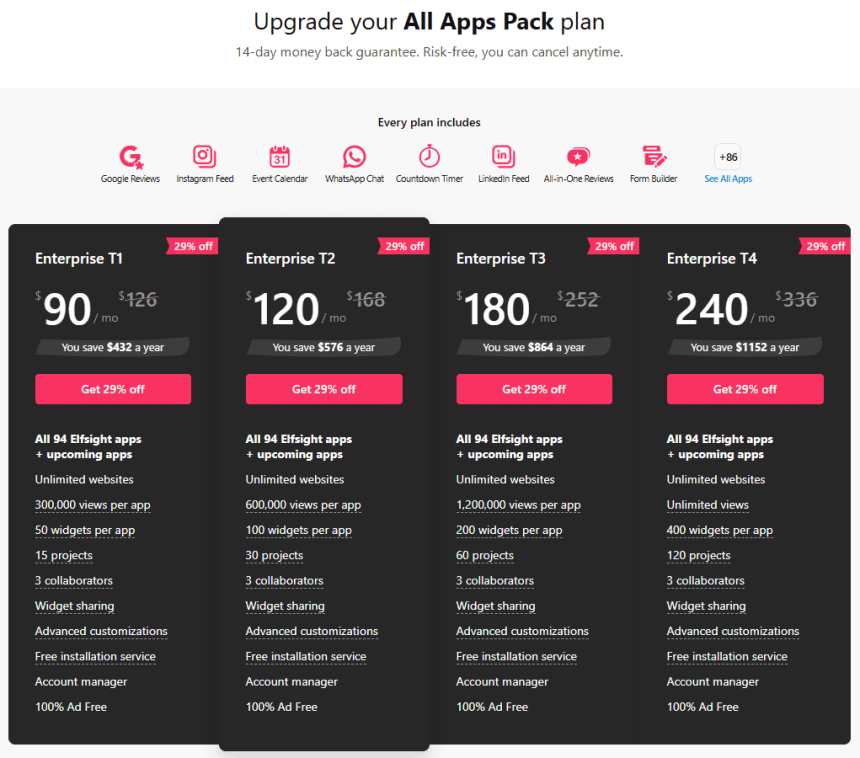
Elfsight also offers an All Apps Pack—this is a bundle that gives you access to 90+ apps (all widget types) with plan limits applied per app.
It can be a great deal if you want to use multiple widget types across your site.
| Option | Best for | Pros | Watch-outs |
|---|---|---|---|
| Single App Plan | You only need 1 widget type (e.g., just Instagram Feed or just Popup) | Cheaper entry point, focused, easy to manage | If you later add more widget types, costs can stack |
| All Apps Pack | You want multiple widget types (reviews + popup + forms + chat + social feeds) | One subscription for many tools, consistent UI, faster experimentation | Paying for breadth you may not use if you only need one widget |
For many affiliate and comparison sites, the All Apps Pack becomes attractive once you’re actively using 3+ widget categories:
e.g., social proof (reviews/testimonials) + lead capture (forms/popups) + engagement (chat/social feed).
- Reviews/Testimonial widget (trust)
- Popup or Announcement Bar (timely offer)
- Email capture form (own your audience)
- Chat button (high-intent support)
How to choose the right plan in 5 minutes
Step 1) Identify your widget placement pattern
- One page only (single landing page) → Free or Basic
- Homepage + a few pages → Basic
- Across many blog posts (sidebars, footers, templates) → Pro or Premium
Step 2) Estimate views using pageviews (not unique visitors)
Look at your analytics for the pages where the widget will load. If widgets are embedded in templates, assume they’ll load on many pages.
Step 3) Count widget variants you actually need
Want a different popup for different categories? A different review widget per brand? A different form per lead magnet?
More variants → higher plan.
Step 4) Decide between Single App vs All Apps Pack
If you’re only buying one widget type, start with Single App. If you’re building a full conversion toolset, consider All Apps Pack.
Pro tips to reduce views + avoid deactivation
- Don’t place multiple widgets of the same app on one page unless you truly need them (each can add to views).
- Be careful with site-wide placement (headers/footers/sidebars) on large content sites—views stack fast.
- Build while logged in to your Elfsight account on the same browser/device when editing (helps prevent your own views from being counted in many cases).
- Monitor usage inside your Elfsight dashboard so you see “days to reset” and don’t get surprised.
- Start with one high-impact widget (reviews or popup) and expand once you confirm a measurable lift.
Want more conversion strategies? Browse Sensecentral’s guides here:
Conversion tips •
Popups •
Reviews widgets •
WordPress tools
FAQ
1) How many views do I get on Elfsight Free?
Free is designed mainly for testing. If you’re placing widgets on multiple pages, you’ll likely need to upgrade so your widget doesn’t disappear after hitting the monthly limit.
2) What exactly counts as a “view”?
A view is counted when the widget loads on a page (or via a share link). It’s not the number of unique visitors, and it’s not clicks.
Reloads and multiple placements can increase views quickly.
3) What happens if I hit the view limit?
The widget can be temporarily deactivated (disappear on your site) until the next reset date or until you upgrade.
4) Is Basic enough for a small blog?
Often yes—if your widget isn’t installed site-wide and traffic is modest. If you add widgets to templates or multiple posts, Pro is safer.
5) Is Pro the best plan?
For many growing sites, yes—because it supports broader placement, more variants, and a much higher view threshold.
6) Should I buy Single App or All Apps Pack?
If you only want one widget type, Single App is usually the best value. If you want multiple widget types (reviews + popup + forms + chat), All Apps Pack can be more cost-effective.
7) Do prices change?
Prices and promos can change, and some apps may have different pricing. Always verify inside the official pricing pages or your dashboard before purchasing.
8) What’s the fastest way to start?
Start on Free, build one widget, install it on a real page, monitor performance, then upgrade when views/placements grow.
Use this button to open Elfsight:
References
- Elfsight Help Center: Pricing
- Elfsight Help Center: View Limit (How views work)
- Elfsight: Official Pricing Page
- Elfsight: Widgets Directory
Last note: If you want, you can paste this post, then replace the internal links with your exact Sensecentral category URLs (e.g., /category/wordpress/, /category/website-tools/, etc.)
to strengthen internal linking.