




Introduction
Engineering drawing consists of a number of geometrical Constructions. A few methods are illustrated here without mathematical proofs.
1. To divide a straight line 65 mm into a given number of equal parts say 5
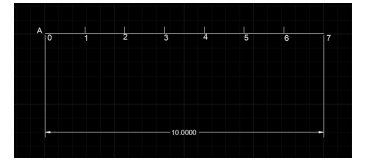
Solution
1. Draw a line of 65 mm with Command L
2. Name the Line With Text Command A,B
3. To Divide line Type Command DIV Enter
4. Select Object To Divide Select Line
5. Enter the Number Of Segment of 5 Enter
6. Select Point Style from utilities to show divisions.
2. To bisect a given angle 900
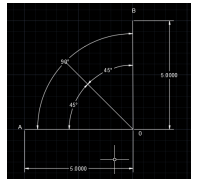
Solution
1. Draw a line of 50 mm with Command L Name the Lane With Text Command A,B
2. Draw another Line 50 mm From the End of Previous Line with 900 Angle with Command
L name the Line With Text Command B,C
3. To Bisect Line Type Command XL press enter
4. Select Bisect Option or Enter B and specify angle vertex point at End Point.
5. Specify Angle Starting Point
6. Specify angle end point enter
7. Mention Angle After Bisection
Polygons
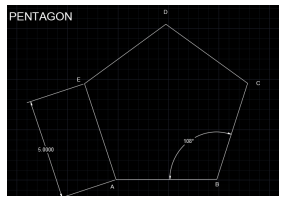
1. To construct a regular polygon (say a pentagon) given the length of the side 5(EDGE
METHOD)
Solution
1. To construct any polygon Enter Command POL
2. Enter No of Sides 5
3. Specify Center pf Polygon or Edge enter Command E
4. Specify First End Point of Edge & Specify second End Point of Edge by entering specific
Distance 5
5. Name the Edges With text Command TEXT
2. Inscribe a hexagon in a given circle of 50 mm Diameter (Inscribe Circle Method)
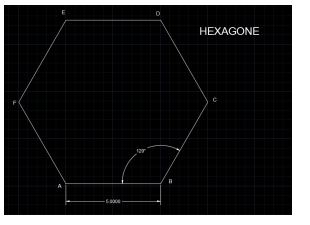
Solution
1. To construct any polygon Enter Command POL
2. Enter No of Sides 6
3. Specify Center pf Polygon or Edge enter select Center
4. Enter an option with Inscribed in Circle with command I
5. Specify radius Of Circle with 50
6. Name the Edges With text Command TEXT

