- 1) What CES 2026 Revealed About Rollable Laptops
- 2) What Is a Rollable Laptop (and How It’s Different From Foldables)
- 3) Why 2026 Feels Like an Inflection Point
- A) Better mechanics: quieter, steadier, more “laptop-like”
- B) “More screen” matters more in 2026 than it did in 2020
- C) Performance headroom is higher
- D) The industry is testing multiple “expandable” ideas at once
- 4) The Big Rollable Designs People Are Talking About
- A) Lenovo Legion Pro Rollable: ultra-wide gaming without an external monitor
- B) ThinkPad Rollable XD Concept: the “work laptop” rollable done differently
- C) ThinkBook Plus Gen 6 Rollable: the “category bridge” between concept and product
- 5) What Must Improve for Rollables to Go Mainstream
- 1) Durability: the #1 barrier
- 2) Serviceability: repairs must be possible (and priced sanely)
- 3) Price: rollables must compete with “laptop + portable monitor”
- 4) Battery & thermals: bigger screen, bigger power demands
- 5) Software: dynamic resizing must feel seamless
- 6) Who Rollable Laptops Are Actually For
- 7) Buyer Guide: What to Look For Before You Spend Big
- Display quality & protection
- Mechanism confidence signals
- Software polish
- Performance: don’t forget the “screen tax”
- 8) Predictions: What Rollables Look Like in 2027–2028
- FAQs
- Are rollable laptop screens durable enough for daily use?
- Rollable vs foldable: which is better?
- Will rollables be expensive?
- Do rollables help with multitasking?
- What should I watch for in reviews?
- Are rollables just a gimmick?
- References & Further Reading
CES 2026 did something unusual: it made “rollable laptops” feel less like a sci-fi party trick and more like a product category that could actually stick. For years, expanding displays appeared as prototypes, leak photos, and short-lived demos. This time, the conversation shifted from “cool, but why?” to “okay… who is this for, and when can I buy one?”
In this deep dive, we’ll break down what rollable laptops are, what CES 2026 revealed, why the timing is different now, and what still needs to happen for rollables to become a mainstream choice alongside clamshells, 2-in-1s, and foldables.
Key Takeaways
- CES 2026 showcased bigger, more practical rollable designs—including ultra-wide gaming and business-focused vertical expansion.
- Mechanisms are improving: quieter motors, better tension control, and tougher cover materials are addressing “fragile prototype” fears.
- Software is finally ready: modern window snapping, scaling, and multitasking workflows make “more screen” genuinely useful.
- Mainstream hinges on 4 things: durability testing, serviceability, pricing, and consistent availability.
- Rollables won’t replace clamshells—but they can replace the “portable monitor” lifestyle for many people.
1) What CES 2026 Revealed About Rollable Laptops
CES 2026 (Jan 6–9 in Las Vegas) was packed with AI PCs, new GPUs, and “next-gen everything.” But in the laptop space, the more interesting story wasn’t raw performance—it was form factor maturity. Rollable laptops returned with a clear theme: expandable screens designed around real workflows.
Two announcements made the idea feel closer to mainstream:
- Horizontal rollable displays for gaming and ultra-wide use cases. Lenovo showcased a Legion rollable concept that expands into wider modes aimed at awareness and immersion. (Official Lenovo coverage: Lenovo Legion at CES 2026 press release)
- Vertical rollable displays for productivity. Lenovo highlighted a ThinkPad rollable concept that grows taller—built for documents, code, dashboards, and collaboration. (Official Lenovo coverage: Lenovo CES 2026 concept press release)
Meanwhile, Lenovo’s ThinkBook Plus Gen 6 Rollable appears as a CES 2026 Innovation Awards honoree—explicitly framed as a rollable display AI PC transitioning toward product reality. CES Innovation Awards entry
That combination—multiple rollable directions (gaming + business) and a rollable ThinkBook positioned as a product—changed the tone. Rollables aren’t “back” as a single stunt. They’re back as a platform idea: a laptop that scales its display to the moment.
2) What Is a Rollable Laptop (and How It’s Different From Foldables)
A rollable laptop uses a flexible OLED (or similar) display that stays protected inside the chassis (or lid) and expands via a motorized mechanism. Instead of a hinge that folds the screen in half, a rollable display slides/rolls out to create more screen area.
Rollable vs Foldable: the key differences
- Crease behavior: Foldables have a bend point; rollables curve across a larger radius, which can reduce the “hard fold” crease perception (though it doesn’t eliminate all wear challenges).
- Portability tradeoff: Foldables can become tablet-like; rollables keep the classic laptop footprint and expand only when needed.
- Mechanism complexity: Foldables rely heavily on hinge engineering; rollables add motors, rollers, tensioning systems, and internal guides.
- Use case: Foldables chase “laptop + tablet.” Rollables chase “laptop + bigger screen” without carrying a second display.
If you’ve ever traveled with a portable monitor—or constantly used split-screen and felt cramped—rollables target that pain directly.
3) Why 2026 Feels Like an Inflection Point
Rollable laptops didn’t fail because the idea was bad. They struggled because the ecosystem wasn’t ready. CES 2026 suggests that multiple pieces are aligning at once:
A) Better mechanics: quieter, steadier, more “laptop-like”
Earlier rollables felt like prototypes because the movement looked delicate or noisy. Lenovo’s Legion rollable concept, for example, explicitly highlights a dual-motor tension system and low-friction materials designed to reduce vibration and noise while protecting the OLED panel. Lenovo Legion rollable concept details
B) “More screen” matters more in 2026 than it did in 2020
Workflows have changed. People juggle:
- chat + docs + browser research
- code editor + logs + preview
- video call + slides + notes
- creation tools + timelines + assets
Modern OS features make extra pixels useful instead of messy. Windows 11’s snapping and layout tools are built for fast multi-window work (see Microsoft’s guides: Snap your windows and Snap layouts overview).
C) Performance headroom is higher
Expandable screens invite heavier multitasking. CES season also brings major silicon announcements, and modern laptop platforms can better handle high-refresh OLEDs, AI features, and more complex workloads. For example, new GPU announcements around CES 2026 include laptop-class performance pushes and AI upscaling tech like DLSS updates (NVIDIA sources: CES 2026 showcase, DLSS 4.5 overview).
D) The industry is testing multiple “expandable” ideas at once
CES 2026 wasn’t only about rollables—it was also full of experiments like twisting displays, unusual hinge designs, and foldable/dual-screen concepts. That matters because it signals manufacturers are confident enough to iterate. When a form factor is dying, brands stop experimenting. When it’s maturing, you see variation.
4) The Big Rollable Designs People Are Talking About
A) Lenovo Legion Pro Rollable: ultra-wide gaming without an external monitor
This concept is the “wow” moment of CES 2026: a gaming laptop that expands horizontally into an ultra-wide experience. Lenovo describes a roll-out mechanism built to keep the OLED stable while expanding, and it frames different usage modes for different play styles. Lenovo Legion at CES 2026
Media coverage puts the concept into real-world language: bring a laptop, press a key, and get more peripheral awareness and workspace—without lugging a second screen. (See: Wired, Windows Central.)
Why it matters: gaming is one of the best “mainstream ramps” for new displays. People already pay for ultra-wide monitors. If a laptop can deliver that feeling—portably—suddenly rollable screens don’t sound like a gimmick. They sound like a premium feature.
B) ThinkPad Rollable XD Concept: the “work laptop” rollable done differently
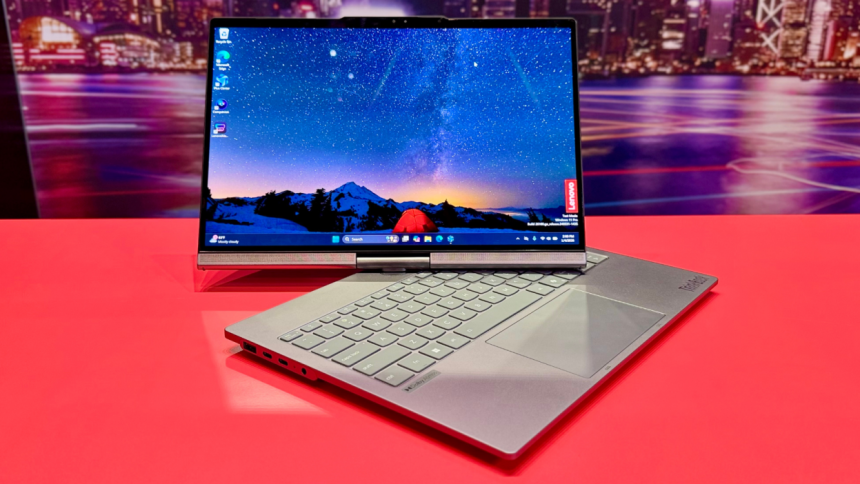
Instead of expanding wider, the ThinkPad Rollable XD concept expands taller. Lenovo frames it as a device that transforms from a compact 13.3” into a near 16” workspace and adds a “world-facing” display element on the outside of the lid. It also highlights a transparent cover built with Corning Gorilla Glass Victus 2 for durability. Lenovo ThinkPad Rollable XD concept | Corning: Gorilla Glass Victus 2
The Verge’s coverage adds an important detail: the flexible OLED wraps around the lid and expands vertically with a gesture, and Lenovo hints the rollable panel could eventually become a configurable option. The Verge on ThinkPad Rollable XD
Why it matters: vertical expansion is incredibly practical. It reduces scrolling, makes side-by-side + stacked window layouts easier, and fits modern productivity patterns (chat + doc, code + output, slide + notes).
C) ThinkBook Plus Gen 6 Rollable: the “category bridge” between concept and product
If you want the “mainstream” clue, this is it: the ThinkBook Plus Gen 6 Rollable appears as a CES 2026 Innovation Awards honoree and is described as a rollable display AI PC moving from proof-of-concept toward a real product direction. CES Innovation Awards listing
Lenovo’s own marketing describes a rollable laptop that expands with a gesture or keystroke to a larger screen, enabling a single expanded display or split-screen usage. (Lenovo product page: ThinkBook Plus Gen 6 Rollable)
Why it matters: when an idea becomes “a named model line,” it stops being a one-off prototype and starts being something retailers, IT buyers, and everyday consumers can imagine owning.
5) What Must Improve for Rollables to Go Mainstream
To become mainstream, rollable laptops must deliver the one thing people care about most: confidence. Confidence that the screen won’t fail. Confidence that repairs are possible. Confidence that the premium price buys real daily value.
1) Durability: the #1 barrier
Rollables introduce a new failure anxiety: “What happens to that flexible display after thousands of roll cycles?” Laptop buyers keep devices for years. Mainstream adoption requires:
- cycle testing clarity (how many expansions is it rated for?)
- dust and debris resistance (tiny particles are the enemy of moving mechanisms)
- scratch protection for the flexible panel and any exposed portions
Lenovo’s CES 2026 messaging emphasizes protective design choices—like low-friction materials and tension systems on the Legion concept, and Gorilla Glass Victus 2 coverage on the ThinkPad concept. Those are good signs, but mainstream requires real-world warranty confidence. Legion mechanism notes | ThinkPad XD durability notes
2) Serviceability: repairs must be possible (and priced sanely)
Mainstream laptops survive because parts can be replaced: keyboards, batteries, displays. Rollables add motors, guides, and tensioning hardware. A mainstream rollable needs:
- clear repair pathways (authorized service or modular replacements)
- reasonable out-of-warranty costs
- good availability of parts across regions
If rollable repairs cost “almost the price of a new laptop,” adoption stalls outside early adopters.
3) Price: rollables must compete with “laptop + portable monitor”
Here’s the blunt math: a solid laptop plus a portable monitor can be cheaper than a premium experimental form factor. For rollables to win, they must offer:
- better convenience (one device, one cable, one OS)
- better ergonomics (less neck strain, fewer accessories)
- a clear productivity or gaming advantage
Expect rollables to start expensive. The mainstream moment is when “expensive but reasonable” replaces “expensive and risky.”
4) Battery & thermals: bigger screen, bigger power demands
More OLED area at high brightness and refresh rates can drain power quickly. Manufacturers must prove that expanded mode doesn’t turn into a “plug-in-only” experience. The sweet spot is:
- smart auto-dimming and adaptive refresh
- efficient processors and GPU tuning
- thermal design that stays quiet even while driving the full expanded display
5) Software: dynamic resizing must feel seamless
Rollables only feel “mainstream” when expansion is frictionless:
- windows don’t jump unpredictably
- apps scale cleanly without blurry UI
- snap layouts and multi-window features adapt instantly
Windows snapping and layout improvements help make “more screen” useful instead of chaotic. Microsoft: Snap your windows
6) Who Rollable Laptops Are Actually For
Rollables won’t be “for everyone.” They’ll be for people who regularly hit the limits of a normal laptop display.
Best-fit audiences
- Gamers and streamers who love ultra-wide immersion and HUD/overlay space.
- Developers who want more vertical code without carrying a second display.
- Analysts and researchers living in dashboards, sheets, and split-screen browsing.
- Creators who want bigger timelines, canvas space, and tool palettes.
- Hybrid workers who jump between coffee shops, offices, and travel—without a portable monitor.
If you never multitask, don’t split windows, and mostly browse casually, a rollable laptop is likely overkill.
7) Buyer Guide: What to Look For Before You Spend Big
If (or when) rollables hit retail shelves more broadly, shop like a cautious early adopter. Here’s your checklist.
Display quality & protection
- Brightness and reflections: OLED can be gorgeous but reflections can be brutal in bright rooms.
- Refresh rate behavior: does it keep smoothness in expanded mode?
- Panel protection: any external-facing display areas should use durable cover materials (e.g., Gorilla Glass classes). Corning Victus 2
Mechanism confidence signals
- Rated roll cycles and warranty coverage (look for specifics, not vague marketing).
- Noise and wobble during expansion (a “premium” device should feel solid).
- Failure mode clarity: what happens if the motor fails mid-roll?
Software polish
- Does the laptop include a one-tap expand/shrink UI?
- Does it remember window layouts when you expand?
- Does it support fast snapping and productivity modes? Microsoft Snap Layouts
Performance: don’t forget the “screen tax”
Driving more pixels, running more windows, and rendering more frames increases load. If you’re buying a rollable gaming laptop, watch GPU support and upscaling tech (NVIDIA: CES 2026 showcase). If you’re buying a productivity rollable, prioritize efficient modern CPUs.
CES 2026 also featured major platform updates and roadmaps from chipmakers (Intel resources: Intel CES 2026 press kit; AMD news: AMD Ryzen AI 400 series announcement).
8) Predictions: What Rollables Look Like in 2027–2028
Rollables are likely to follow a familiar adoption curve:
- Phase 1 (now): prototypes and halo devices that prove the mechanism and grab attention.
- Phase 2: “premium-but-real” models aimed at niche users (power users, creatives, gaming).
- Phase 3: standardization—more brands, more reliable parts, better pricing, and broader availability.
CES 2026 makes Phase 2 feel closer because it showcased rollables that map to obvious, money-backed categories: gaming ultra-wide and business productivity. Those are markets where buyers accept higher prices—if reliability is strong.
My bet: rollables won’t replace most laptops. But they can become a mainstream premium option the same way OLED screens did: first “expensive and niche,” then “normal on high-end models.”
FAQs
Are rollable laptop screens durable enough for daily use?
Durability is the biggest question. CES 2026 concepts emphasize improved mechanisms and tougher cover materials, but mainstream confidence will come from rated cycle testing, real-world reviews, and warranty support—especially for the roll mechanism and flexible OLED layer.
Rollable vs foldable: which is better?
Foldables are best if you want “laptop + tablet.” Rollables are best if you want “laptop + bigger screen” without changing the basic laptop experience. For productivity and multi-window work, rollables can feel more natural.
Will rollables be expensive?
Early models will likely carry a premium due to flexible OLED costs and the motorized mechanism. Mainstream adoption depends on prices getting closer to what people already spend on premium ultrabooks—or on rollables clearly replacing the need for a portable monitor.
Do rollables help with multitasking?
Yes—if software scaling is polished. Extra screen space is most valuable when window management is fast and predictable. Windows 11 snapping features are built for this kind of workflow. Microsoft: Snap your windows
What should I watch for in reviews?
Noise, wobble, roll speed, display uniformity, reflections, dead pixels after repeated roll cycles, and how well apps remember layouts when switching between compact and expanded modes.
Are rollables just a gimmick?
They were easy to dismiss when they solved no clear problem. CES 2026 reframed rollables as a direct answer to a very real pain: needing more screen while staying truly mobile.
References & Further Reading
- CES 2026 opens today (CTA press release)
- CES Innovation Awards: ThinkBook Plus Gen 6 Rollable
- Lenovo Legion rollable concept press release
- Lenovo concepts at CES 2026 (ThinkPad Rollable XD)
- Wired: Lenovo rollable ultra-wide gaming laptop
- Tom’s Hardware: Lenovo rollable concepts at CES 2026
- The Verge: ThinkPad Rollable XD concept
- The Verge: Coolest laptops at CES 2026
- The Guardian: Standout tech from CES 2026 (including rollable laptops)
- Microsoft Support: Snap your windows
- Microsoft: Organize your screen with Snap layouts
- Corning: Gorilla Glass Victus 2
- NVIDIA: CES 2026 partner product showcase
- NVIDIA: DLSS 4.5 overview
- Intel: CES 2026 press kit
- AMD: Ryzen AI 400 series press release