- Table of Contents
- 1) What Is a Tri-Fold Smartphone?
- 2) How Tri-Folds Fold: Z/Flex-S vs G/Flex-G
- 3) Why Tri-Folds Are Showing Up Now
- 4) What’s New in 2026 (And Why It Matters)
- 5) Real Devices & Notable Concepts to Know
- Commercial: Huawei Mate XT (tri-fold smartphone with three screen sizes)
- Commercial push: Samsung Galaxy Z TriFold
- Concepts: TECNO and TCL experiments
- 6) What Tri-Folds Change in Daily Life
- 1) “Stageable” screen sizes (not just phone vs tablet)
- 2) Better multitasking potential
- 3) Reading and “paper-like” workflows
- 4) Creator and business use-cases
- 5) The “one device” travel advantage
- 7) The Trade-Offs: Price, Durability, Repairs, and Practicality
- Trade-off 1: Price will be premium (at first)
- Trade-off 2: Two hinges = more moving parts
- Trade-off 3: Repairs can be expensive
- Trade-off 4: Thickness and weight are hard problems
- Trade-off 5: Dust, debris, and daily life
- 8) Software: The Real Battle for Tri-Folds
- App layouts must adapt (or they waste screen)
- Stage-based UX can become a new habit
- DeX-like and desktop modes become more relevant
- The crease problem is also a software problem
- 9) Should You Buy One? A Simple 2026 Buying Guide
- 10) Key Takeaways
- 11) FAQs
- Are tri-fold smartphones the same as “triple-screen” phones?
- Will tri-folds replace tablets?
- Are tri-folds durable enough for normal daily use?
- What’s the biggest advantage over a normal foldable?
- Do apps need special support?
- Is the crease going away?
- Should I buy the first generation?
- What should I look for when comparing tri-fold models?
- 12) References & Further Reading
Updated: January 10, 2026
Foldables proved a phone can become a tablet with one hinge. Now, tri-fold smartphones (also called multi-fold or triple-screen foldables) take the idea further: they fold twice, giving you three “panels” that can switch between phone mode, two-panel mode, and a near-tablet canvas.
In 2026, the conversation has shifted from “Are foldables real?” to “What’s the next jump?”—and tri-folds are a strong answer. We’ve already seen commercial tri-fold hardware from Huawei and an official push from Samsung toward the category, plus a wave of concepts and prototypes from other brands.
This guide explains what tri-fold smartphones are, how they work, why they matter, what’s happening in 2026, and whether you should actually upgrade—or wait.
Table of Contents
1) What Is a Tri-Fold Smartphone?
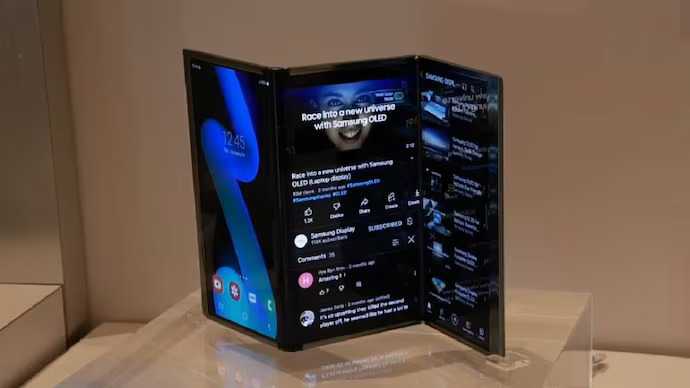
A tri-fold smartphone is a phone with a flexible display that folds at two separate hinge points. Instead of one fold (like a book-style foldable), you get three segments—think of it like a brochure with three sections. When fully opened, the device aims to provide a small tablet-like workspace without carrying a separate tablet.
Most tri-fold designs support at least three main “modes”:
- Phone mode: a narrow, pocketable phone form.
- Two-panel mode: a wider screen for reading, video, or split-screen multitasking.
- Three-panel mode: near-tablet size for productivity, gaming, and content creation.
The big promise is simple: more screen, more flexibility, and potentially more useful multitasking than current foldables.
If you’re new to foldables in general, the key idea is that modern flexible OLED displays can bend repeatedly, and manufacturers strengthen the folding area with layered materials, hinge engineering, and protective glass-like solutions. For a quick overview of foldable glass research, Corning’s foldable glass page is a good starting point:
Corning Foldable Glass (overview).
2) How Tri-Folds Fold: Z/Flex-S vs G/Flex-G
Not all tri-folds fold the same way. Two patterns dominate discussions:
Z-fold / “Flex S” (in-and-out folding)
A Z-fold style can fold in a way that resembles an “S” or “Z” profile from the side, potentially allowing one panel to be exposed outward as a cover area while the rest folds behind. Samsung Display has discussed “S-type” concepts in its multi-fold explanations:
Samsung Display: “A Display That Folds Twice”.
Potential benefit: you can get a usable outer screen without needing a second separate cover display.
Potential risk: if any part of the flexible screen is exposed outward while folded, it may be more vulnerable to scratches or impacts.
G-fold / “Flex G” (dual inward folding)
A G-fold style typically folds both hinges inward so the flexible display stays protected inside when closed. Samsung Display has also referenced “G-type” concepts as part of multi-fold evolution:
Samsung Display: Flex G mentions.
Potential benefit: better protection for the flexible screen when folded.
Potential trade-off: you may need a separate cover screen for quick tasks, adding complexity.
In practice, the “best” fold pattern depends on what a company prioritizes: protection, slimness, usability when closed, or manufacturing simplicity.
3) Why Tri-Folds Are Showing Up Now
Tri-folds have existed as prototypes for years, but only recently started looking commercially viable. The shift is driven by a few trends converging:
- Better flexible OLED manufacturing: improved yields and reliability lower the risk of selling more complex fold designs.
- Hinge engineering maturity: one hinge is hard; two hinges require even tighter tolerances and durability testing.
- Materials progress: ultra-thin glass and protective layers have improved compared to early foldables. (See Corning’s foldable glass overview:
Corning Foldable Glass.) - Software readiness: Android and OEM skins have been steadily improving large-screen and foldable support. Google’s guidance for adaptive apps is here:
Android: Build adaptive apps.
One more reason: consumers increasingly use phones for everything—work, reading, video, spreadsheets, scanning documents, editing, and even light desktop workflows. A tri-fold tries to be the “one device” that eliminates the need for a second screen.
4) What’s New in 2026 (And Why It Matters)
2026 is important because the industry isn’t just teasing tri-folds—it’s building a story that multi-fold is the next mainstream step.
Samsung makes tri-fold official
Samsung’s official introduction of the Galaxy Z TriFold positions the device as a productivity + cinematic viewing machine with a large unfolded display and high-end specs. You can read the official announcement here:
Samsung Global Newsroom: Galaxy Z TriFold.
Even if you don’t buy the first generation, Samsung going public matters because it tends to kick-start ecosystems—accessory makers, app optimizations, and broader consumer awareness.
Crease anxiety starts to fade (slowly)
Foldable displays have always had one visual “tell”: the crease. At CES 2026, Samsung Display showed a concept panel that aims to remove the visible crease—something that could dramatically improve mainstream acceptance if it becomes mass-producible. Coverage worth reading:
Important nuance: these were described as concept panels. But concept-to-product timelines tend to shrink once a technology is publicly demonstrated and validated.
5) Real Devices & Notable Concepts to Know
To understand tri-folds, it helps to separate commercial devices (real products you can buy in at least some markets) from concept devices (technology demos that may never ship).
Commercial: Huawei Mate XT (tri-fold smartphone with three screen sizes)
Huawei’s Mate XT line is often referenced as the first widely discussed commercial tri-fold approach. For official specs, start here:
Huawei: Mate XT specs.
For a broader overview and release timeline, this summary is helpful:
Wikipedia: Huawei Mate XT.
For launch coverage and pricing context, see:
The Verge: Huawei Mate XT launch & pricing
and global launch reporting here:
Gadgets 360: Mate XT global launch details.
Commercial push: Samsung Galaxy Z TriFold
Samsung’s official Z TriFold announcement is a major signal that tri-fold may become a “real category,” not just a one-off curiosity:
Samsung Global Newsroom: Galaxy Z TriFold.
Concepts: TECNO and TCL experiments
Several brands have used tri-fold concepts to showcase hinge creativity and new form factors:
- Business Wire India: TECNO PHANTOM Ultimate G Fold concept
- Croma Unboxed: TECNO tri-fold concept explainer
- WIRED: TCL tri-fold concepts
- Counterpoint Research: TCL tri-fold prototype discussion
- Notebookcheck: TCL Fold ’n Roll concept
Concept devices matter because they preview what’s likely: hinge patterns, screen aspect ratios, and how thin a multi-fold might realistically get.
6) What Tri-Folds Change in Daily Life
A tri-fold is not just a bigger screen. It’s a different way to use a phone—because the screen can expand in stages. Here are the upgrades that actually matter.
1) “Stageable” screen sizes (not just phone vs tablet)
Book-style foldables give you two primary sizes. Tri-folds can offer three practical sizes (small, medium, large). That middle size is underrated: it’s often perfect for reading, email, split-screen messaging, or watching a video while browsing.
2) Better multitasking potential
When you have three panels, a natural UI idea is “three work zones”: one for messaging, one for a document, one for a browser or reference. Even if you personally prefer one or two apps at a time, having space makes everything calmer—less app switching, fewer interruptions.
If you build apps, Android’s large-screen guidance is increasingly direct about adaptive layouts:
Android: Build adaptive apps.
For foldable posture detection and device features, see:
Jetpack WindowManager codelab.
3) Reading and “paper-like” workflows
Tri-folds are especially compelling for long-form reading (books, PDFs, research, study notes). Why? Because a wide unfolded layout can resemble a small tablet or even a paperback-like “two-page” view. If you read for work or learning, tri-folds may be the first foldable form factor that feels truly natural for extended sessions.
4) Creator and business use-cases
With a large unfolded display, tri-folds can act as:
- a presentation preview screen,
- a portable editing canvas for short-form video,
- a spreadsheet-and-email mini workstation,
- a field tool for architects, engineers, technicians, or sales teams.
Samsung’s Z TriFold positioning leans heavily into “mobile workspace” and cinematic viewing in its official narrative:
Samsung: Galaxy Z TriFold announcement.
5) The “one device” travel advantage
If you travel with both a phone and a tablet, a tri-fold is trying to replace that second device. Whether it succeeds depends on weight, battery life, durability, and how comfortable the unfolded screen feels in real environments (café tables, trains, airports).
7) The Trade-Offs: Price, Durability, Repairs, and Practicality
Tri-folds are exciting, but they are also the most complex mainstream phone design yet. Here are the real trade-offs you should understand.
Trade-off 1: Price will be premium (at first)
Two hinges + a larger flexible panel + more structural reinforcement usually means a high bill of materials. Early tri-fold models are positioned as halo devices. As coverage of Huawei’s launch pricing shows, early tri-folds can land in “laptop money” territory:
The Verge: Huawei Mate XT pricing context.
Trade-off 2: Two hinges = more moving parts
Hinges don’t just fold the screen—they manage stress distribution, keep debris out, and help the display fold without cracking or creating pressure points. Two hinges also increase the number of “failure points” compared to a single-hinge foldable.
Trade-off 3: Repairs can be expensive
Foldable repairs are already costly. Tri-folds add more complexity, so repair pricing can be a shock. Even summaries of repair-cost discussions around tri-fold hardware highlight how high the stakes can get:
Wikipedia: Huawei Mate XT (includes repair-cost notes).
Trade-off 4: Thickness and weight are hard problems
A tri-fold is basically stacking three panels. Manufacturers fight thickness with stronger, lighter materials and smarter internal layout. Samsung’s official Z TriFold materials and durability notes (including water resistance rating and cover glass references) are worth skimming:
Samsung: Z TriFold specs & durability notes.
Trade-off 5: Dust, debris, and daily life
Foldables are improving at resisting water and tolerating normal wear, but sand, dust, and fine debris remain the practical enemies—especially if any flexible screen is exposed externally in certain folding styles.
If you’re the kind of user who is rough on phones or works outdoors often, first-generation tri-folds may not be the best “daily driver” until durability standards catch up.
8) Software: The Real Battle for Tri-Folds
Hardware grabs headlines, but software decides whether tri-folds feel magical or awkward.
App layouts must adapt (or they waste screen)
A large unfolded screen is only great if apps use it well. On a tri-fold, apps may need to handle:
- multiple aspect ratios as the device changes modes,
- different “postures” (fold angles),
- multi-window and drag-and-drop workflows,
- resizing without breaking UI.
Google’s large-screen app quality guidance starts here:
Android: Build adaptive apps.
And for foldable features/postures:
Jetpack WindowManager codelab.
Stage-based UX can become a new habit
Tri-folds unlock a new habit: “open just one more panel.” That sounds small, but it’s a big UX shift. Instead of switching devices (phone → tablet), you upgrade your screen in-place. The best tri-fold software will likely be built around these “stages,” not just a binary closed/open view.
DeX-like and desktop modes become more relevant
As screen size grows, desktop-style experiences become more useful. Samsung’s ecosystem has long explored this direction, and its Z TriFold announcement includes notes about Samsung DeX and modern Android/One UI software:
Samsung: Z TriFold (OS / DeX notes).
The crease problem is also a software problem
Even if creases reduce physically, UI and content often need to avoid placing critical details right on fold lines (think: text columns, video subtitles, timelines). The hope is that creaseless panels demonstrated at CES 2026 reduce the need for such compromises:
The Verge: creaseless foldable panel.
9) Should You Buy One? A Simple 2026 Buying Guide
Tri-fold smartphones are exciting—but not everyone should buy the first wave. Use this quick decision guide.
Buy a tri-fold in 2026 if…
- You already love foldables and want the next frontier.
- You do real work on your phone (docs, spreadsheets, research, editing).
- You travel and want one device instead of phone + tablet.
- You’re comfortable paying early-adopter pricing.
Wait if…
- You want proven durability and widespread repair availability.
- You hate babying screens (or you’re often around dust/sand).
- You mostly use social apps, messaging, and casual browsing.
- You’re waiting for creaseless displays to become mainstream.
Consider a “great foldable” instead if…
If your main goal is simply a bigger screen sometimes, a mature one-hinge foldable can still be the best value and least risky. Tri-folds shine most for heavy reading, heavy multitasking, and “mini tablet” workflows.
10) Key Takeaways
- Tri-fold smartphones fold twice, giving you three usable screen stages instead of just “phone vs tablet.”
- Two hinge styles dominate: Z/Flex-S (in-and-out) and G/Flex-G (dual inward), each with different protection/usability trade-offs.
- 2026 is a turning point because Samsung has made tri-fold official and display tech is pushing toward less-visible creases.
- They can replace a tablet for some people—especially readers, travelers, and productivity-focused users.
- The downsides are real: cost, repairs, durability anxiety, and software optimization are still evolving.
11) FAQs
Are tri-fold smartphones the same as “triple-screen” phones?
People use the terms interchangeably, but “tri-fold” usually implies a single flexible display that folds twice. “Triple-screen” can also describe devices with separate panels, though most modern talk is about a continuous flexible OLED.
Will tri-folds replace tablets?
For many users, they could replace a small tablet—especially for reading, video, and basic productivity. But if you want a large 11–13 inch tablet experience, tri-folds are still smaller and more fragile.
Are tri-folds durable enough for normal daily use?
They’re improving, but they’re still complex devices. If you’re careful with your phone, you’ll likely be fine. If you’re rough on devices or often deal with dust/sand, waiting for later generations is safer.
What’s the biggest advantage over a normal foldable?
The middle stage and the fully expanded stage. Tri-folds can feel more natural for reading and multitasking because you can expand the screen gradually instead of jumping straight from phone to tablet.
Do apps need special support?
They don’t “need” it to run, but they need adaptive layouts to feel good. Android’s official guidance on adaptive apps and foldable posture support is here:
Build adaptive apps and
Jetpack WindowManager.
Is the crease going away?
Not fully yet, but CES 2026 showcased creaseless foldable display concepts that could reduce or remove the visible crease if commercialized:
The Verge coverage.
Should I buy the first generation?
Only if you love being an early adopter and you’ll genuinely use the larger canvas daily. Otherwise, the second generation usually offers better durability, better pricing, and better software maturity.
What should I look for when comparing tri-fold models?
- Fold pattern (inward vs outward exposure)
- Water resistance rating and durability notes
- Software multitasking features (split-screen, drag-and-drop, desktop mode)
- Warranty, repair support, and local availability
12) References & Further Reading
- Samsung Global Newsroom: Galaxy Z TriFold
- Samsung Display: “A Display That Folds Twice”
- Huawei: Mate XT official specs
- The Verge: Huawei Mate XT launch
- Gadgets 360: Mate XT global launch details
- The Verge: Creaseless foldable panel at CES 2026
- Android Developers: Build adaptive apps
- Android Developers: Jetpack WindowManager codelab
- Corning: Foldable Glass
- WIRED: TCL foldable concepts
- Counterpoint Research: TCL foldable concepts
- Notebookcheck: TCL Fold ’n Roll
- Business Wire India: TECNO tri-fold concept
- Croma Unboxed: TECNO tri-fold overview
If you enjoyed this, you may also like: “Foldables in 2026: What Finally Matters (Beyond the Hype)” and “Best Android Apps That Actually Use Big Screens Well.”