
If you’ve ever tried to “set up Notion properly,” you already know the problem: the idea is simple, but building a complete system from scratch takes hours (and usually ends in a messy workspace).
This is where a curated bundle helps. Instead of creating databases, dashboards, trackers, and workflows one-by-one, you can start with a complete structure and customize only what matters to you.
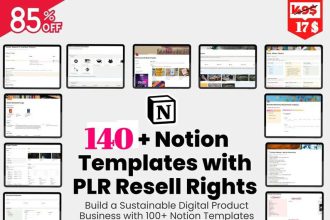
What you get in a 142-template Notion bundle
- Life planning dashboards (daily/weekly/monthly planning)
- Productivity systems (tasks, projects, meeting notes, workspace hubs)
- Finance templates (budget, expenses, subscriptions, savings goals)
- Health & wellness trackers (habits, workouts, meal planning)
- Student workflows (classes, assignments, exam prep, study plans)
- Business & freelance tools (client CRM, invoicing tracker, SOPs)
- Content creation systems (content calendar, idea bank, posting tracker)
How to set it up in 10 minutes
- Download the guide file containing your Notion template links.
- Open a template link.
- Click Duplicate (top-right) to add it to your Notion workspace.
- Rename sections, adjust properties, and remove what you don’t need.
Want the fastest way to build your Notion system?
Grab the complete Notion Ultimate Bundle (142 Templates) and duplicate what you need in minutes.
Who this is best for
- Beginners who want a clean, ready-to-use setup.
- Busy professionals who need structure without building templates.
- Students who want one place for classes, assignments, and revision.
- Creators & freelancers managing content + clients + projects.
Pro tips to avoid an “overloaded” workspace
- Start with one dashboard (personal, student, or business)—then expand.
- Create an “Archive” page and move unused templates there (don’t delete).
- Rename templates using a consistent prefix (e.g., “Personal —”, “Business —”).
FAQ
Do I need Notion paid?
No—these templates work with a free Notion account. (You can upgrade later if you want advanced permissions or bigger team workflows.)
Can I edit everything?
Yes. You can change icons, pages, properties, and layouts to fit your routine.
What if I only need 10 templates?
That’s normal. The value is that you can pick only what you need today, and have the rest ready for later.
Final takeaway
If you want to move from “Notion experiment” to a real daily system, a complete bundle is the quickest path—duplicate, customize, and use immediately.
Next step: choose one dashboard (personal/student/business) and commit to it for 7 days. Consistency beats complexity.